

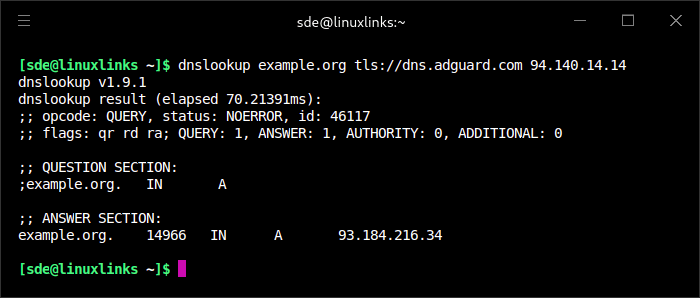
dnslookup is a command-line utility for performing DNS queries against a specified resolver. It supports conventional DNS lookups as well as encrypted DNS protocols, allowing users to test nameservers without relying exclusively on the system’s default DNS configuration.
The application is particularly useful for diagnosing encrypted DNS connectivity and comparing responses from different resolvers. Users can specify the transport protocol, select a DNS server and request particular types of records.
dnslookup provides a relatively straightforward interface to several DNS protocols, making it suitable for network administrators and users investigating name resolution problems.
This is free and open source software.
Key Features
- Supports conventional DNS queries over UDP and TCP.
- Encrypted DNS support includes DNS over HTTPS (DoH), DNS over TLS (DoT), DNS over QUIC (DoQ) and DNSCrypt.
- Supports HTTP/2 and HTTP/3 for DNS-over-HTTPS queries.
- Can explicitly require HTTP/3 when connecting to a compatible DoH resolver.
- Supports DNS-over-HTTPS endpoints requiring HTTP Basic authentication.
- Accepts custom resolver addresses and encrypted DNS endpoints.
- Supports DNS stamps for configuring compatible encrypted resolvers.
- Allows users to specify DNS record types, including A, AAAA, MX, TXT and PTR.
- Performs reverse DNS lookups, automatically recognising IPv4 and IPv6 addresses.
- Supports encrypted resolver connections using hostnames or IP addresses.
- Provides options for controlling DNS transport behaviour when testing different resolvers.
- Provides machine-readable JSON output for scripts and automated DNS diagnostics.
- Supports DNSSEC DO-bit control, EDNS Client Subnet, padding and custom EDNS options.
- Cross-platform support – runs on Linux, macOS, and Windows.
Website: github.com/ameshkov/dnslookup
Support:
Developer: Andrey Meshkov
License: MIT License
dnslookup is written in Go. Learn Go with our recommended free books and free tutorials.
Related Software
| Alternatives to dig | |
|---|---|
| dog | DNS client with colorful output, DNS-over-TLS and DNS-over-HTTPS support |
| doggo | Command-line DNS client for humans |
| drill | Perform DNS lookups and display answers returned from the name server(s) |
| dnslookup | Supports plain DNS, DoH, DoT, DoQ, and DNSCrypt |
| dug | Global DNS propagation checker |
| q | Support for UDP, TCP, DoT, DoH, DoQ and ODoH |
| DNS Clients | |
|---|---|
| dog | Colourful output, understands normal command-line argument syntax |
| doggo | Command-line DNS client for humans |
| q | Tiny command line DNS client supporting UDP, TCP, DoT, DoH, DoQ and ODoH |
| ddclient | Update dynamic DNS entries |
| GoDNS | Dynamic DNS (DDNS) client tool |
| dig | DNS lookup utility |
| awl | DNS lookup tool |
| ZDNS | High-speed DNS resolver and command line utility |
| dnslookup | Make DNS lookups |
| dug | Global DNS propagation checker |
| drill | Perform DNS lookups |
| dness | Dynamic DNS client |
| zns | Fast DNS lookup tool with DNSSEC validation and delegation tracing |
| In-a-Dyn | Small and simple Dynamic DNS, DDNS, client |
| doh | Query multiple DNS-over-HTTPS resolvers with JSON output |
| dnsupdate | Modern and flexible dynamic DNS client |
| ch4 | Dig-compatible DNS client with UDP, TCP and EDNS support |
| wig | Simple and lightweight DNS client |
| dyndnsc | Dynamic DNS update client |
Read our verdict in the software roundup.
 Explore our carefully curated directory of recommended free and open source software, covering every major software category. Explore our carefully curated directory of recommended free and open source software, covering every major software category.The directory forms part of our extensive collection of articles for Linux enthusiasts. It includes hundreds of detailed reviews, together with free and open source alternatives to proprietary software from companies such as Google, Microsoft, Apple, Adobe, IBM, Cisco, Oracle, and Autodesk. LinuxLinks also covers interesting projects worth exploring, Linux-compatible hardware, free programming books and tutorials, and much more. Know a useful free and open source Linux application that we haven’t covered? Tell us about it using our submission form. |
Please read our Comment Policy before commenting.