

wig is a simple and lightweight DNS client.
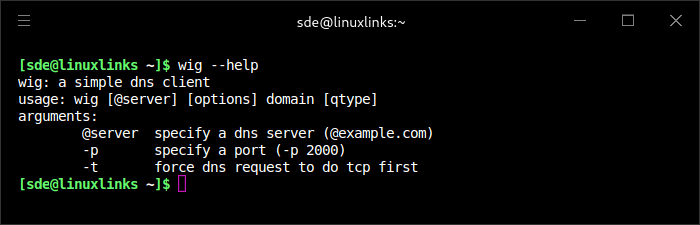
For simple usage, just type the domain name followed by the record type: `example.com AAAA`. Or you can just type the domain, `example.com`, and it will default to the A record.
If you want to use a custom dns server, just specify the ip or domain after the @ like `@1.1.1.1` or `@ns1.google.com`.
If you want to specify a port, you can add `-p port_num`.
Finally, if you want to force tcp, you can add `-t`. Wig only runs on Linux systems that are Posix 1995 compliant.
This is free and open source software.
Website: g.freya.cat/wig/tree
Support:
Developer:
License: GNU General Public License v3.0
wig is written in C. Learn C with our recommended free books and free tutorials.
Related Software
| Alternatives to dig | |
|---|---|
| dog | DNS client with colorful output, DNS-over-TLS and DNS-over-HTTPS support |
| doggo | Command-line DNS client for humans |
| drill | Perform DNS lookups and display answers returned from the name server(s) |
| dnslookup | Supports plain DNS, DoH, DoT, DoQ, and DNSCrypt |
| dug | Global DNS propagation checker |
| q | Support for UDP, TCP, DoT, DoH, DoQ and ODoH |
| DNS Clients | |
|---|---|
| dog | Colourful output, understands normal command-line argument syntax |
| doggo | Command-line DNS client for humans |
| q | Tiny command line DNS client supporting UDP, TCP, DoT, DoH, DoQ and ODoH |
| ddclient | Update dynamic DNS entries |
| GoDNS | Dynamic DNS (DDNS) client tool |
| dig | DNS lookup utility |
| awl | DNS lookup tool |
| ZDNS | High-speed DNS resolver and command line utility |
| dnslookup | Make DNS lookups |
| dug | Global DNS propagation checker |
| drill | Perform DNS lookups |
| dness | Dynamic DNS client |
| In-a-Dyn | Small and simple Dynamic DNS, DDNS, client |
| dnsupdate | Modern and flexible dynamic DNS client |
| wig | Simple and lightweight DNS client |
| dyndnsc | Dynamic DNS update client |
Read our verdict in the software roundup.
 Explore our carefully curated directory of recommended free and open source software, covering every major software category. Explore our carefully curated directory of recommended free and open source software, covering every major software category.The directory forms part of our extensive collection of articles for Linux enthusiasts. It includes hundreds of detailed reviews, together with free and open source alternatives to proprietary software from companies such as Google, Microsoft, Apple, Adobe, IBM, Cisco, Oracle, and Autodesk. LinuxLinks also covers interesting projects worth exploring, Linux-compatible hardware, free programming books and tutorials, and much more. Know a useful free and open source Linux application that we haven’t covered? Tell us about it using our submission form. |
Please read our Comment Policy before commenting.