

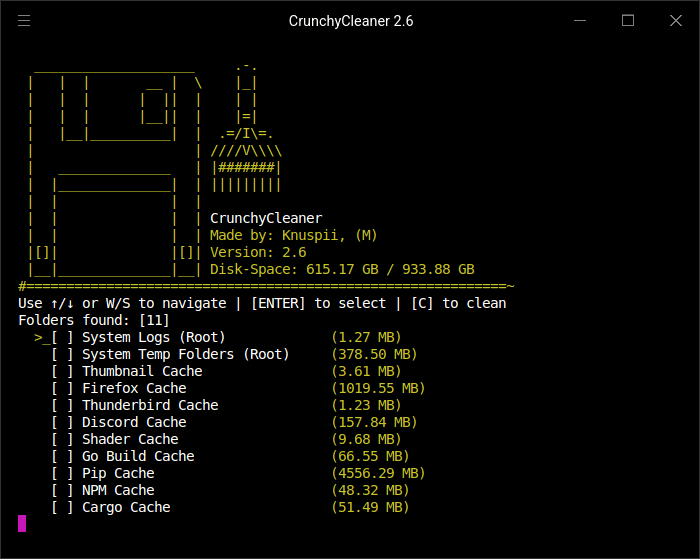
CrunchyCleaner is a cache-cleaning utility with a terminal interface. It brings together cleanup targets for desktop applications, browsers, development tools, and games, providing an interactive alternative to locating their cache directories manually.
The program offers interactive selection alongside command-line options for unattended cleaning and simulation. Available cleaning targets depend on the operating system and the applications present.
This is free and open source software.
Key Features
- Provides a minimalist terminal interface for selecting supported cache locations to clean.
- Covers system temporary files, logs, thumbnail caches, shader caches, and shell history.
- Recognises browser cache locations for Firefox, Google Chrome, Microsoft Edge, Brave, Opera, and Zen.
- Includes cleaning targets for Steam and the Heroic Games Launcher.
- Supports application caches associated with Discord, Telegram, and Spotify.
- Cleans development-environment caches for Visual Studio Code and JetBrains IDEs.
- Includes cache targets for Go, Python’s pip and uv, Cargo, NuGet, and Gradle.
- Covers JavaScript development caches associated with npm, Yarn, Node.js, and Electron.
- Recognises additional development-related caches, including Playwright.
- Provides a dry-run mode that simulates cleaning without deleting files, allowing the proposed operation to be checked first.
- Offers an automation mode that selects all available cleaning targets and starts immediately, avoiding interactive selection when unattended operation is wanted.
- Cross-platform support – runs on Linux and Windows.
Website: github.com/knuspii/crunchycleaner
Support:
Developer: Knuspii
License: GNU General Public License v3.0
CrunchyCleaner is written in Go. Learn Go with our recommended free books and free tutorials.
Related Software
| System Cleaning Tools | |
|---|---|
| Czkawka | Finds duplicate files, big files, empty files, similar images, and much more |
| BleachBit | Delete unnecessary files from the system |
| Sweeper | History and temporary file cleaner for KDE 4 |
| Flatsweep | Flatpak leftover cleaner |
| Moonbit | Modern system cleaner built in Go with a TUI and CLI |
| uCareSystem | Automated maintenance utility |
| Linux Cleaner | Make routine Linux maintenance easier |
| CrunchyCleaner | Lightweight cache cleanup tool |
| Bleach | Terminal-based Linux maintenance utility |
| Ubuntu Cleaner | Clean up your system |
| Stacer | System optimizer and monitoring tool |
| Spruce | Clean up application caches |
Read our verdict in the software roundup.
 Explore our carefully curated directory of recommended free and open source software, covering every major software category. Explore our carefully curated directory of recommended free and open source software, covering every major software category.The directory forms part of our extensive collection of articles for Linux enthusiasts. It includes hundreds of detailed reviews, together with free and open source alternatives to proprietary software from companies such as Google, Microsoft, Apple, Adobe, IBM, Cisco, Oracle, and Autodesk. LinuxLinks also covers interesting projects worth exploring, Linux-compatible hardware, free programming books and tutorials, and much more. Know a useful free and open source Linux application that we haven’t covered? Tell us about it using our submission form. |
Please read our Comment Policy before commenting.