

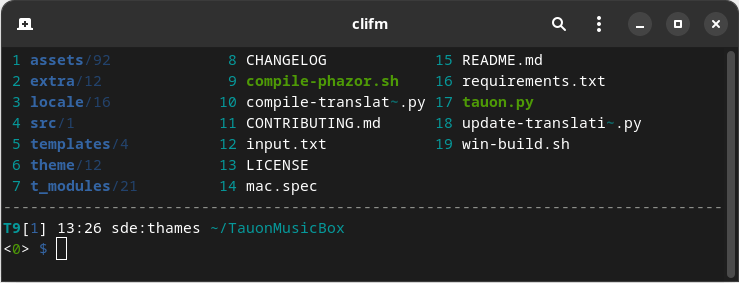
CliFM is a Command Line Interface File Manager: all input and interaction is performed via commands. This is its main feature and strength.
It replaces the traditional TUI interface (also known as curses or text-menu based interface) by a command-line interface (CLI),
This is free and open source software.
Key Features
- Specific:
- Really CLI-based. No GUI nor TUI at all, but just a command-line.
- It can run on the kernel built-in console and even on a SSH or any other remote session.
- Highly compatible with old VT102-only terminal emulators like Rxvt and Rxvt-based ones: even on a terminal with only 8 colors and no Unicode support, clifm will just work. It can run even on an old DEC-VT100 terminal!
- High performance. Incredibly lightweight and fast even on really old hardware.
- Short (and even one-character) commands.
- Entry list numbers (ELN’s) for file names.
- Extended color codes for file-types and -extensions.
- Files counter for directories and symlinks to directories.
- Privacy: Zero data collection and no connection to the outside world at all.
- Security: Secure environment and secure commands.
- Navigation and file operations:
- Bookmarks.
- File tags.
- File filters.
- Files selection (supports both glob and regular expressions and works even across multiple instances of the program).
- Files search (supports both glob and regular expressions).
- copy(-as), move(-as), interactive rename, and open-with functions.
- File names cleaner.
- Autocommands.
- Auto-cd, auto-open, and autols.
- Directory jumper, similar to autojump, z.lua, and zoxide.
- Virtual directories.
- Fastback function.
- Backdir – Quickly change to a parent directory.
- A built-in resource opener (supports regular expressions and is able to discern between GUI and non-GUI environments).
- A built-in Freedesktop-compliant trash system.
- Up to eight workspaces.
- Eleven sorting methods.
- Bulk operations: rename, create, remove, and create symbolik links in bulk.
- Files encryption/decryption (plugin).
- Copy files to your smart phone (plugin).
- Archiving and compression support (including Zstandard and ISO 9660).
- Symlinks editor.
- Remote file systems management.
- Mount/unmount storage devices.
- Advanced Copy support (just
cpandmvwith a nice progress bar). - Directory history map to keep in sight previous, current, and next entries in the directory history list.
- Shell:
- Auto-suggestions.
- TAB completion, with fzf integration.
- Syntax highlighting.
- Warning prompt for invalid command names.
- Fused parameters for ELN’s.
- Fuzzy completion for file names and paths.
- Wildcards expansion via TAB.
- File types expansion via TAB.
- Bash-like quoting system.
- Shell commands execution.
- Sequential and conditional commands execution.
- Directory and commands history.
- Glob and regular expressions (including inverse matching).
- Aliases.
- Logs.
- Prompt and profile commands (run commands with each new prompt or at program startup).
- Modes:
- Stealth mode: Leave no trace on the host system. No file is read, no file is written.
- Light mode (just in case it is not fast enough for you).
- Resource opener.
- Disk usage analyzer mode.
- Files lister (ls-mode).
- Customization:
- User profiles.
- Customizable keyboard shortcuts.
- Theming support (more than a dozen color schemes).
- Prompt customization.
- Four customizable keybindings for custom plugins.
- Compile features in/out.
- Misc:
- Plugins.
- File previews (via BFG, a native file previewer, but including support for Ranger’s scope.sh and pistol as well).
- Icons support, including emoji-icons

- Git integration.
- Desktop notifications.
- Unicode support.
- Disk usage.
- CD on quit and file picker functions.
- A built-in pager for files listing.
- Read and list files from STDIN (standard input).
Website: github.com/leo-arch/clifm/wiki
Support: GitHub Code Repository
Developer: L. Abramovich
License: GNU General Public License v2.0
CliFM is written in C. Learn C with our recommended free books and free tutorials.
Related Software
| File Managers | |
|---|---|
| Krusader | Advanced orthodox file manager for KDE |
| nnn | Fast and flexible file manager |
| Dolphin | Default file manager for KDE |
| Midnight Commander | User-friendly yet powerful orthodox file manager |
| Double Commander | File manager with two panels side by side |
| superfile | Modern terminal file manager |
| Ranger | Console file manager with VI key bindings |
| PCManFM-Qt | Lightweight Qt-based file manager which uses GLib |
| PCManFM | Default file manager for LXDE |
| Files | File browser designed for elementary OS |
| GNOME Files | Spatial file manager; default file manager for GNOME |
| Spacedrive | Powered by a virtual distributed filesystem |
| lf | Terminal file manager written in Go |
| GNOME Commander | Orthodox file manager for the GNOME desktop environment |
| Yazi | Fast, well optimized, and beautiful file manager. |
| CliFM | Shell-like, command line terminal file manager |
| Xfe | Very similiar to Windows Explorer |
Read our verdict in the software roundup.
| Console File Managers | |
|---|---|
| nnn | Fast and flexible file manager |
| Midnight Commander | User-friendly yet powerful orthodox file manager |
| superfile | Very fancy and modern terminal file manager |
| Ranger | File manager with an ncurses frontend written in Python |
| lf | Terminal file manager heavily inspired by ranger |
| Yazi | File manager with asynchronous support |
| CliFM | Shell-like, command line terminal file manager |
| joshuto | Ranger-like file manager |
| far2l | Linux fork of FAR Manager v2 |
| Vifm | ncurses based file manager with vi like keybindings |
| fm | Double pane file manager written in Go |
| elio | Fast file browsing with rich previews in three panes |
| felix | TUI file manager with Vim-like key mapping |
| fman | Uses Bubbletea, Lipgloss, Bubblezone, stickers, Chroma, and go-arg |
| FCD | Continuation of rnr |
| projectable | TUI file manager built for projects |
| Last File Manager | 1 or 2 pane Python based file manager |
| WCM Commander | A Far Manager clone |
| TUIFI Manager | Termux-oriented file manager |
| sff | Simple file finder |
| jafff | Just another f* fast file manager |
| goful | Another file manager written in Go |
| rnr | Combines the best features of Midnight Commander and Ranger |
| fff | Simple file manager |
Read our verdict in the software roundup.
 Explore our carefully curated directory of recommended free and open source software, covering every major software category. Explore our carefully curated directory of recommended free and open source software, covering every major software category.The directory forms part of our extensive collection of articles for Linux enthusiasts. It includes hundreds of detailed reviews, together with free and open source alternatives to proprietary software from companies such as Google, Microsoft, Apple, Adobe, IBM, Cisco, Oracle, and Autodesk. LinuxLinks also covers interesting projects worth exploring, Linux-compatible hardware, free programming books and tutorials, and much more. Know a useful free and open source Linux application that we haven’t covered? Tell us about it using our submission form. |
Please read our Comment Policy before commenting.