

caudec is a command-line utility for Linux and OS Ⅹ that transcodes (converts) audio files from one format (codec) to another. It leverages multi-core CPUs with lots of RAM by using a ramdisk, and running multiple processes concurrently (one per file and per codec).
caudec is most useful when dealing with one album at a time (with 1, 2 or 3 discs, with each track as a separate file). Handling of multiple albums is done via scripting. caudec cannot efficiently deal with very large files (recordings that are several hours long), or very large numbers of files (messy collections with a single directory and thousands of files).
This is free and open source software.
Key Features
- Fast in operation.
- Supported input formats / codecs: WAV, AIFF, CAF, FLAC, WavPack, Monkey’s Audio, TAK, Apple Lossless (ALAC).
- Supported output formats / codecs: WAV, AIFF, CAF, FLAC, Flake, WavPack, Monkey’s Audio, TAK, Apple Lossless (ALAC), lossyWAV, LAME, Ogg Vorbis, Nero AAC, qaac, Musepack, Opus.
- Support for high quality resampling and downmixing / upmixing to stereo, with SoX.
- Optimized I/O: input files are copied onto a ramdisk sequentially, so as to get the best performance out of the underlying medium (e.g. a hard drive). Transcoding however is done concurrently. Example: file 1 gets copied. When that’s done, transcoding of file 1 starts. Meanwhile, file 2 gets copied, etc. There is very little time lost reading the files.
- Transcoding to several different codecs at once is possible. In that case, decoding of input files is done only once.
- Multiple instances of caudec can be run concurrently while sharing resources.
- Metadata is preserved (as much as possible) from one codec to another.
- Multiprocess Replaygain scanner (except for Opus and Musepack).
- Uses existing, popular command line tools and encoders / decoders.
- Configurable compression levels and bitrates for individual output codecs.
- Metadata whitelist and blacklist settings for controlling which tags are preserved.
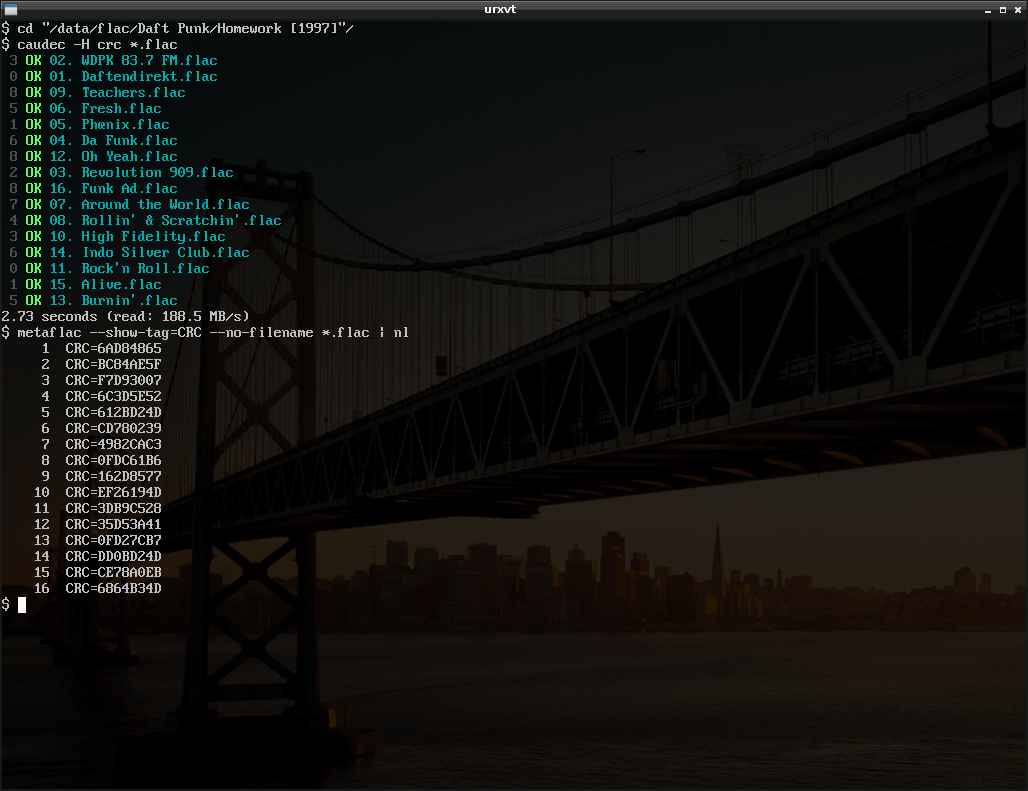
- Optional CRC32, MD5 and SHA checksums for converted audio files.
- Configurable clipping prevention when applying gain or resampling.
- Cross-platform support – runs on Linux and macOS.
Website: github.com/text-editor/caudec
Support:
Developer: Guillaume Cocatre-Zilgien
License: GNU General Public License v3.0
caudec is written in Shell.
Related Software
| Audio Converters | |
|---|---|
| fre:ac | High quality audio converter and CD ripper |
| FFmpeg | Record, convert and stream audio and video |
| Flacon | Split single audio file containing an album into separate audio tracks |
| SoX_ng | Command-line audio converter, recorder and effects processor |
| SoX | Swiss Army knife of sound processing programs |
| SoundConverter | GNOME-powered sound conversion |
| Perl Audio Converter | Supports a wide range of audio formats and video extensions |
| Ecasound | Software package designed for multitrack audio processing |
| FFaudioConverter | Graphical audio converter and filter tool |
| Audimorf | Straightforward tool for changing the format of your audio files |
| Transition | Graphical batch converter for audio files and video soundtracks |
| phiola | Lightweight audio player, recorder, converter and streaming server |
| soundKonverter | Frontend to various audio converters |
| Gnac | Audio converter for GNOME |
| caudec | Multiprocess audio converter supporting many formats |
Read our verdict in the software roundup.
 LinuxLinks helps you discover the best free and open source software for Linux. Explore our extensive collection of recommended applications, including alternatives to popular proprietary software. LinuxLinks helps you discover the best free and open source software for Linux. Explore our extensive collection of recommended applications, including alternatives to popular proprietary software.We also publish software reviews, Linux tutorials, hardware reviews, free programming books and articles covering the wider open source community. Browse our Linux resources to discover more. Know a useful free and open source Linux application we haven't covered? Suggest a program for inclusion. Has your software been featured on LinuxLinks? Display one of our Featured on LinuxLinks badges on your website or GitHub README. |
Please read our Comment Policy before commenting.