
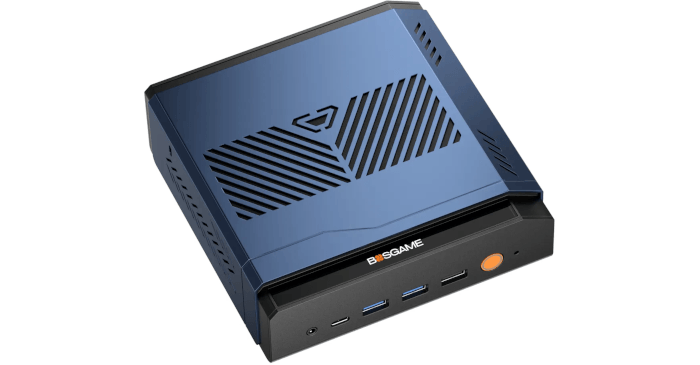
Interrogation of the System
I’ll use the inxi utility to examine the VTA-439’s technical specifications in detail.
Processor
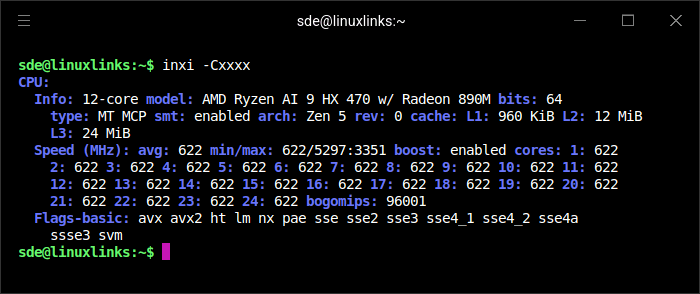
The VTA-439 is powered by AMD’s Ryzen AI 9 HX 470, a 12-core, 24-thread processor with SMT enabled. The processor uses AMD’s latest Zen 5 architecture, combining high-performance Zen 5 cores with compact Zen 5c cores. It has 960 KiB of L1 cache, 12 MiB of L2 cache, and 24 MiB of L3 cache. At idle, all cores were running at around 622 MHz, which is normal power-saving behaviour, with boost enabled and maximum frequencies reported up to around 5.3 GHz. The CPU also exposes the expected modern instruction set support, including AVX, AVX2, SSE variants, and AMD SVM virtualisation.
The lscpu --extended output shows the hybrid core layout clearly.
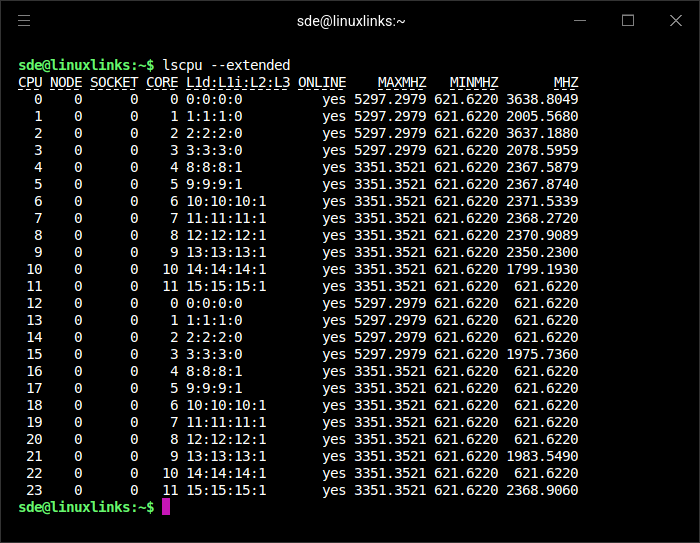
The Ryzen AI 9 HX 470 exposes 24 logical CPUs, but these map to 12 physical cores with SMT enabled. Logical CPUs 0-11 are the first thread on each physical core, while CPUs 12-23 are their SMT siblings. Cores 0-3 are the higher-frequency Zen 5 cores, with a reported maximum frequency of around 5.3GHz, while cores 4-11 are the compact Zen 5c cores, topping out at around 3.35GHz.
The Ryzen AI 9 HX 470 is best viewed as a refreshed version of the Ryzen AI 9 HX 370 rather than a completely new design. Both chips use the same 12-core, 24-thread layout, combining 4 Zen 5 cores with 8 Zen 5c cores, and both include Radeon 890M integrated graphics.
The HX 470 brings modest improvements: a slightly higher maximum CPU boost clock, faster-clocked Radeon 890M graphics, improved LPDDR5x memory support, and a stronger Ryzen AI engine. In day-to-day Linux desktop use, the difference is unlikely to be dramatic, but GPU-heavy workloads, AI workloads, and benchmarks favour the HX 470.
Graphics
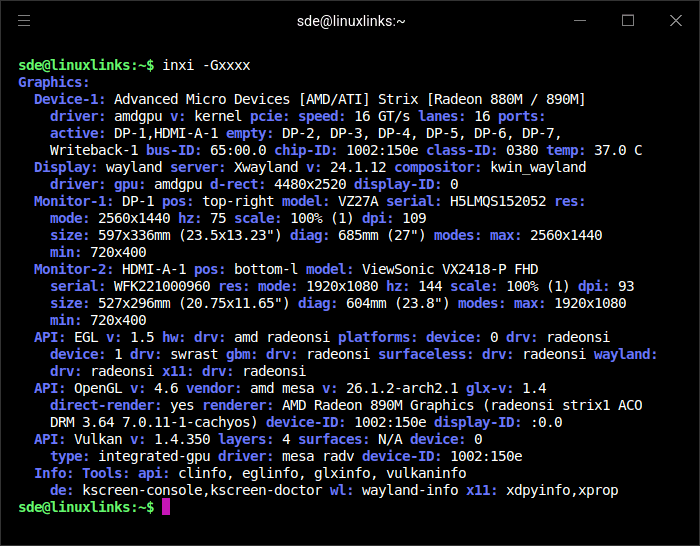
The graphics output shows the VTA-439’s integrated AMD Strix GPU running with the amdgpu kernel driver. inxi identifies the device as Radeon 880M / 890M, while the OpenGL renderer reports AMD Radeon 890M Graphics. The GPU has a maximum frequency of 3100 MHz. The system is running KDE Plasma on Wayland with KWin, with Xwayland also active. The Ryzen AI 9 HX 470 offers up to 86 TOPS of total AI compute, including up to 55 TOPS from the NPU.
Two displays were connected during testing: a 27-inch ViewSonic monitor over DisplayPort at 2560×1440 and 75Hz, and a 24-inch ViewSonic Full HD monitor over HDMI at 1920×1080 and 144Hz. The reported OpenGL stack is Mesa 26.1.2 with OpenGL 4.6 support, while Vulkan is available through Mesa’s RADV driver. The GPU temperature was 37°C when the reading was taken.
Disk
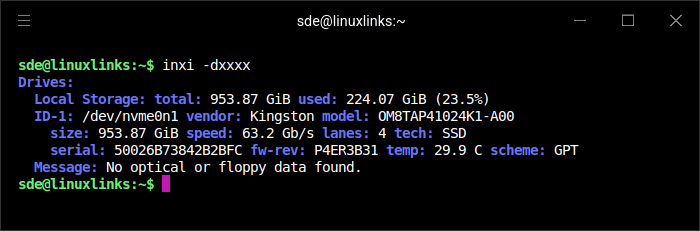
The VTA-439 came with a Kingston 1TB NVMe SSD installed. It’s a PCIe 4.0 x4 2280 drive with a maximum read speed of 6,100 MB/s and a maximum write speed of 5,300 MB/s. It’s a fast QLC drive from a well-known brand. There are two further NVMe slots available for storage expansion. Thanks to the case design, they’re easy to access: remove a single screw and the NVMe and SO-DIMM slots are exposed.
The VTA-439 provides three M.2 NVMe slots, but they don’t all offer the same bandwidth. I’ve verified that one slot operates at PCIe 4.0 x4, while the other two operate at PCIe 4.0 x2. In practical terms, the x4 slot can support up to around 7GB/s with a fast Gen4 SSD, while the x2 slots top out closer to 3.5-3.8GB/s. That’s still fast for most workloads, but users wanting maximum sequential throughput should use the x4 slot for their fastest drive.
My SSD uses a GPT partition scheme and was running at a cool 29.9°C.
Memory
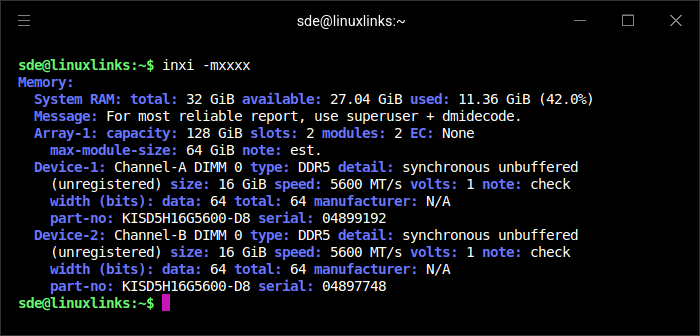
The VTA-439 has 32GB of DDR5 RAM installed as 2 × 16GB modules running at 5600MT/s. On my review unit, inxi does not report a manufacturer, but the modules are identified by the part number KISD5H16G5600-D8 rather than a familiar retail part from Crucial, Kingston, Samsung, or another major consumer memory brand.
PassMark’s database identifies it as Shenzhen Micro Innovation Industry KISD5H16G5600-D8 16GB, while some listings describe it as KingFast DDR5 16GB SO-DIMM.
The RAM is socketed, so it can be upgraded. The case design is practical here: remove a single screw and the RAM slots are accessible.
inxi reports the maximum RAM is 128GB. BOSGAME’s specification sheet states that the machine supports 64GB modules, which would make the maximum 128GB. I’ve not verified that.
Network
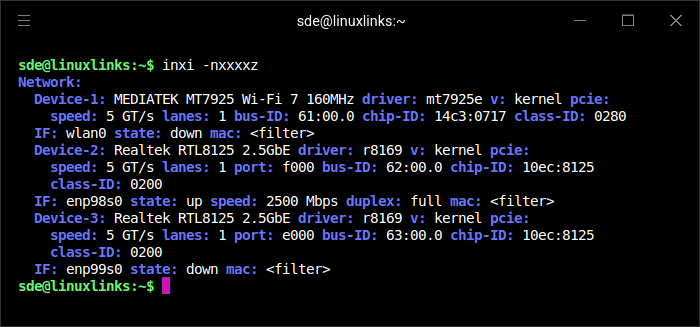
Networking is well covered on the VTA-439. inxi reports a MediaTek MT7925 Wi-Fi 7 adapter, handled by the kernel’s mt7925e driver. When the screenshot was taken, I wasn’t using a Wi-Fi connection.
The machine also includes two Realtek RTL8125 2.5GbE Ethernet controllers. Both are handled by the kernel’s r8169 driver. One Ethernet port was active at 2500 Mbps full duplex, while the second port was present but not connected. Dual 2.5GbE is a useful inclusion, particularly if the machine is used for fast local transfers, server duties, or network-focused workloads.
Bluetooth
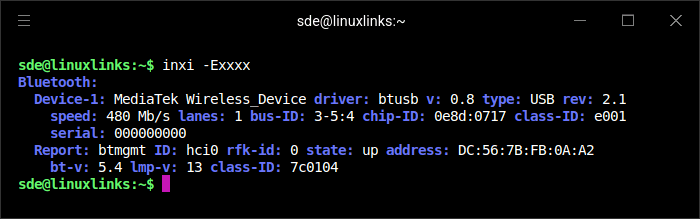
Bluetooth is provided by a MediaTek wireless device connected internally over USB. It’s handled by the kernel’s btusb driver and is reported as a USB 2.1 device running at 480 Mb/s.
The Bluetooth controller was active when the screenshot was taken. inxi reports Bluetooth 5.4 support, with LMP version 13. Bluetooth 5.4 is mainly a Bluetooth Low Energy improvement. Its headline features are Periodic Advertising with Responses (PAwR) and Encrypted Advertising Data, aimed at efficient, secure communication with lots of low-power devices.
Audio
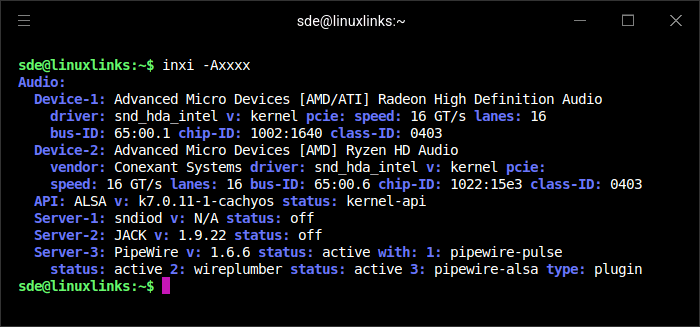
The VTA-439 exposes two AMD audio devices: Radeon High Definition Audio for digital audio over the display outputs, and Ryzen HD Audio for the machine’s onboard audio. Both are handled by the kernel’s snd_hda_intel driver.
At the software level, ALSA is present as expected, with PipeWire 1.6.6 active as the main sound server. PipeWire’s PulseAudio compatibility layer, WirePlumber session manager, and ALSA plugin are all running, so the audio stack is configured in the standard way for a modern Linux desktop.
Temperature
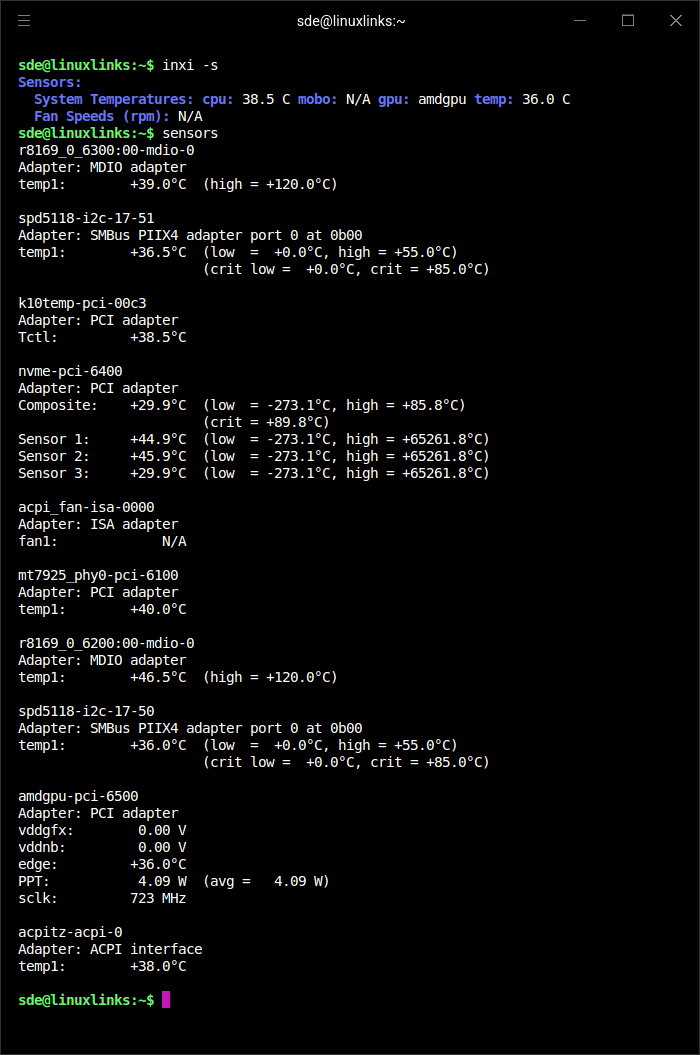
The sensor output shows the VTA-439 running cool under light load. inxi reports the CPU at 38.5°C and the integrated AMD GPU at 36.0°C, both of which are very comfortable readings for a compact mini PC.
The NVMe SSD also looks well controlled, with a composite temperature of 29.9°C. Some of the drive’s individual sensors report higher values around 45°C, but these are still well within normal operating limits. The MediaTek Wi-Fi 7 adapter is reported at 40.0°C, while the two Realtek 2.5GbE controllers sit at 39.0°C and 46.5°C.
Linux does not expose usable fan speed readings on this system, with inxi and sensors both reporting fan speed as unavailable. The AMD GPU power reading is low: package power was reported at around 4W, with the GPU clock at 723MHz, which is consistent with a largely idle desktop.
These readings were recorded at an ambient temperature of 19.2°C.
For the next article in this series, I’ll benchmark the mini PC.
Pages in this article:
Page 1 – Introduction and Design
Page 2 – First Impressions running Linux
Page 3 – Interrogation of the System
Complete list of articles in this series:
| BOSGAME VTA-439 Mini PC | |
|---|---|
| Introduction | Introduction to the series and interrogation of the machine |
| Benchmarks | Benchmarking the BOSGAME VTA-439 Mini PC |
| Power | Testing and comparing the power consumption |
| Easy Diffusion | Local Stable Diffusion package with a browser-based GUI |
| BIOS | Explore the machine's BIOS |
| Noise | How quiet is this mini PC? |
Please read our Comment Policy before commenting.