
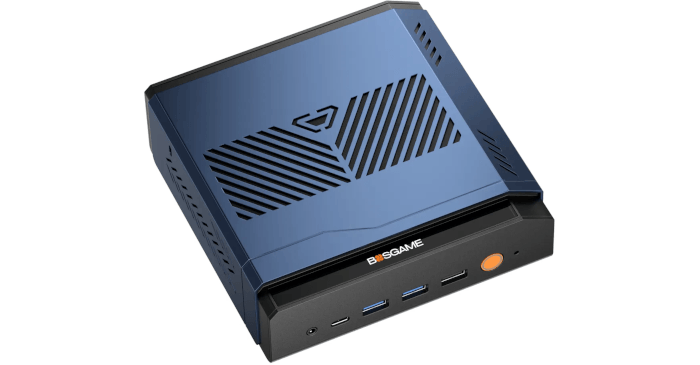
First Impressions of Running Linux on the VTA-439
I tested the VTA-439 with CachyOS, and also used Ubuntu 24.04 LTS and Ubuntu 26.04 LTS for benchmarking purposes.
Installing CachyOS is straightforward. After disabling Secure Boot in the BIOS, the installation completed without a hitch. The whole process is very quick, and I like most of the defaults CachyOS uses, with the exception of its choice of fish as the default shell. I also always use the Kite global theme for KDE, which I install together with Klassy, a KDE theming utility. This gives the desktop square window corners, which makes screenshots look cleaner.
From a hardware perspective, the experience is very smooth. Wayland works cleanly, monitors were automatically configured to use their highest refresh rates, and Vulkan/OpenGL work fine.
All networking adapters were detected automatically, so Wi-Fi 7, Bluetooth and the dual 2.5GbE Ethernet ports worked without any firmware or manual setup. Linux also detects the Ryzen AI/NPU (55 TOPS), although for NPU work I recommend Ubuntu rather than CachyOS. I’ll be exploring the NPU in more detail in later articles in this series.
Suspend and resume work reliably, networking returns properly, and USB devices wake correctly.
The VTA-439 is a particularly good match for CachyOS. The Ryzen AI 9 HX 470 is very recent silicon, paired with AMD’s Radeon 890M integrated graphics, so it benefits from a rolling Linux distribution with up-to-date kernel, Mesa and firmware support. CachyOS also gives this machine a performance-focused base, with optimised repositories for modern x86-64-v3, x86-64-v4 and Zen 4/5 class processors, plus CachyOS kernels with scheduler tuning intended to improve desktop responsiveness under load.
On CachyOS, the optimised repository for Zen 4 and Zen 5-class AMD processors is named znver4. I can confirm that this repository is enabled with the following command:
$ grep -nEi '^\[(cachyos|.*znver4|.*znver5|core|extra|multilib)' /etc/pacman.conf
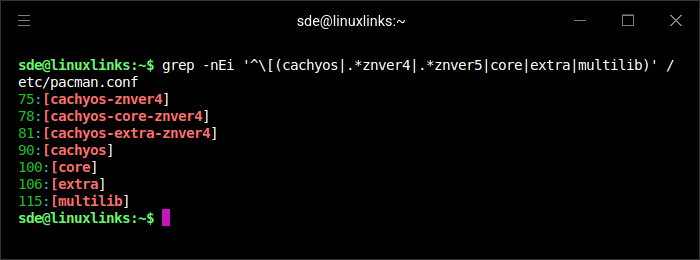
The znver4 repositories appear at the top of /etc/pacman.conf, ahead of the standard CachyOS and Arch repositories, so pacman will prefer the CPU-optimised znver4 packages where they’re available. This is a good fit for the VTA-439’s modern AMD processor.
Next, let’s examine how the VTA-439 allocates system memory.
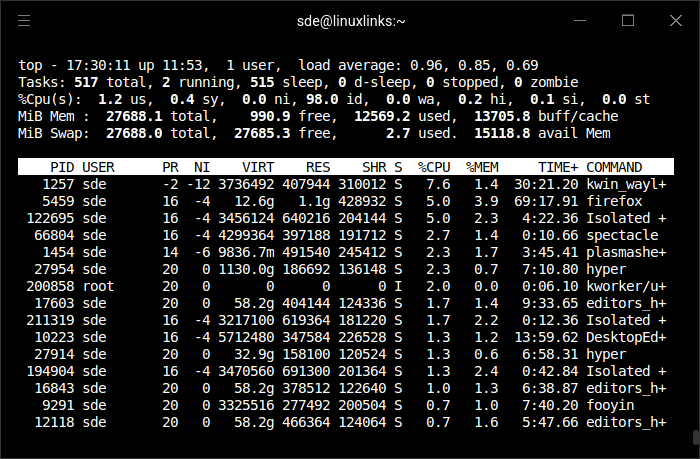
The top output reports 27,688MiB of total system memory available to Linux, even though the machine has 32GB of RAM installed. The missing memory is not being used by ordinary processes; it’s reserved by the platform. This is consistent with the integrated Radeon 890M having a fixed UMA allocation of around 4GB, with the rest accounted for by normal firmware and hardware reservations.
By default, the BIOS does not show a UMA Frame Buffer Size option, so the integrated GPU memory allocation appears to be fixed at 4GB. That’s sufficient for desktop compositing, media playback, multiple displays, and lighter GPU workloads, but it can limit more demanding tasks. High-resolution gaming, large texture packs, GPU compute, and some AI workloads may exceed what a 4GB graphics allocation can comfortably handle.
UMA Frame Buffer Size is hidden by default, but it can be exposed and changed. Follow these steps:
- Boot the machine and enter the BIOS.
- Press [Alt + F5].
- Press [F4] to save and reboot.
- Re-enter BIOS ➔ Go to Advanced (Wrench Icon) ➔ AMD CBS.
- NBIO Common Options ➔ GFX Configuration.
- Select Dedicated Graphics Memory. On my system, this setting lets me allocate 0.5GB, 1GB, 2GB, 4GB, 6GB, 8GB, 16GB, or 24GB of system memory to graphics memory.
- Press [F4] to save.
I’ve changed the amount allocated to the GPU to 8GB.
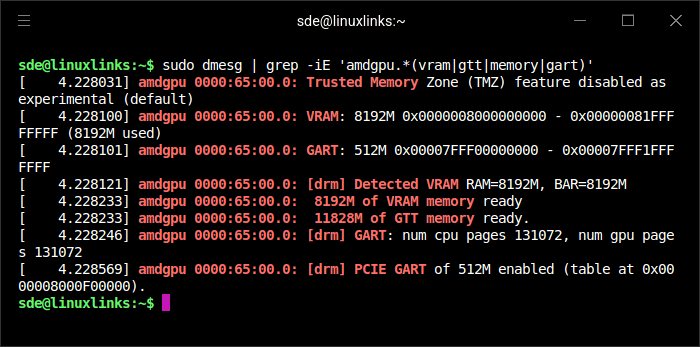
Do not change any other BIOS settings unless you’re sure what they do.
Next page: Page 3 – Interrogation of the System
Pages in this article:
Page 1 – Introduction and Design
Page 2 – First Impressions running Linux
Page 3 – Interrogation of the System
Complete list of articles in this series:
| BOSGAME VTA-439 Mini PC | |
|---|---|
| Introduction | Introduction to the series and interrogation of the machine |
| Benchmarks | Benchmarking the BOSGAME VTA-439 Mini PC |
| Power | Testing and comparing the power consumption |
| Easy Diffusion | Local Stable Diffusion package with a browser-based GUI |
| BIOS | Explore the machine's BIOS |
| Noise | How quiet is this mini PC? |
Please read our Comment Policy before commenting.