

An office suite is a collection of related software for knowledge workers. The software is distributed together in a single package, with a consistent graphical interface, and typically with strong integration between the different components.
The types of software included in an office suite often consist of word processing, spreadsheets, presentations, database and more. For many users the office suite (together with a web browser and email client) represents the cornerstone of their computing day, particularly in the business field. A high quality office suite is therefore a basic necessity for any computing platform to prosper.
Microsoft Office still dominates market share of office suites. Businesses have often rejected free Office alternatives. However, things are changing. With the cost of a price subscription plan for Microsoft Office, the average home user or small business will welcome a free alternative. Fortunately, there are some truly excellent open source alternatives available for Linux (and other operating systems).
Our recommendations are captured in our legendary LinuxLinks-style ratings chart. Only free and open source software is eligible for inclusion.
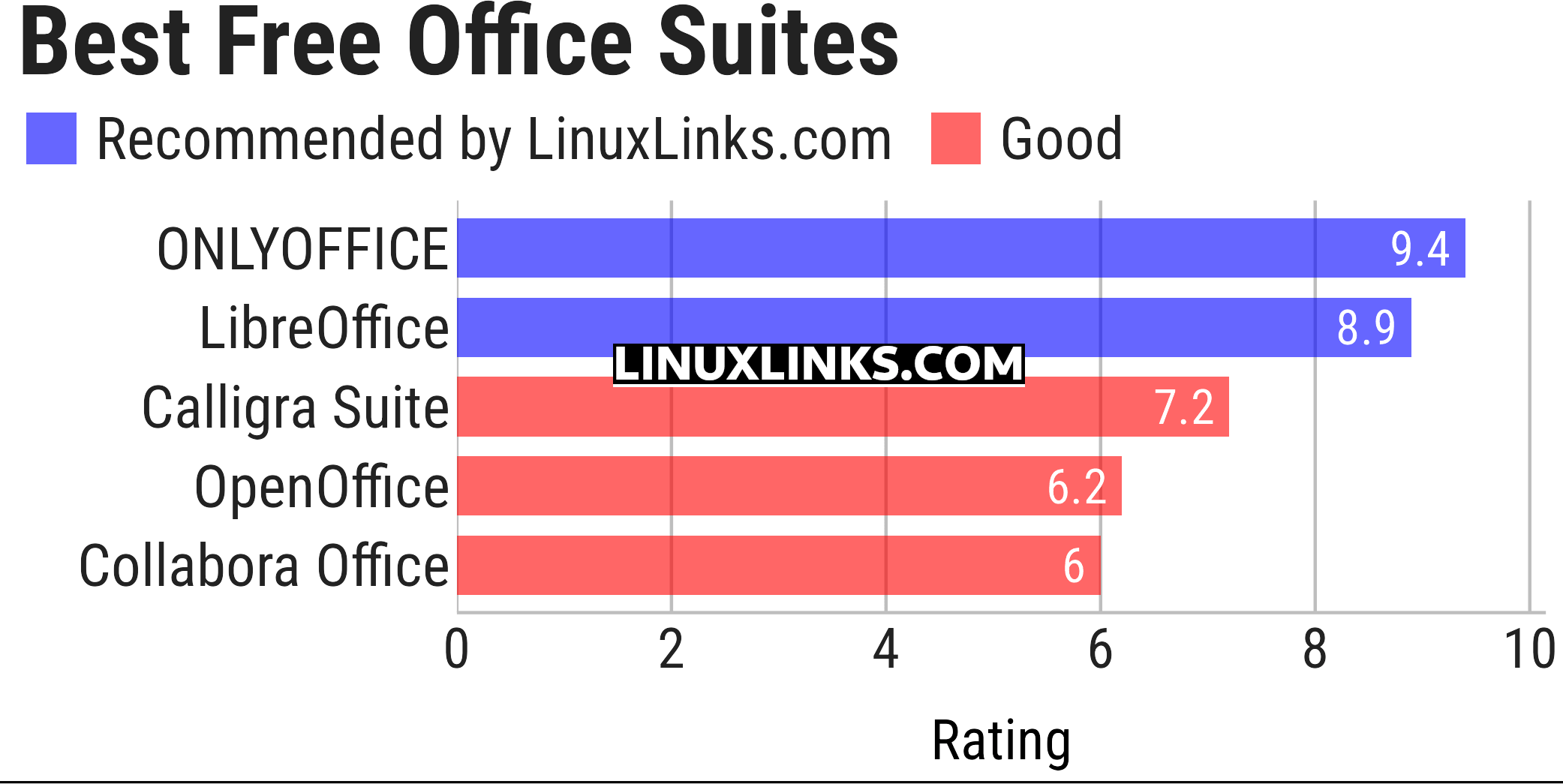
Click the links in the table below to learn more about each suite.
| Office Suites | |
|---|---|
| ONLYOFFICE | Multifunctional cloud online office suite |
| LibreOffice | Powerful, high quality, complete, free open source office suite |
| Calligra Suite | Integrated set of open source applications, forked from KOffice in 2010 |
| Apache OpenOffice | Office productivity software suite |
| Collabora Office | Desktop office suite |
This article has been updated to reflect the changes outlined in our recent announcement.
 Explore our carefully curated directory of recommended free and open source software, covering every major software category. Explore our carefully curated directory of recommended free and open source software, covering every major software category.The directory forms part of our extensive collection of articles for Linux enthusiasts. It includes hundreds of detailed reviews, together with free and open source alternatives to proprietary software from companies such as Google, Microsoft, Apple, Adobe, IBM, Cisco, Oracle, and Autodesk. LinuxLinks also covers interesting projects worth exploring, Linux-compatible hardware, free programming books and tutorials, and much more. Know a useful free and open source Linux application that we haven’t covered? Tell us about it using our submission form. |
Please read our Comment Policy before commenting.
all the four are awesome and comfortable to use, but I really really hate distros who come with WPS as their default office suite. it’s pretty bad and resource-heavy, and unable to remove clean well, even purge.
I’ve never had a problem with cleanly removing WPS.
LibreOffice is utterly user unfriendly, difficult to navigate and configure. Try finding page setup: it’s not where it should be. The interface is horrible, and it cannot open documents in their original format. Documents written using a previous version of LibreOffice have to be reformatted, which is useless when timestamps are important. It is also annoyingly American by default.
In comparison, I can open a Word document from 2003 in WPS, and it opens perfectly.
There’s lots of things wrong with LibreOffice, but it’s still, by far, the best free and open source desktop office suite. By a long way!
WPS is a trial.