

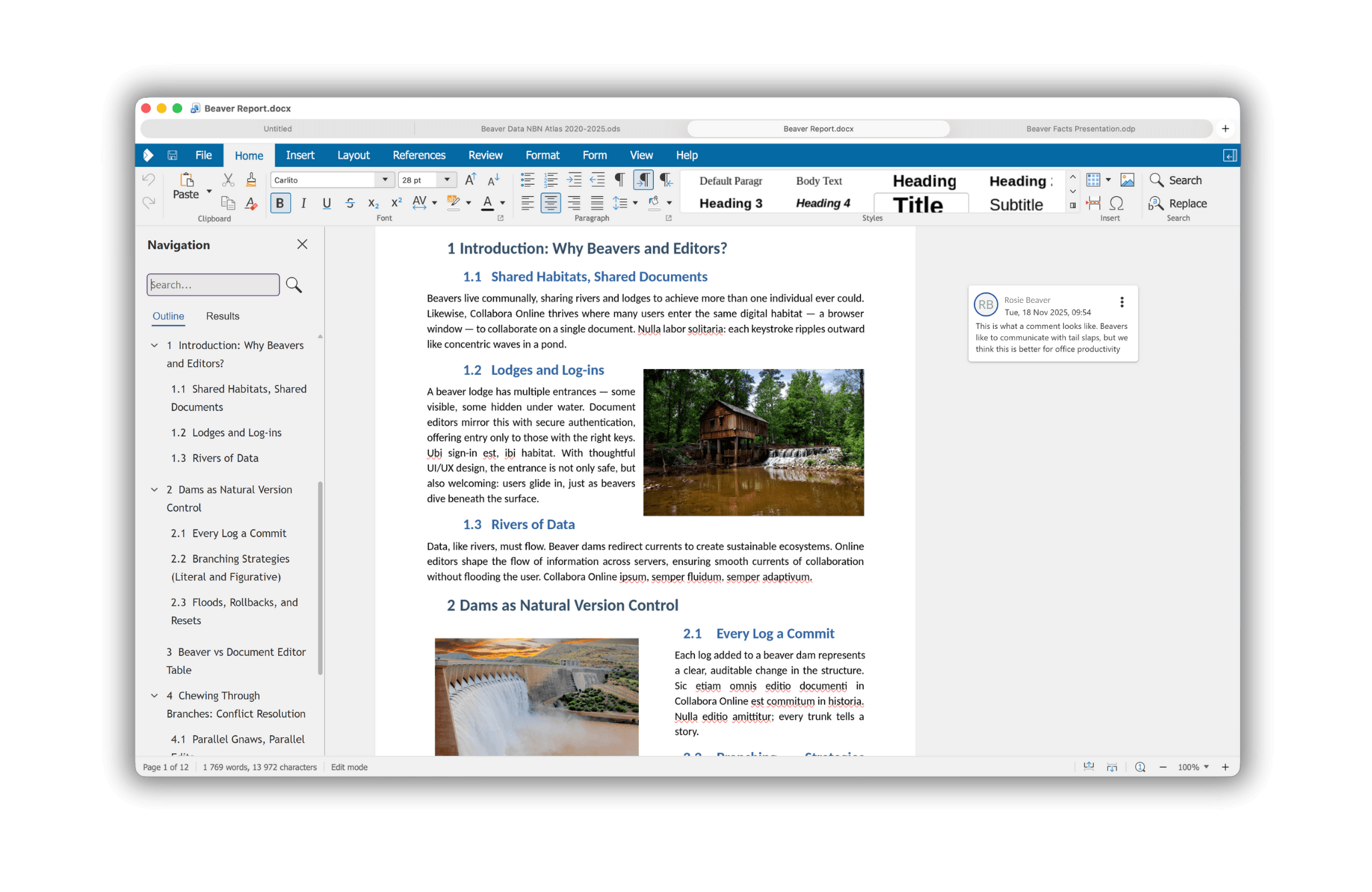
Collabora Office is a desktop productivity suite that brings the interface and document-editing technology of Collabora Online to applications running locally on Linux, Windows and macOS. It is built on LibreOffice technology but presents a different editing experience from the traditional LibreOffice desktop applications.
The suite provides tools for working with text documents, spreadsheets, presentations and drawings. Its interface uses familiar browser-style controls while integrating with desktop features, including local file handling, clipboard operations and display settings.
Collabora Office is designed for users who want a consistent editing environment across desktop and browser-based office applications. Documents can be edited locally without an internet connection, while supported integrations make it possible to work with shared files and collaborative services.
This is free and open source software.
Key Features
- Writer – creates and edits text documents with formatting, tables, images and document-layout controls.
- Calc – spreadsheet editor with formulas, charts, pivot tables, conditional formatting and data analysis tools.
- Impress – presentation editor with slide layouts, transitions, animations and multimedia.
- Draw – creates diagrams, illustrations and other graphical documents.
- OpenDocument support – edits documents using ODT, ODS, ODP and other supported ODF formats.
- Microsoft Office compatibility – opens and saves DOCX, XLSX and PPTX documents.
- PDF export – generates PDF documents from office files.
- Document comparison – examines differences between versions of text documents.
- Multi-page viewing – displays several document pages within a single workspace.
- Spreadsheet table styles – applies reusable formatting to tabular data.
- Calculated pivot-table fields – adds derived calculations to spreadsheet pivot tables.
- Advanced spreadsheet analysis – includes statistical operations and additional calculation functions.
- Presentation management – organises slide sections and rearranges slides using thumbnail views.
- Markdown interoperability – supports working with Markdown content through compatible editing operations.
- Start screen – provides access to recent documents, templates and application settings.
- Dark mode – adjusts the interface to compatible desktop appearance settings.
- Cloud document integration – opens and saves documents through supported collaborative services.
- Cross-platform support – runs on Linux, macOS, and Windows.
Website: www.collaboraonline.com
Support:
Developer: Collabora Productivity Ltd
License: Mozilla Public License v2.0
Collabora Office is written in C++, JavaScript, and TypeScript. Learn C++ with our recommended free books and free tutorials. Learn JavaScript with our recommended free books and free tutorials. Learn TypeScript with our recommended free books and free tutorials.
Related Software
| Office Suites | |
|---|---|
| ONLYOFFICE | Multifunctional cloud online office suite |
| LibreOffice | Powerful, high quality, complete, free open source office suite |
| Calligra Suite | Integrated set of open source applications, forked from KOffice in 2010 |
| Apache OpenOffice | Office productivity software suite |
| Collabora Office | Desktop office suite |
Read our verdict in the software roundup.
 Explore our carefully curated directory of recommended free and open source software, covering every major software category. Explore our carefully curated directory of recommended free and open source software, covering every major software category.The directory forms part of our extensive collection of articles for Linux enthusiasts. It includes hundreds of detailed reviews, together with free and open source alternatives to proprietary software from companies such as Google, Microsoft, Apple, Adobe, IBM, Cisco, Oracle, and Autodesk. LinuxLinks also covers interesting projects worth exploring, Linux-compatible hardware, free programming books and tutorials, and much more. Know a useful free and open source Linux application that we haven’t covered? Tell us about it using our submission form. |
Please read our Comment Policy before commenting.