

A computer font is implemented as a digital data file containing a set of graphically related glyphs. A computer font is designed and created using a font editor.
Most computer fonts are in either bitmap or outline data formats. Bitmap fonts consist of a matrix of dots or pixels representing the image of each glyph in each face and size. Outline or vector fonts use Bézier curves, drawing instructions and mathematical formulae to describe each glyph, which make the character outlines scalable to any size.
Linux users may not have a plethora of fonts, but there are many lovely and usable fonts. Different Linux fonts are supplied with different Linux distros. What you may need is an efficient way to manage your fonts. Step forward a dedicated font manager utility.
Here’s our verdict captured in a LinuxLinks-style chart. We only feature free and open source software in this article.
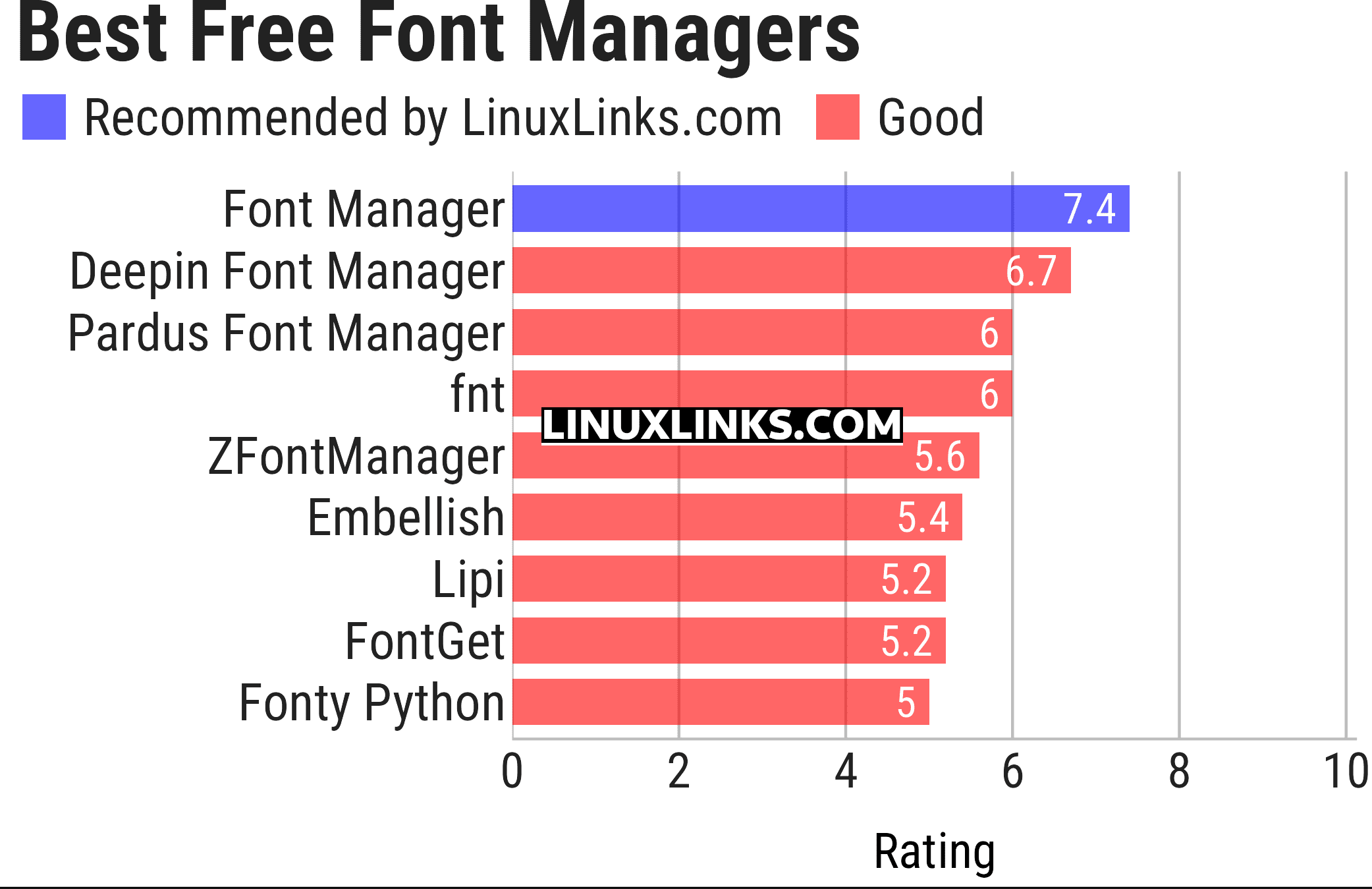
Let’s explore the font managers. For each application we have compiled its own portal page, a full description with an in-depth analysis of its features, a screenshot, together with links to relevant resources.
| Font Managers | |
|---|---|
| Font Manager | Simple tool suitable for the needs of most desktop users |
| Deepin Font Manager | Manage your fonts |
| Pardus Font Manager | Lightweight font management application |
| fnt | apt for fonts |
| ZFontManager | Preview, organise, install and activate fonts |
| Embellish | Install, remove, update and preview Nerd Fonts |
| Lipi | Search, preview and install fonts from Google Fonts |
| FontGet | Install and manage fonts from the command line |
| Fonty Python | Find, view and manage font files of all kinds |
This article has been updated to reflect the changes outlined in our recent announcement.
 Explore our carefully curated directory of recommended free and open source software, covering every major software category. Explore our carefully curated directory of recommended free and open source software, covering every major software category.The directory forms part of our extensive collection of articles for Linux enthusiasts. It includes hundreds of detailed reviews, together with free and open source alternatives to proprietary software from companies such as Google, Microsoft, Apple, Adobe, IBM, Cisco, Oracle, and Autodesk. LinuxLinks also covers interesting projects worth exploring, Linux-compatible hardware, free programming books and tutorials, and much more. Know a useful free and open source Linux application that we haven’t covered? Tell us about it using our submission form. |
Please read our Comment Policy before commenting.