
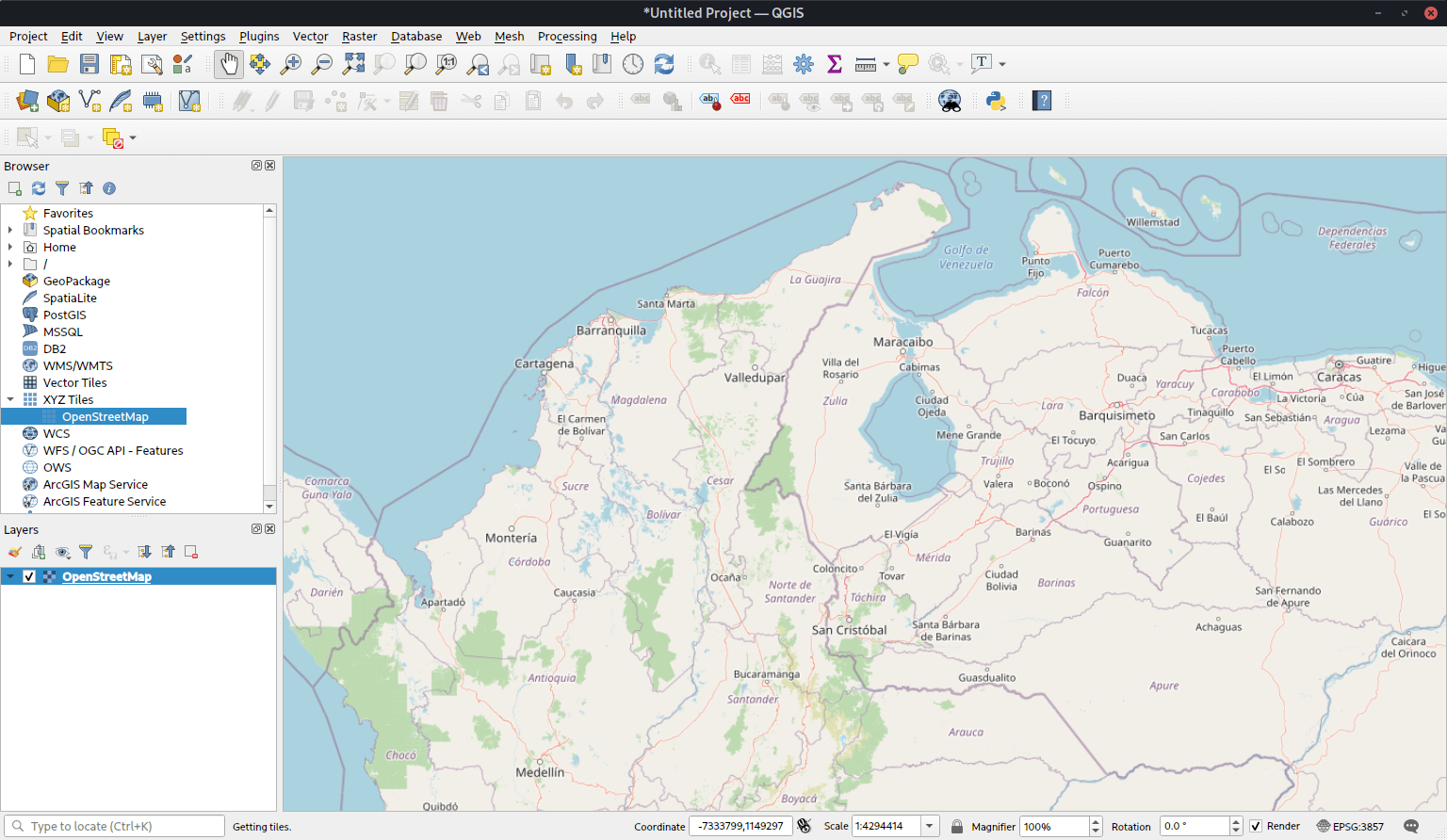
Quantum GIS (QGIS) is a user friendly Open Source Geographic Information System (GIS). QGIS supports vector, raster, and database formats.
A Geographical Information System (GIS) is a collection of software that allows you to create, visualise, query and analyse geospatial data. Geospatial data refers to information about the geographic location of an entity. This often involves the use of a geographic coordinate, like a latitude or longitude value. Spatial data is another commonly used term, as are: geographic data, GIS data, map data, location data, coordinate data and spatial geometry data.
QGIS aims to be an easy to use GIS, providing common functions and features. The initial goal was to provide a GIS data viewer.
QGIS has reached that point in its evolution and is being used by many for their daily GIS data viewing needs.
Key Features
- View and overlay vector and raster data in different formats and projections without conversion to an internal or common format. Supported formats include:
- spatially-enabled PostgreSQL tables using PostGIS.
- most vector formats supported by the OGR library, including ESRI shapefiles, MapInfo, SDTS and GML.
- all raster formats supported by the GDAL library, such as digital elevation models, aerial photography or landsat imagery.
- GRASS mapsets.
- online spatial data served as OGC-compliant WMS or WFS.
- Create maps and interactively explore spatial data with a friendly graphical user interface. The many helpful tools available in the GUI include:
- on the fly projection.
- map composer.
- overview panel.
- spatial bookmarks.
- identify/select features.
- edit/view/search attributes.
- feature labeling.
- change vector and raster symbology.
- add a graticule layer.
- decorate your map with a north arrow, scale bar and copyright label.
- save and restore projects.
- Create, edit and export spatial data using:
- digitizing tools for GRASS and shapefile formats.
- the georeferencer plugin.
- GPS tools to import and export GPX format, convert other GPS formats to GPX, or down/upload directly to a GPS unit.
- Perform spatial analysis using the buffer tool (PostGIS only) or the integrated GRASS tools, including:
- map algebra.
- terrain analysis.
- hydrologic modeling.
- network analysis.
- and many others.
- Publish your map on the internet using the export to Mapfile capability (requires a webserver with UMN MapServer installed).
- Adapt Quantum GIS to your special needs through the extensible plugin architecture.
- Plugins
- Add WFS Layer.
- Add Delimited Text Layer.
- Decorations (Copyright Label, North Arrow and Scale bar).
- Georeferencer.
- GPS Tools.
- GRASS.
- Graticule Creator.
- PostgreSQL Geoprocessing functions.
- SPIT Shapefile to PostgreSQL/PostGIS Import Tool.
- Python Console.
Website: www.qgis.org
Support: Documentation
Developer: QGIS Development Team
License: GNU General Public License v2.0
QGIS is written in C++. Learn C++ with our recommended free books and free tutorials. Learn Python with our recommended free books and free tutorials.
Related Software
| GIS: Earth Science Software | |
|---|---|
| GRASS | Geographic Resources Analysis Support System |
| Quantum GIS | User friendly Geographic Information System |
| SAGA | System for Automated Geoscientific Analyses |
| GMT | Collection of tools that allow users to manipulate data sets |
| GeoServer | Server written in Java that allows users to share and edit geospatial data |
| OpenJUMP | Geographic Information System written in Java |
| gvSIG Desktop | Powerful, user-friendly Geographic Information System |
| PostGIS | Database extender for PostgreSQL object-relational database |
| WhiteboxTools | Advanced geospatial data analysis platform |
| MapServer | System for developing web-based GIS applications |
| uDig | Spatial data viewer/editor |
Read our verdict in the software roundup.
| Virtual Globes | |
|---|---|
| Quantum GIS | User friendly Geographic Information System |
| OpenStreetMap | A copyright free alternative to Google Maps |
| Marble | Combination atlas/virtual globe |
| GeoMapApp | Earth science exploration, global topography database, and visualization |
| osgEarth | C++ toolkit for rendering geospatial data in 3D |
| World Wind | Virtual globe initially developed by NASA's Learning Technologies project |
| TerriaMap | Build and deploy web-based geospatial data explorers |
| ossimPlanet | Accurate 3D global geo-spatial viewer |
Read our verdict in the software roundup.
| Mapping Tools | |
|---|---|
| Organic Maps | Offline maps & GPS app for hiking, cycling, biking, and driving |
| CoMaps | Community-led maps and navigation application |
| QGIS | GIS that supports vector, raster, and database formats |
| Marble | Virtual globe and world atlas |
| Placemark | Web-based tool for geospatial data |
| JOSM | Extensible editor for OpenStreetMap |
| uMap | Web application for creating and publishing custom interactive maps |
| Map | Wardley map editor |
| Kadas Albireo | Mapping application based on QGIS targeted at non-specialized users |
| TuiView | Lightweight raster GIS |
| Pure Maps | Native map and navigation application |
| Merkaartor | OpenStreetMap mapping program |
| GNOME Maps | Find places around the world |
| VersaTiles | Generate, process, store, serve, and render map tiles |
Read our verdict in the software roundup.
 Explore our carefully curated directory of recommended free and open source software, covering every major software category. Explore our carefully curated directory of recommended free and open source software, covering every major software category.The directory forms part of our extensive collection of articles for Linux enthusiasts. It includes hundreds of detailed reviews, together with free and open source alternatives to proprietary software from companies such as Google, Microsoft, Apple, Adobe, IBM, Cisco, Oracle, and Autodesk. LinuxLinks also covers interesting projects worth exploring, Linux-compatible hardware, free programming books and tutorials, and much more. Know a useful free and open source Linux application that we haven’t covered? Tell us about it using our submission form. |
Please read our Comment Policy before commenting.