
Last Updated on May 7, 2026
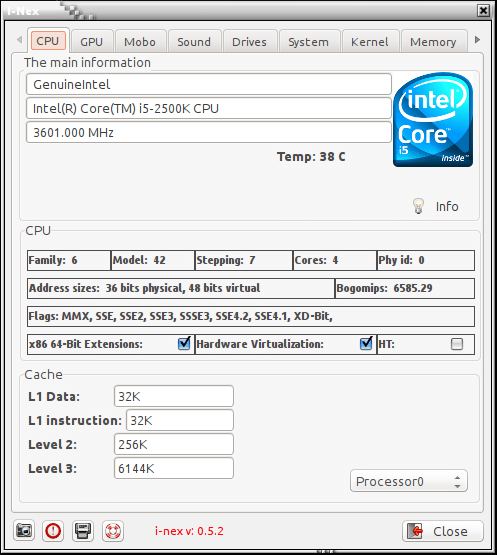
I-Nex is an open source system and hardware information tool similar to the Windows utility, CPU-Z. It comes with a well designed graphical user interface that allows users to view information about their system hardware.
Besides displaying hardware information, I-Nex can also generate advanced reports which can be forwarded to a nopaste service.
I-Nex uses a new version of Gambas which can make installation non-trivial for some distributions.
Key Features
- Tabbed interface.
- CPU:
- Main information.
- Family / Model / Stepping / Cores / Phy id.
- Address sizes / Bogomips.
- Flags.
- x86 64-Bit Extensions / Hardware Virtualization / HT.
- Cache:
- L1 Data.
- L1 Instruction.
- Level 2.
- Level 3.
- GPU:
- Graphics card.
- OpenGL:
- OpenGL Vendor.
- OpenGL Renderer.
- OpenGL Version.
- Present resolution.
- Available resolutions.
- Mobo:
- Manufacturer.
- Model.
- Bios: Manufacturer, Date, Version.
- Sound:
- Version.
- ID.
- Modules.
- HWdep.
- PCM.
- Drives:
- Drive vendor / rev.
- Device model / Max sectors.
- Mount point.
- Device uuid.
- Mount width.
- Device real size / State.
- Filesystem type / Modalias.
- Ext range / Range / Removable.
- Discard granularity / Discard zeroes data / Discard max bytes.
- HW sector size / Add random.
- Max sectors kb / Max HW sectors kb.
- Max segments / Max segment size.
- Read ahead kb / Scheduler.
- System:
- Host name.
- Distribution.
- Edition.
- Time zone.
- GCC version.
- X.org version.
- GLX version.
- Architecture.
- Shell.
- Default LM/DM.
- Number of installed packages.
- System uptime.
- Kernel:
- Shows found kernels.
- Kernel command line.
- Module information.
- Memory:
- RAM used.
- SWAP used.
- Total, Used, Free, Shared, Buffers, Cached, and SWAP total.
- Web:
- Ethernet controller.
- Show receive and transmit.
- USB | Input:
- USB device plugged.
- Manufacturer.
- Product.
- Max power.
- Speed.
- Version.
- Serial.
- idVendor / idProduct.
- General reports: CPU Tab, Motherboard / Bios Tab, Sound Tab, Graphics Tab, Include lspci, Include lsusb, Include /proc/scsi/scsi, Include dmesg, Include unity support test.
- Send report to a nopaste service.
- Take a screenshot.
Website: github.com/i-nex/I-Nex
Support:
Developer: Michat Gtowienka
License: GNU General Public License v3.0
Related Software
| GUI System Profilers | |
|---|---|
| Hardinfo2 | A continuation of HardInfo offering system information and benchmarking |
| CPU-X | Similar tool to CPU-Z but differs in a few important ways |
| I-Nex | Gambas based alternative to CPU-Z |
| HardInfo | System Profiler and Benchmark |
| KInfoCenter | Centralized and convenient overview of your system |
| Examine | System information viewer for the COSMIC Desktop |
| CPU-G | Python based alternative to CPU-Z |
| CPU Info | Presents detailed hardware and software information |
| Big Hardware Info | View and share hardware information |
Read our verdict in the software roundup.
 Explore our carefully curated directory of recommended free and open source software, covering every major software category. Explore our carefully curated directory of recommended free and open source software, covering every major software category.The directory forms part of our extensive collection of articles for Linux enthusiasts. It includes hundreds of detailed reviews, together with free and open source alternatives to proprietary software from companies such as Google, Microsoft, Apple, Adobe, IBM, Cisco, Oracle, and Autodesk. LinuxLinks also covers interesting projects worth exploring, Linux-compatible hardware, free programming books and tutorials, and much more. Know a useful free and open source Linux application that we haven’t covered? Tell us about it using our submission form. |
Please read our Comment Policy before commenting.