

Internet radio, sometimes called web radio, online radio, or streaming radio, is a digital audio service that transmits content over the internet instead of traditional AM or FM bands.
Its popularity comes from its ease of access and the huge variety of material available. Many internet radio platforms are free to use and do not require users to subscribe or register, which makes them easy for a broad audience to enjoy. Listeners can tune in to thousands of stations from around the world, covering a wide mix of programming such as music, news, sport, cultural features, and talk shows. The choice of genres is especially wide, ranging from classical and jazz to pop, folk, and more niche interests, often offering far more variety than local broadcast radio. As long as there is a reliable internet connection, people can listen from almost anywhere, making internet radio a practical and versatile alternative to conventional radio.
TuneIn CLI is a Rust-based terminal application for browsing and listening to internet radio stations from the command line. It uses TuneIn Radio and Radio Browser as providers, letting users discover stations worldwide, stream them directly in the terminal, and access additional server and service functionality for local use.
This is free and open source software.
Installation
I evaluated TuneIn CLI with CachyOS, an Arch-based distribution that’s optimized for modern CPUs. Its core idea is to rebuild much of the Arch Linux stack with CPU-specific optimizations such as x86-64-v3, x86-64-v4, and Zen4+ builds, plus techniques like LTO, PGO, and other tuning in key packages and kernels.
Initially I went with a manual installation.
First, clone the project’s repository and change into the newly created directory.
$ git clone https://github.com/tsirysndr/tunein-cli
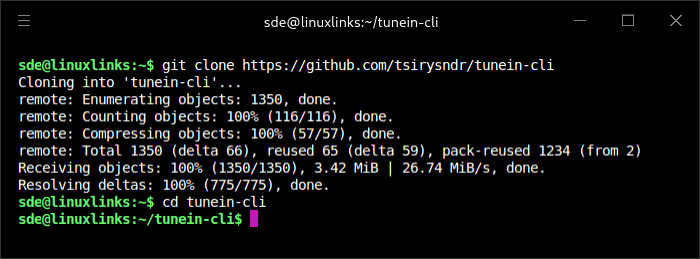
Now build the source code. There were a few warnings in the build but it didn’t stop the compilation.
$ cargo install --path .
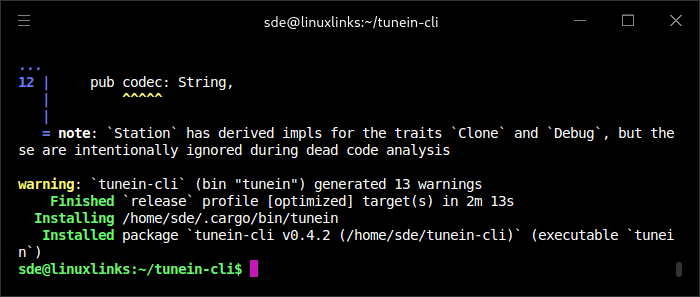
While the Rust project built and installed successfully, the compiler found unused code and is warning me about it. More importantly, the software had some issues with playback. Rather than investigate further, I also installed the binary package using yay.
$ yay -S tunein-cli-bin
In Operation
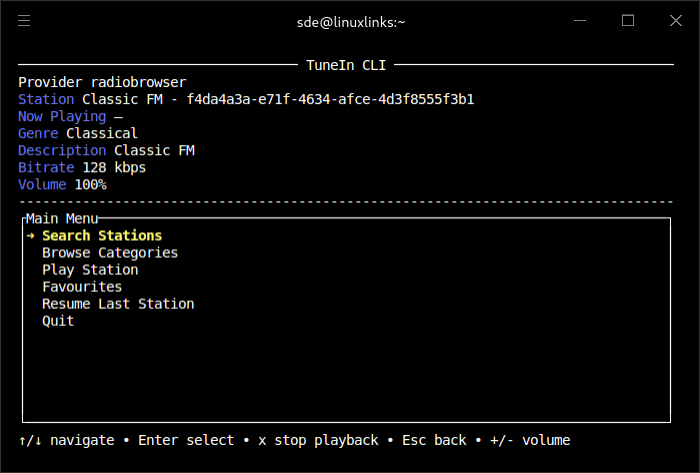
To start listening with Radio Browser, issue the command:
$ tunein -p radiobrowser
As you can see we get a very basic TUI interface which lets you search for stations, browse categories, play a station, and access your favourite stations.
Other Features
- Supports both TuneIn Radio and Radio Browser as station providers.
- Can play a station by name or by station ID.
- Shows what is currently playing when that information is available.
- Includes a local server mode.
Summary
TuneIn CLI is a basic internet radio player, but it has several shortcomings, including some instability. It’s also crying out for stream curation, as many stations are poorly organized and a large number of streams are broken.
There are many better terminal-based internet radio players available for Linux.
Website: github.com/tsirysndr/tunein-cli
Support:
Developer: Tsiry Sandratraina
License: MIT License
TuneIn CLI is written in Rust. Learn Rust with our recommended free books and free tutorials.
Related Software
| Terminal-Based Internet Radio Apps | |
|---|---|
| PyRadio | Cross-platform curses based with support for Radio Browser |
| radio-active | Command-line tool to listen to more than 30,000 radio stations |
| SonicRadio | Stylish TUI radio player |
| RadioGoGo | Surf global radio waves |
| tera | Play radio stations, CRUD your favorite lists, and explore stations |
| radion | TUI client written in Bash |
| cTune | ncurses tool with good search functionality |
| rig.fm | Fast, focused, keyboard-friendly, and free of clutter |
| Radio Recorder | Internet radio player and recorder |
| PMRP-NG | Ground-up rewrite of PMRP |
| goradion | TUI internet radio player that uses mpv |
| Radiotrope | AI agent-enabled internet radio player |
| Radioboat | Terminal web radio client, built with simplicity in mind |
| PMRP | Poor Man's Radio Player |
| radio-cli | Simple radio CLI written in Rust |
| TuneIn CLI | Basic internet radio with TuneIn Radio and Radio Browser as providers |
| tmuzika | Music player and internet radio player |
| Curseradio | Very simple application for navigating and playing radio streams |
Read our verdict in the software roundup.
 Explore our carefully curated directory of recommended free and open source software, covering every major software category. Explore our carefully curated directory of recommended free and open source software, covering every major software category.The directory forms part of our extensive collection of articles for Linux enthusiasts. It includes hundreds of detailed reviews, together with free and open source alternatives to proprietary software from companies such as Google, Microsoft, Apple, Adobe, IBM, Cisco, Oracle, and Autodesk. LinuxLinks also covers interesting projects worth exploring, Linux-compatible hardware, free programming books and tutorials, and much more. Know a useful free and open source Linux application that we haven’t covered? Tell us about it using our submission form. |
Please read our Comment Policy before commenting.