

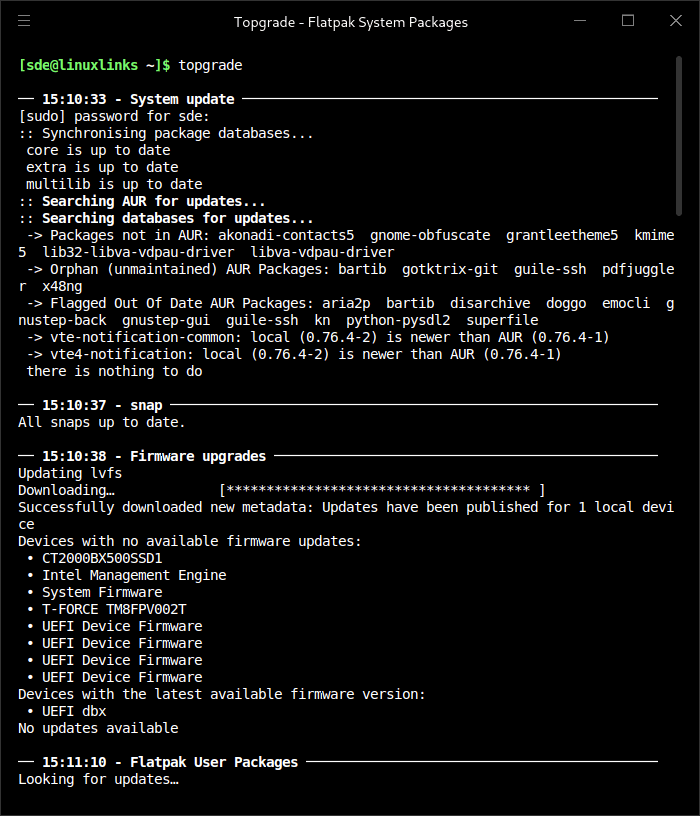
Keeping your system up to date usually involves invoking multiple package managers. This results in big, non-portable shell one-liners saved in your shell. To remedy this, Topgrade detects which tools you use and runs the appropriate commands to update them.
This is free and open source software.
Features include:
- Linux: Run the system package manager:
- Arch based: Run
yayor fall back topacman. - RedHat based: Run
yum upgrade(ordnfif present). - Debian based: Run
apt update && apt dist-upgrade. - Clear Linux: Run
swupd update. - Gentoo: Run
layman -s ALL && emerge --sync -q && eix-update && emerge -uDNa world - openSUSE: Run
zypper refresh && zypper dist-upgrade. - Void: Run
xbps-install -Su.
- Arch based: Run
- Linux: Run etc-update:
- DragonFly BSD: Upgrade and audit packages.
- FreeBSD: Upgrade and audit packages.
- Unix: Run
brew update && brew upgrade. This should handle both Homebrew and Linuxbrew. - Unix: Run
nix upgrade-nix && nix --upgrade. - Unix: Run Pearl
pearl update. - Windows: Run Topgrade inside WSL.
- Windows: Upgrade Powershell modules.
- Windows: Upgrade all Chocolatey packages.
- Windows: Upgrade all Scoop packages.
- Check if the following paths are tracked by Git. If so, pull them:
- ~/.emacs.d (Should work whether you use Spacemacs or a custom configuration)
- ~/.zshrc
- ~/.tmux
- ~/.config/fish
- ~/.config/nvim
- ~/.vim
- ~/.config/openbox
- ~/.config/bspwm
- ~/.config/i3
- ~/.config/sway
- Powershell Profile
- Microsoft Terminal configuration
- Custom defined paths
- Unix: Run zr update
- Unix: Run zplug update
- Unix: Run oh-my-zsh update
- Unix: Run antigen update
- Unix: Run antibody update
- Unix: Run fisher
- Unix: Upgrade tmux plugins with TPM. Note: Do not use the -b flag in your configuration as suggested by the TPM readme.
- Update Rustup by running
rustup update. This will also attempt to runrustup self updatewhen Rustup is installed inside the home directory. - Run Cargo install-update
- Upgrade Emacs packages (You’ll get a better output if you have Paradox installed)
- Upgrade Flutter SDK
- Upgrade OCaml packages
- Upgrade vcpkg globally installed packages
- Upgrade myrepos managed sourcecode repositories
- Upgrade Python packages installed using pipx
- Upgrade R globally installed packages
- Upgrade stack
- Upgrade Vim/Neovim packages. Works with the following plugin frameworks:
- NeoBundle
- Vundle
- Plug
- Dein
- Voom
- Node:
- Run
yarn global updateif yarn is installed. - Run
npm update -g. In Unix systems other then macOS the step will be performed only ifnpm root -gis a path inside your home directory.
- Run
- Run
composer global updateif Composer’s home directory is inside the home directory of the user. Runvalet installafter. - Upgrade Atom packages.
- Run
gem upgrade --user-installif~/.gemexists. - Linux: Update Flatpak packages.
- Linux: Update snap packages.
- Linux: Run fwupdmgr to show firmware upgrade. (View only. No upgrades will actually be performed).
- Linux: Run pihole updater.
- Run custom defined commands.
- Final stage:
- Linux: Run needrestart
- Windows: Run Windows Update (You’ll have to install PSWindowsUpdate)
- macOS: Upgrade App Store applications using masmacOS: Upgrade the system
- FreeBSD: Run
freebsd-upgrade - Cross-platform support – runs under Linux, FreeBSD, macOS, and Windows.
Website: github.com/topgrade-rs/topgrade
Support:
Developer: Many contributors
License: GNU General Public License v3.0
Topgrade is written in Rust. Learn Rust with our recommended free books and free tutorials.
| Explore Linux | |
|---|---|
 | Best Free and Open Source Software - A huge collection of recommended free and open source software covering every major category. |
 | In-depth Linux Software Reviews - Detailed assessments of Linux software covering features, usability and overall quality. |
 | The Big List of Active Linux Distros - An extensive collection of actively developed Linux distributions. |
 | Open Source Alternatives - Alternatives to software and services from Google, Microsoft, Apple, Adobe, IBM, Autodesk, Oracle and others. |
 | Essential Linux System Tools - Indispensable utilities for monitoring, maintaining and managing Linux systems. |
 | Linux Productivity Tools - Useful utilities for improving productivity and streamlining everyday tasks. |
 | Alternatives to Popular CLI Tools - Modern alternatives to familiar command-line utilities supplied with Linux systems. |
 | Awesome Free Linux Game Tools - Tools, utilities and companion software that improve gaming on Linux. |
 | Machine Learning on Linux - Machine learning and deep learning software, self-hosted applications and practical tools. |
 | Saving Money with Linux - Practical ways to reduce electricity consumption and lower computing costs with Linux. |
 | Linux Candy - Fun, entertaining and sometimes delightfully quirky software from the lighter side of Linux. |
Please read our Comment Policy before commenting.