

Textosaurus is a simple cross-platform text editor based on Qt and Scintilla.
The editor aims to provide similar workflow as Notepad++.
The software is published under an open source license.
Features include:
- User Interface:
- Cross-platform look and feel.
- Configurable toolbar.
- Changeable icon themes and styles.
- Main window remembers its location and size.
- Hideable toolbar and statusbar.
- Main window can stay on top.
- Tray icon.
- Record/save/play macros.
- Simple interface.
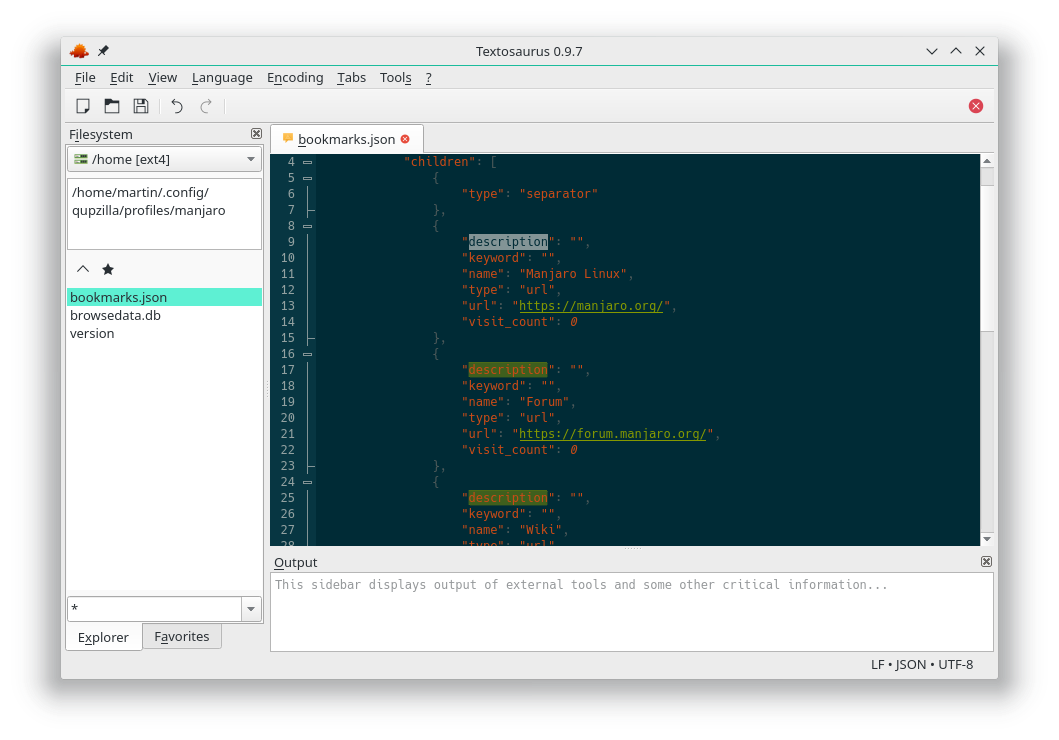
- Movable dock sidebars:
- “Output” sidebar – can display output of external tools and other information.
- “Filesystem” sidebar – allows to browse folder hierarchy and mark some files as favorites.
- “Markdown Preview” sidebar – allows users to display simple preview of your Markdown scripts.
- Tabbed interface.
- Text editor component:
- Supports a lot of input encodings.
- Input file encoding detection.
- Switchable encoding for each separate document.
- Uses full UTF-8 internally.
- Auto-indent with mixed TAB/SPACES support.
- Load relatively big files (100 MB file should not be a problem).
- Print files including syntax highlighting.
- Print to PDF.
- Code folding.
- Hideable line numbers.
- Configurable color schemes.
- URL highlights (fast on big files, only currently visible lines).
- Highlights occurrences of current selection (fast on big files, only currently visible lines).
- Switchable indent characters (spaces/tabs).
- Adjustable tab/indent width.
- Adjustable vertical line height (responds to SHIFT+WHEEL UP/DOWN shortcut too).
- Adjustable editor font (size can be changed also via CTRL+WHEEL UP/DOWN shortcut).
- Display ligatures.
- Simple find/replace functionality, which allows users to:
- Search forward/backward for plain string or regular expression (ECMAScript).
- Display number of occurrences of search phrase in a document.
- Replace all occurrences.
- Display results via “Find Results” sidebar.
- Switchable EOL mode for new documents.
- EOL mode auto-detection.
- syntax highlighting for many text formats.
- Intuitive filtering for menu of available syntax highlighters.
- Conversion of existing EOLs.
- Switchable visibility of EOL/whitespace characters.
- Support for many text operations, which allows users to:
- Upload selection/document to pastebin sites,
- Convert to/from Base64 and Base64Url.
- Convert to/from URL encoded text.
- Convert to HTML escaped text.
- Insert current date/time.
- Support for external scripts, which allows users to:
- Pass current selection/line/document/file to your script,
- Run scripts with arbitrary interpreter (Python, Bash or some other executable).
- Get output of scripts (as new file, replace selection/document, copy to clipboard, …).
- Settings of external tools is completely portable.
- Misc:
- Cross-platform easy-to-use plugin API.
- Save/restore session in platform independent way.
- All user data (settings, external tools definitions, …) are fully portable.
- Depends only on Qt (Scintilla is bundled).
- Relatively lightweight.
- No JavaScript components, no bundled Chromium, no Electron, no web technologies inside.
Website: github.com/martinrotter/textosaurus
Support: Developer’s homepage
Developer: Martin Rotter
License: GNU General Public License v3.0
Textosaurus is written in C++. Learn C++ with our recommended free books and free tutorials.
| Explore Linux | |
|---|---|
 | Best Free and Open Source Software - A huge collection of recommended free and open source software covering every major category. |
 | In-depth Linux Software Reviews - Detailed assessments of Linux software covering features, usability and overall quality. |
 | The Big List of Active Linux Distros - An extensive collection of actively developed Linux distributions. |
 | Open Source Alternatives - Alternatives to software and services from Google, Microsoft, Apple, Adobe, IBM, Autodesk, Oracle and others. |
 | Essential Linux System Tools - Indispensable utilities for monitoring, maintaining and managing Linux systems. |
 | Linux Productivity Tools - Useful utilities for improving productivity and streamlining everyday tasks. |
 | Alternatives to Popular CLI Tools - Modern alternatives to familiar command-line utilities supplied with Linux systems. |
 | Awesome Free Linux Game Tools - Tools, utilities and companion software that improve gaming on Linux. |
 | Machine Learning on Linux - Machine learning and deep learning software, self-hosted applications and practical tools. |
 | Saving Money with Linux - Practical ways to reduce electricity consumption and lower computing costs with Linux. |
 | Linux Candy - Fun, entertaining and sometimes delightfully quirky software from the lighter side of Linux. |
Please read our Comment Policy before commenting.