

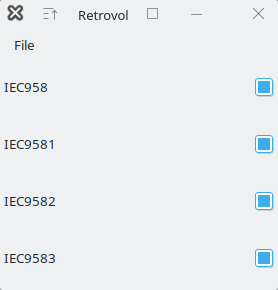
Retrovol is a volume setting program. It adds an icon to the tray that can be scrolled on to change the volume. It can be middle-clicked to mute/unmute. It can be right-clicked to get a menu with an option to display the main window, which lists all the volume controls it can detect on your system.
Sliders can be controlled by clicking, draging, scrolling (either up/down or left/right), and by using the left/right and PgUp/PgDown keys. Note that for the keyboard to work, you have to select the control with the keyboard. There is no visual feedback yet to show whether a control is selected.
For stereo audio controls, you can modify only the left or right channels by holding the shift or control keys respectively while manipulating the slider.
Configuration changes can be made in the ~/.retrovolrc file, or through the preferences window at File->Configure. For example, you can change the colors to green and blue, make the segments fatter, disable the tray icon, and have the main window only display specific sliders.
Retrovol will only allow one instance to run at a time. If you attempt to launch a second instance it will instead pop up the main window if it isn’t already visible.
Also, Retrovol accepts a -bg commandline option to specify the tray icon’s background color. Normally it will just use the normal GTK background color, but if that doesn’t match your tray, you can use this to adjust it. This can also be specified in the config file (or through the preferences gui)
but those are not convenient to automatically update to match the colorscheme when you change WM themes or whatever. Thus the -bg option is provided so that the script which launches Retrovol could look at the color of the theme and supply that on the commandline, without needing to modify the config file.
This is free and open source software.
Website: github.com/pizzasgood/retrovol
Support:
Developer: pizzasgood
License: Public Domain
Retrovol is written in C++. Learn C++ with our recommended free books and free tutorials.
Related Software
| Graphical Volume Mixers | |
|---|---|
| pwvucontrol | Pipewire volume control |
| KMix | Sound mixer |
| deej | Hardware volume mixer |
| Myxer | Lightweight, powerful volume mixer built with modern UI design |
| pavucontrol | Simple GTK based volume control tool |
| Mixxc | GTK4-based volume mixer |
| xfce4-mixer | Volume control application based on GStreamer |
| QasTools | Collection of Qt-based mixer and setup tools |
| pavucontrol-qt | Pulseaudio mixer in Qt |
| Mixer | No-frills volume mixer |
| wmsmixer | Hack to wmmixer |
| wmmixer | Mixer application designed for WindowMaker |
| Retrovol | Retro-looking volume setting program |
| hyprmixer | Volume mixer and media controller |
Read our verdict in the software roundup.
 Explore our carefully curated directory of recommended free and open source software, covering every major software category. Explore our carefully curated directory of recommended free and open source software, covering every major software category.The directory forms part of our extensive collection of articles for Linux enthusiasts. It includes hundreds of detailed reviews, together with free and open source alternatives to proprietary software from companies such as Google, Microsoft, Apple, Adobe, IBM, Cisco, Oracle, and Autodesk. LinuxLinks also covers interesting projects worth exploring, Linux-compatible hardware, free programming books and tutorials, and much more. Know a useful free and open source Linux application that we haven’t covered? Tell us about it using our submission form. |
Please read our Comment Policy before commenting.