

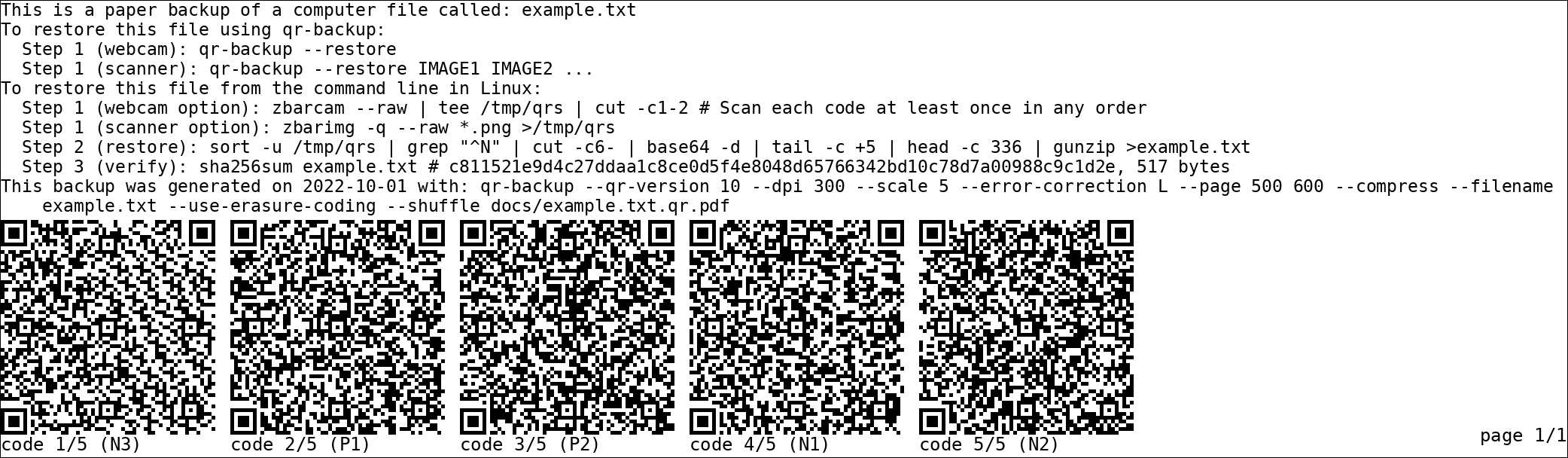
qr-backup is a command-line utility that converts digital files into printable pages of QR codes. The resulting PDF can be printed and stored as a physical backup, providing a way to preserve important information without relying exclusively on electronic storage.
The program is particularly suited to relatively small files such as configuration data, documents and other information where long-term recoverability matters more than storage density. Files are divided into QR-encoded blocks and arranged across one or more pages.
Recovery can be performed by scanning the printed codes with a webcam or document scanner. qr-backup also includes error recovery, allowing some QR codes to be missing or unreadable without necessarily losing the original file.
This is free and open source software.
Key Features
- Convert files into printable PDF documents containing QR codes.
- Back up multiple files and directories through archive creation.
- Restore the original data by scanning printed QR codes.
- Use a webcam to read codes during recovery.
- Recover from scanned images using a document scanner.
- Include printed restoration instructions in the backup document.
- Support restoration without having qr-backup installed, using documented command-line tools.
- Compress data automatically to reduce the number of printed pages.
- Optionally encrypt backups using a passphrase.
- Generate a random encryption passphrase when requested.
- Use Reed-Solomon erasure coding to recover data when some QR codes are missing.
- Support recovery with up to approximately 30% of codes missing when using compatible restoration settings.
- Print multiple copies of individual QR codes for additional redundancy.
- Shuffle the distribution of codes between pages to reduce the effect of localised damage.
- Configure QR code density, error correction, printing resolution and page dimensions.
- Add custom notes and choose how recovery instructions appear on printed pages.
- Perform optional verification of generated backups.
- Support output redirection and use within shell pipelines.
Website: github.com/za3k/qr-backup
Support:
Developer: Zachary Vance
License: Creative Commons Zero v1.0 Universal
qr-backup is written in Python. Learn Python with our recommended free books and free tutorials.
Related Software
| QR Tools | |
|---|---|
| Zint | Barcode generating solution |
| CoBang | QR code and barcode scanner |
| Qreator | Easily create your own QR codes |
| Decoder | Fancy yet simple QR Codes scanner and generator |
| qrtool | Encode and decode QR code |
| QRab | QR code reader |
| qr-backup | Paper backup of files using QR codes |
| QR ScanGen | QR code scanner and generator |
| QR Scanner | QR scanner/generator app |
| libqrencode | Encoding data in a QR Code symbol |
| ClipQR | Scan QR codes on screen and from camera |
| Qrca | QR code scanner for Plasma Mobile |
| qr-rs | Encode URLs or text into QR codes |
| segno | Python library and CLI tool for generating QR Codes and Micro QR Codes |
| AR Tag | Minimalist image editor |
Read our verdict in the software roundup.
 LinuxLinks helps you discover the best free and open source software for Linux. Explore our extensive collection of recommended applications, including alternatives to popular proprietary software. We also publish software reviews, Linux tutorials, hardware reviews, free programming books and articles covering the wider open source community. Browse our Linux resources to discover more. Know a useful free and open source Linux application we haven't covered? Suggest a program for inclusion. Has your software been featured on LinuxLinks? Display one of our Featured on LinuxLinks badges on your website or GitHub README. |
Please read our Comment Policy before commenting.
This looks rather funky.