

NeoMutt is a small but very powerful text based program for reading and sending electronic mail under Unix operating systems, including support for color terminals, MIME, OpenPGP, and a threaded sorting mode.
It’s a project of projects, as it brings together many patches to extend Mutt.
NeoMutt is configured through variables which, if the user wants to permanently use a non-default value, are written to configuration files. NeoMutt supports a rich config file syntax to make even complex configuration files readable and commentable.
Because NeoMutt allows for customizing almost all key bindings, there are so-called “functions” which can be executed manually (using the command line) or in macros. Macros allow the user to bind a sequence of commands to a single key or a short key sequence instead of repeating a sequence of actions over and over.
NeoMutt supports a “hook” concept which allows the user to execute arbitrary configuration commands and functions in certain situations such as entering a folder, starting a new message or replying to an existing one. These hooks can be used to highly customize NeoMutt’s behavior including managing multiple identities, customizing the display for a folder or even implementing auto-archiving based on a per-folder basis and much more.
Key Features
- Attach Headers Color – Color attachment headers using regex, just like mail bodies.
- Compose to Sender – Send new mail to the sender of the current mail.
- Compressed Folders – Read from/write to compressed mailboxes.
- Conditional Dates – Use rules to choose date format.
- Custom Mailbox Tags – Implements Notmuch tags and Imap keywords.
- Encrypt-to-Self – Save a self-encrypted copy of emails.
- Fmemopen – Replace some temporary files with memory buffers.
- Forgotten Attachment – Alert user when (s)he forgets to attach a file to an outgoing email.
- Global Hooks – Define actions to run globally within NeoMutt.
- Header Cache Compression – Options for compressing the header cache files.
- Ifdef – Conditional config options.
- Index Color – Custom rules for theming the email index.
- Initials Expando – Expando for author’s initials.
- Kyoto Cabinet – Kyoto Cabinet backend for the header cache.
- Limit Current Thread – Focus on one Email Thread.
- LMDB – LMDB backend for the header cache.
- Multiple FCC – Save multiple copies of outgoing mail.
- Nested If – Allow complex nested conditions in format strings.
- New Mail – Execute a command upon the receipt of new mail.
- NNTP – Talk to a Usenet news server.
- Notmuch – Email search engine.
- Progress Bar – Show a visual progress bar on slow operations.
- Quasi-Delete – Mark emails that should be hidden, but not deleted.
- Reply With X-Orig-To – Direct reply to email using X-Original-To header.
- Sensible Browser – Make the file browser behave.
- Sidebar – Panel containing list of Mailboxes.
- Skip Quoted – Leave some context visible.
- Status Color – Custom rules for theming the status bar.
- TLS-SNI – Negotiate with a server for a TLS/SSL certificate.
- Trash Folder – Automatically move deleted emails to a trash bin.
Website: neomutt.org
Support: Guide
Developer: Richard Russon and many contributors
License: GNU General Public License v2.0
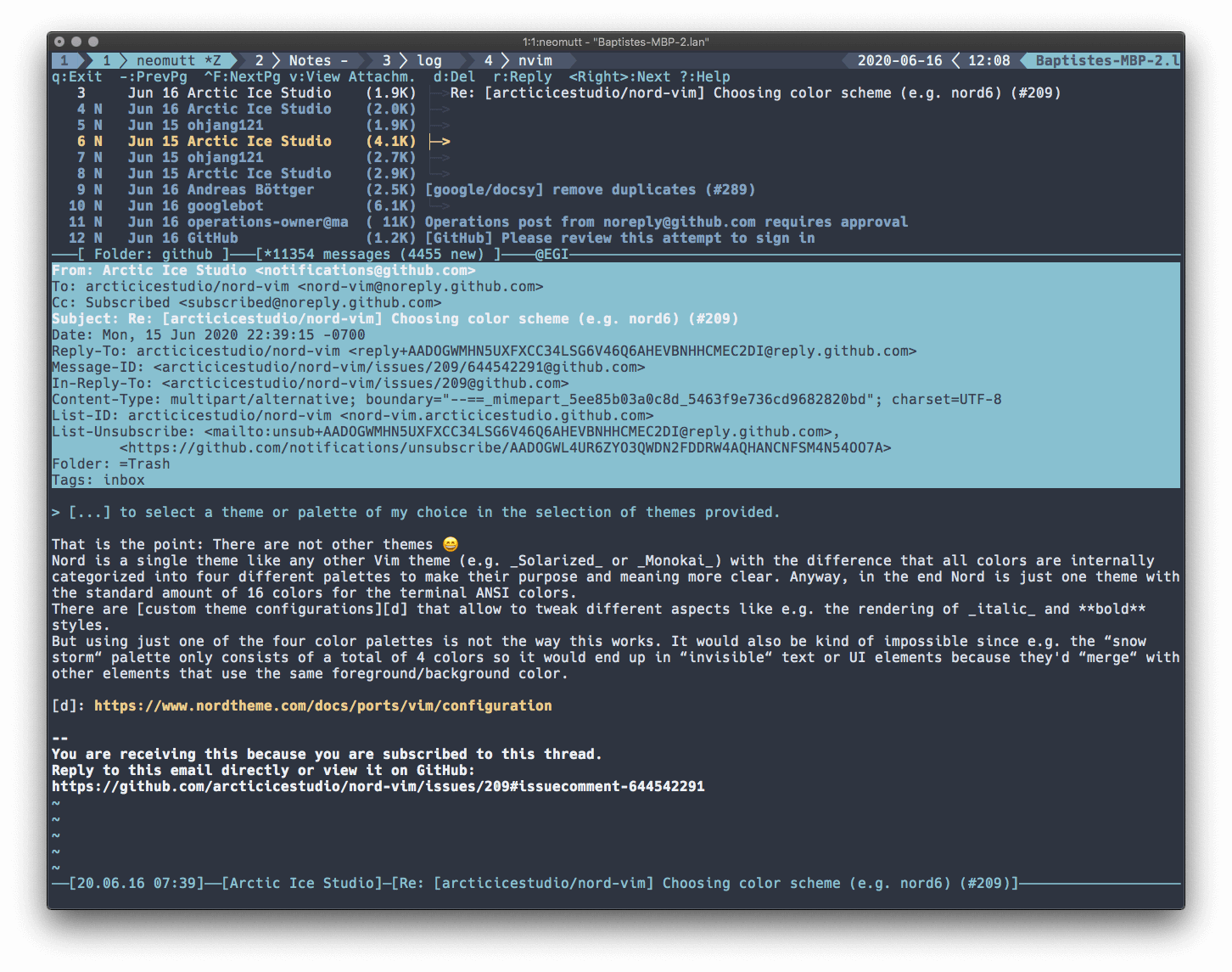
NeoMutt is written in C. Learn C with our recommended free books and free tutorials.
Related Software
| Console Email Clients | |
|---|---|
| NeoMutt | Brings together many patches to extend Mutt |
| mu4e | An extension of mu that runs a full-featured email client within Emacs |
| Himalaya | CLI email client written in Rust |
| Sup | Curses threads-with tags style email client |
| Mutt | Small but very powerful text based program |
| Alpine | Alternatively Licensed Program for Internet News and Email |
| meli | Configurable and extensible e-mail client with sane defaults |
| nmail | User interface similar to alpine / pine |
| alot | Lets notmuch handle your mailindex and uses a toolkit to render its display |
| Wanderlust | Mail/news management system with IMAP4rev1 support for Emacs |
| aerc | Billed as a "pretty good email client" |
| matcha | Powerful, feature-rich email client for your terminal |
| Cone | COnsole Newsreader And Emailer |
| bower | Curses frontend for the Notmuch email system |
| Indicium Mail TUI | Keyboard-driven terminal interface with a streamlined workflow |
| CXPost | Cross-platform desktop app for managing multiple accounts |
| mxr | Local-first messaging app built for speed and offline use |
| Epist | Keyboard-centric desktop app for fast, focused correspondence |
| Vmail | Vim interface to Gmail |
| neatmail | Non-interactive email client |
Read our verdict in the software roundup.
 Explore our comprehensive directory of recommended free and open source software. Our carefully curated collection spans every major software category. Explore our comprehensive directory of recommended free and open source software. Our carefully curated collection spans every major software category.This directory is part of our ongoing series of informative articles for Linux enthusiasts. It features hundreds of detailed reviews, along with open source alternatives to proprietary solutions from major corporations such as Google, Microsoft, Apple, Adobe, IBM, Cisco, Oracle, and Autodesk. You’ll also find interesting projects to try, hardware coverage, free programming books and tutorials, and much more. Discovered a useful open source Linux program that we haven’t covered yet? Let us know by completing this form. |
Please read our Comment Policy before commenting.