
Portable Document Format (PDF) is a file format created by Adobe Systems in 1993 for document exchange. The format includes a subset of the PostScript page description programming language, a font-embedding system, and a structural storage system.
Over the years PDF has become an extremely important file format. If you want to create documents that can be viewed under all major operating systems, PDF is the ticket, as it maintains the overall look and feel of documents regardless of what platform they are viewed under.
This article focuses on useful PDF tools which can help you create PDFs as well as small utilities/libraries that help you work with PDF. It doesn’t seek to overlap with our articles on PDF manipulation tools and PDF viewers as they are covered in separate articles.
Here’s our verdict captured in a legendary LinuxLinks chart. Only free and open source software is eligible for inclusion.
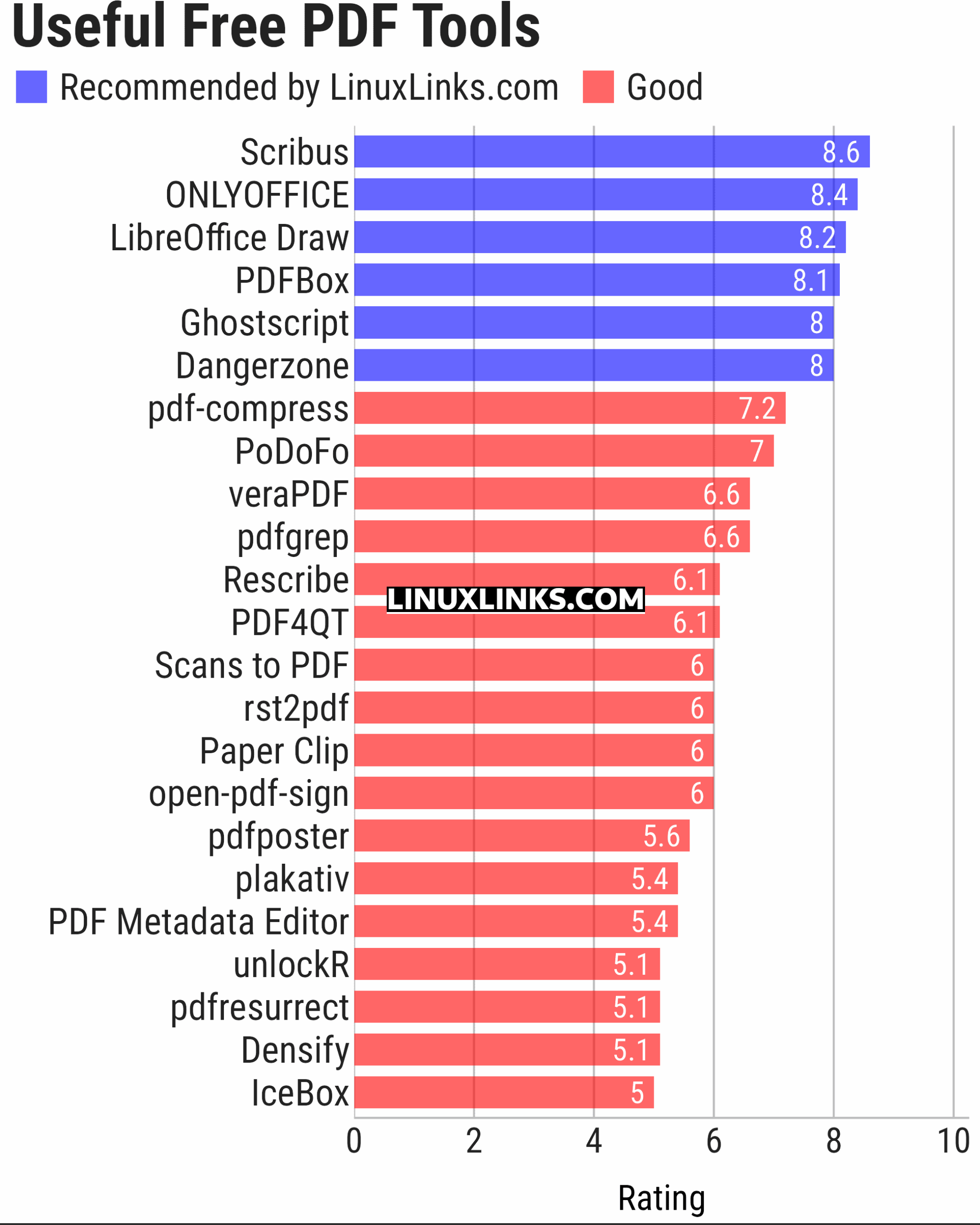
Let’s explore the 23 PDF tools at hand. For each title we have compiled its own portal page, providing a screenshot of the software in action (where appropriate), a full description with an in-depth analysis of its features, together with links to relevant resources.
| PDF Tools | |
|---|---|
| Scribus | Desktop page layout software producing commercial grade PDF output |
| ONLYOFFICE | Cloud online office suite with great PDF functionality |
| LibreOffice Draw | Vector graphics editor and diagramming tool that can create PDFs |
| PDFBox | Java tool for working with PDF documents |
| Ghostscript | Ghostscript PostScript / PDF interpreter |
| Dangerzone | Make PDFs safe |
| pdf-compress | Compress an overly large PDF file to smaller monochrome |
| PoDoFo | Easy to use PDF parsing and creation library |
| veraPDF | Industry supported PDF/A validation |
| pdfgrep | Command-line utility to search text in PDF files |
| Rescribe | Desktop tool for performing OCR |
| PDF4QT | PDF editor |
| Scans to PDF | Create small, searchable PDFs from scanned documents |
| rst2pdf | Converts reStructuredText files into styled documents |
| Paper Clip | Edit PDF document metadata |
| open-pdf-sign | Adds standards-based digital signatures, timestamps and validation |
| pdfposter | Print large posters on multiple sheets |
| plakativ | Stretches PDF or raster image across multiple pages |
| PDF Metadata Editor | Simple GUI tool |
| unlockR | Simple tool to decrypt PDF files |
| pdfresurrect | Analyze PDF documents |
| Densify | Compress PDF files using Ghostscript |
| IceBox | Converts images into a PDF file |
This article has been updated to reflect the changes outlined in our recent announcement.
 Explore our carefully curated directory of recommended free and open source software, covering every major software category. Explore our carefully curated directory of recommended free and open source software, covering every major software category.The directory forms part of our extensive collection of articles for Linux enthusiasts. It includes hundreds of detailed reviews, together with free and open source alternatives to proprietary software from companies such as Google, Microsoft, Apple, Adobe, IBM, Cisco, Oracle, and Autodesk. LinuxLinks also covers interesting projects worth exploring, Linux-compatible hardware, free programming books and tutorials, and much more. Know a useful free and open source Linux application that we haven’t covered? Tell us about it using our submission form. |
Please read our Comment Policy before commenting.
1. Firefox. You can now view and edit PDFs with Firefox.
2. Xournal. Reorder, edit and print PDFs.
These applications are not primarily PDF tools and are included in relevant roundups already. But thanks for your suggestions.