

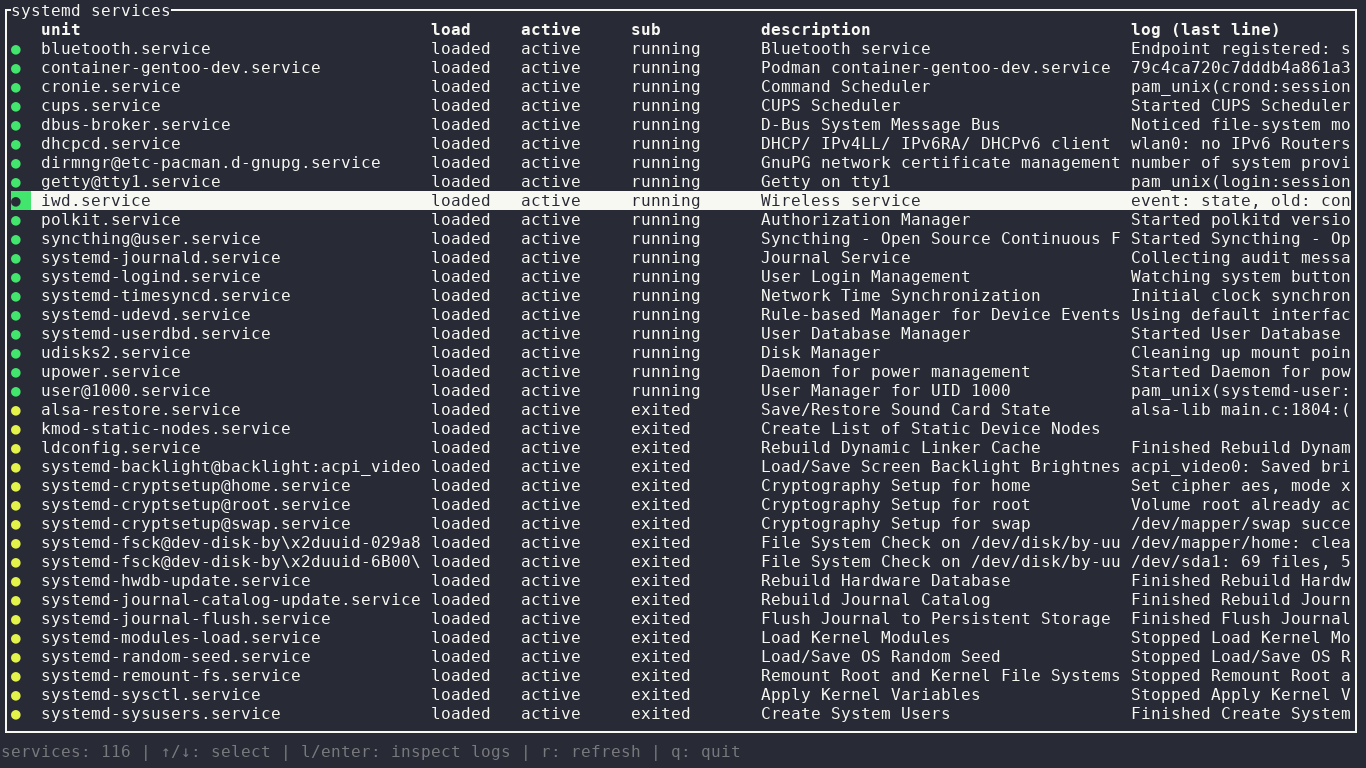
lsu is a terminal user interface for viewing and managing systemd service units and their associated journal logs.
It provides an interactive service list with filtering by load, active and sub-state. You can work with system or user units, sort the list, inspect logs and perform common service-control operations directly from the interface.
This is free and open source software.
Key Features
- Terminal user interface for systemd service units.
- View journal logs for selected services.
- Work with system and user units.
- Filter by load state.
- Filter by active state.
- Filter by sub-state.
- Sort services by name or status.
- Start services.
- Stop services.
- Restart services.
- Enable and disable units.
- Refresh service information on demand.
- Keyboard-driven navigation.
Website: github.com/l5yth/lsu
Support:
Developer: l5yth
License: Apache License 2.0
lsu is written in Rust. Learn Rust with our recommended free books and free tutorials.
Related Software
| systemd CLI/TUI Configuration Tools | |
|---|---|
| systemd-analyse | Helps uncover performance problems |
| systemctl-tui | Interact with systemd services |
| systemctl | Manage and monitor the systemd system |
| isd | Interactive systemd |
| Systemd manager tui | Manage systemd services |
| ServiceMaster | Powerful terminal-based tool for managing systemd units |
| lsu | View systemd service units |
| systemd_commander | Manage systemd services and browse journal logs with an ncurses TUI |
| sdtop | systemd TUI Manager |
| sdctl | Security-focused manager with polkit authentication and log browsing |
| chkservice | Terminal-based tool for managing systemd units |
Read our verdict in the software roundup.
 Explore our carefully curated directory of recommended free and open source software, covering every major software category. Explore our carefully curated directory of recommended free and open source software, covering every major software category.The directory forms part of our extensive collection of articles for Linux enthusiasts. It includes hundreds of detailed reviews, together with free and open source alternatives to proprietary software from companies such as Google, Microsoft, Apple, Adobe, IBM, Cisco, Oracle, and Autodesk. LinuxLinks also covers interesting projects worth exploring, Linux-compatible hardware, free programming books and tutorials, and much more. Know a useful free and open source Linux application that we haven’t covered? Tell us about it using our submission form. |
Please read our Comment Policy before commenting.