
Last Updated on August 20, 2020
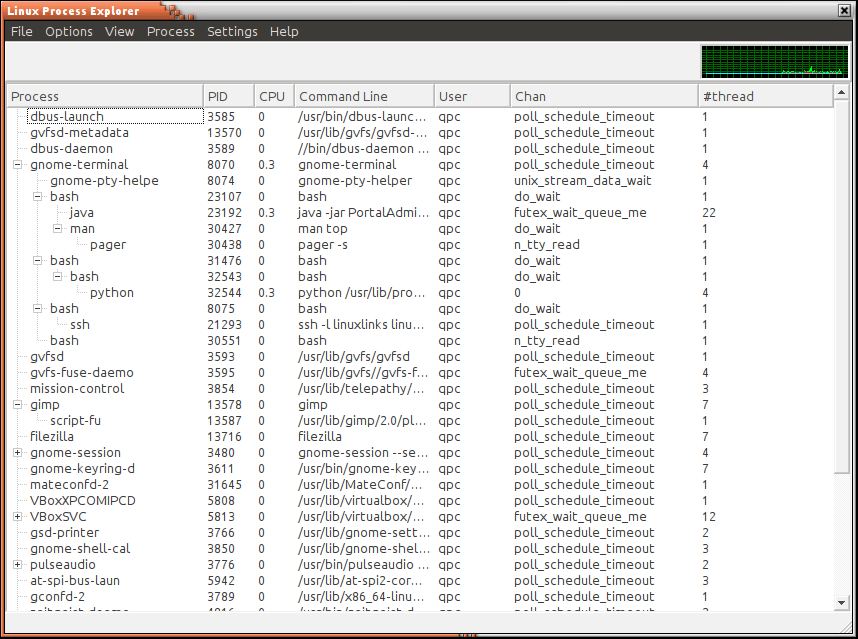
Linux Process Explorer (procexp) is a graphical equivalent to the venerable top utility. This application enables fine grained examination of processes, threads, resource usage per process and figures about IO and TCP/IP traffic usage per process.
procexp also provides information about system resources that are available. It aims to mimic Windows procexp from sysinternals, and aims to be more usable than top and ps, especially for advanced users.
The utility is targeted at advanced system administrators trying to analyze on a process level what is going on in a production server, and software developers analyzing the throughput of their processes.
Features include:
- Graphical performance figures.
- Hierarchical process tree, showing creation and destruction of processes.
- Per process TCP/IP UDP connection and throughput monitoring.
- Environment variable display.
- Easy process tree kill using popup menu.
- Set affinity.
- Set priority.
- Update frequency.
- Depth.
- System information:
- CPU usage graphical charts.
- CPU usage (for kernel and user space).
- Graphical physical memory history.
- System usage: Last 1,5,10 minutes. Running/total number of processes, Last used PID.
- Network information:
- TCO throughput.
- TCP/IP usage in bytes per second.
- IO usage graph.
- Errors.
- Drops.
- Collisions.
Website: github.com/wolfc01/procexp
Support:
Developer: wolfc01
License: GNU GPL v2
procexp is written in Python. Learn Python with our recommended free books and free tutorials.
Return to Alternatives to the Top Utility Home Page
| Explore Linux | |
|---|---|
 | Best Free and Open Source Software - A huge collection of recommended free and open source software covering every major category. |
 | In-depth Linux Software Reviews - Detailed assessments of Linux software covering features, usability and overall quality. |
 | The Big List of Active Linux Distros - An extensive collection of actively developed Linux distributions. |
 | Open Source Alternatives - Alternatives to software and services from Google, Microsoft, Apple, Adobe, IBM, Autodesk, Oracle and others. |
 | Essential Linux System Tools - Indispensable utilities for monitoring, maintaining and managing Linux systems. |
 | Linux Productivity Tools - Useful utilities for improving productivity and streamlining everyday tasks. |
 | Alternatives to Popular CLI Tools - Modern alternatives to familiar command-line utilities supplied with Linux systems. |
 | Awesome Free Linux Game Tools - Tools, utilities and companion software that improve gaming on Linux. |
 | Machine Learning on Linux - Machine learning and deep learning software, self-hosted applications and practical tools. |
 | Saving Money with Linux - Practical ways to reduce electricity consumption and lower computing costs with Linux. |
 | Linux Candy - Fun, entertaining and sometimes delightfully quirky software from the lighter side of Linux. |
Please read our Comment Policy before commenting.
I think this would be a great addition to a software toolbox.
That’s the only thing I find linux is missing, suitable useful softs.