

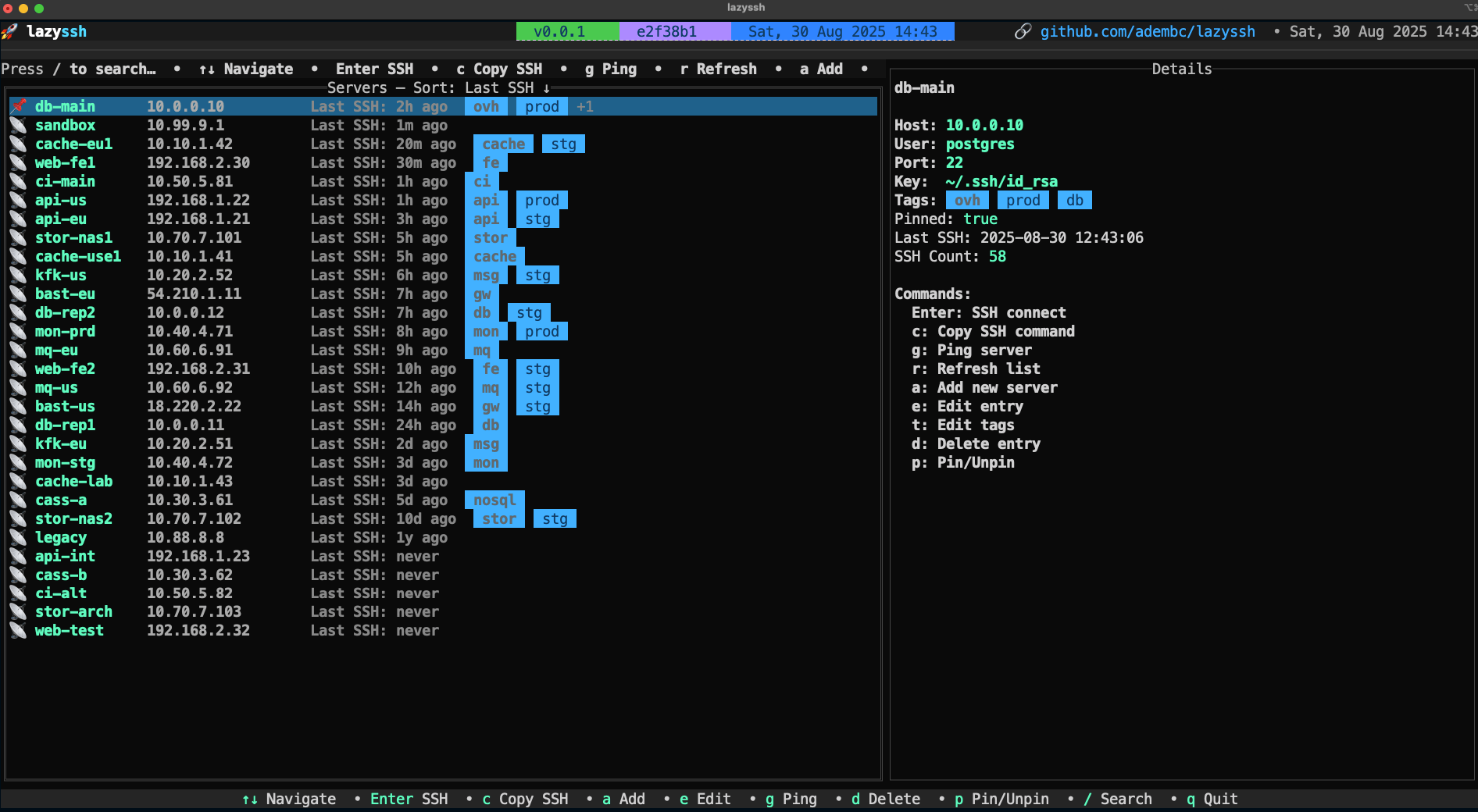
LazySSH is an interactive terminal application for managing SSH connections through a keyboard-driven interface. Inspired by tools such as lazydocker and k9s, it provides a convenient way to browse servers, organise connection details and open remote sessions.
The application works with hosts defined in the user’s existing OpenSSH configuration file. It presents these hosts in a searchable list and allows their settings to be managed through interactive forms, rather than requiring every change to be made in a text editor.
LazySSH is particularly useful for administrators managing numerous servers. Hosts can be labelled, pinned as favourites, checked for connectivity and sorted by their connection history.
The program delegates SSH connections to the installed OpenSSH client, preserving compatibility with existing private keys and SSH agent configuration.
This is free and open source software.
Key Features
- Reads SSH host definitions from ~/.ssh/config and displays them in a navigable terminal interface.
- Adds, edits and removes SSH host definitions using interactive forms arranged into configuration tabs.
- Supports advanced settings including local, remote and dynamic port forwarding.
- Provides configuration options for SSH connection multiplexing, agent forwarding, authentication methods and encryption algorithms.
- Supports ProxyJump and ProxyCommand settings for connections through intermediate hosts.
- Automatically discovers available SSH keys and assists with selecting identity files for connections.
- Filters hosts using fuzzy search across aliases, IP addresses and tags.
- Allows frequently used hosts to be pinned, and provides sorting by alias or previous connection activity.
- Checks host reachability and displays connection status information.
- Preserves unmodified SSH configuration directives, comments and formatting when editing host entries.
- Uses atomic configuration writes and maintains original and rolling backups to protect existing SSH settings.
- Provides keyboard shortcuts for connecting to servers, copying SSH commands and managing host entries.
Website: github.com/Adembc/lazyssh
Support:
Developer: Adem Baccara
License: Apache License 2.0
LazySSH is written in Go. Learn Go with our recommended free books and free tutorials.
Related Software
| Terminal-Based SSH Frontends | |
|---|---|
| LazySSH | Built for managing your fleet of servers directly from your terminal |
| trzsz-ssh | Drop-in replacement for openssh |
| SSHM | Modern, interactive SSH Manager for your terminal |
| Purple | Terminal-based SSH host manager |
| SKM | Simple and powerful SSH keys manager |
| GOTO | Simple SSH manager |
| TermiRs | Modern, async SSH terminal client built with Rust and Ratatui |
| SSHR | TUI SSH manager |
| SSH-List | SSH connection manager with a TUI interface |
| lssh | List-based ssh, scp, sftp client |
| Peroxide | Terminal-based SSH connection manager |
| Bayesian SSH | SSH session manager with Bayesian-ranked search, |
| sshup | Simple SSH manager with a text-user interface |
| SSH Manager TUI | SSH connection manager with a modern color interface |
| ssm | Connect, filter, tag, and much more from a simple terminal interface |
| sshmate | Simplify interactions with SSH servers |
| susshi | Modern, terminal-based SSH connection manager |
| sshtool | Simple interactive SSH session manager |
| ESSH | Terminal-native SSH client |
Read our verdict in the software roundup.
 LinuxLinks helps you discover the best free and open source software for Linux. Explore our extensive collection of recommended applications, including alternatives to popular proprietary software. LinuxLinks helps you discover the best free and open source software for Linux. Explore our extensive collection of recommended applications, including alternatives to popular proprietary software.We also publish software reviews, Linux tutorials, hardware reviews, free programming books and articles covering the wider open source community. Browse our Linux resources to discover more. Know a useful free and open source Linux application we haven't covered? Suggest a program for inclusion. Has your software been featured on LinuxLinks? Display one of our Featured on LinuxLinks badges on your website or GitHub README. |
Please read our Comment Policy before commenting.