

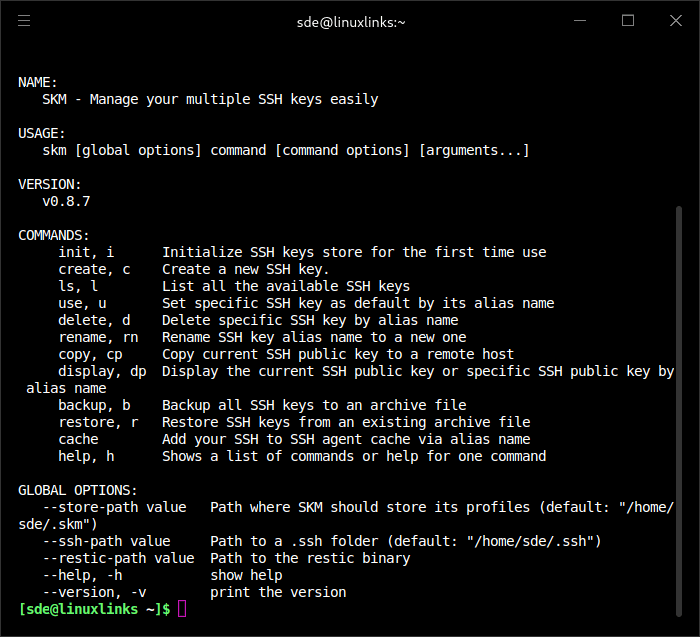
SKM is an SSH key manager designed for people who maintain several identities across different servers, repositories and development environments. It provides commands for creating, organising and selecting SSH keys without having to manage every key file manually.
Keys are organised under memorable aliases, allowing users to switch their default identity, inspect individual keys and copy public keys to remote hosts. An interactive selector makes it easier to work with a larger collection.
SKM also offers tools for examining the security of stored keys. It can identify weak keys, missing passphrases and ageing credentials, while providing facilities for importing, exporting and backing up keys.
This is free and open source software.
Key Features
- Creates and manages SSH keys under descriptive aliases, with support for Ed25519, RSA and FIDO2 hardware-backed key types.
- Lists stored keys with optional detailed information, including key type, strength, fingerprint and SSH agent status.
- Switches the default SSH identity and provides an interactive fuzzy-search interface for selecting keys.
- Imports existing key pairs and exports individual keys as archive bundles, with optional encryption.
- Backs up and restores the SSH key collection.
- Supports adding, changing and removing private-key passphrases.
- Audits stored keys for insufficient RSA strength, missing passphrases and excessive age, with machine-readable output for automation.
- Provides diagnostic checks for the SSH environment, agent configuration and stored keys.
- Publishes public keys to GitHub, GitLab and Bitbucket.
- Copies a selected public key to a remote host, with interactive selection and dry-run options.
- Moves deleted keys into a recoverable trash collection instead of immediately destroying them.
- Supports event hooks for key creation, use, deletion and copying, alongside SSH agent integration.
Website: github.com/TimothyYe/skm
Support:
Developer: Timothy Ye
License: MIT License
SKM is written in Go. Learn Go with our recommended free books and free tutorials.
Related Software
| Terminal-Based SSH Frontends | |
|---|---|
| LazySSH | Built for managing your fleet of servers directly from your terminal |
| trzsz-ssh | Drop-in replacement for openssh |
| SSHM | Modern, interactive SSH Manager for your terminal |
| Purple | Terminal-based SSH host manager |
| SKM | Simple and powerful SSH keys manager |
| GOTO | Simple SSH manager |
| TermiRs | Modern, async SSH terminal client built with Rust and Ratatui |
| SSHR | TUI SSH manager |
| SSH-List | SSH connection manager with a TUI interface |
| lssh | List-based ssh, scp, sftp client |
| Peroxide | Terminal-based SSH connection manager |
| Bayesian SSH | SSH session manager with Bayesian-ranked search, |
| sshup | Simple SSH manager with a text-user interface |
| SSH Manager TUI | SSH connection manager with a modern color interface |
| ssm | Connect, filter, tag, and much more from a simple terminal interface |
| sshmate | Simplify interactions with SSH servers |
| susshi | Modern, terminal-based SSH connection manager |
| sshtool | Simple interactive SSH session manager |
| ESSH | Terminal-native SSH client |
Read our verdict in the software roundup.
 LinuxLinks helps you discover the best free and open source software for Linux. Explore our extensive collection of recommended applications, including alternatives to popular proprietary software. We also publish software reviews, Linux tutorials, hardware reviews, free programming books and articles covering the wider open source community. Browse our Linux resources to discover more. Know a useful free and open source Linux application we haven't covered? Suggest a program for inclusion. Has your software been featured on LinuxLinks? Display one of our Featured on LinuxLinks badges on your website or GitHub README. |
Please read our Comment Policy before commenting.