

KTouch is an open source touch typing tutor application for KDE.
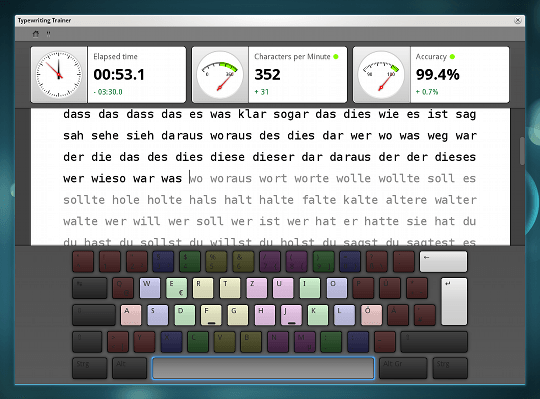
KTouch is an aid for learning how to type with speed and accuracy. It provides a sample text to type and indicates which fingers should be used for each key. It comes with lessons for many different keyboard layouts across many different languages. It also has exercises for learning to use a number pad. As the user types, it keeps real-time statistics of how well they do.
A collection of lessons are included for a wide range of different languages and keyboard layouts, and typing statistics are used to dynamically adjust the level of difficulty. When a user successfully completes a lesson, the next lesson is unlocked.
Although KTouch was designed for the KDE desktop environment, it works with other desktop environments such as GNOME.
Key Features
- Supports various keyboard layouts and you can easily add own keyboard layouts.
- Training lectures are included by default (English, German, French … etc).
- Dozens of courses spanning many different languages and keyboard layouts.
- Add and modify training lectures using the built-in lecture editor.
- Powerful course and keyboard layout editor for user-created training material.
- Detailed training statistics to track and analyze your learning progress (including keys that you typed wrong very often).
- Calculates typing speed and your accuracy on-the-fly and displays them while you type.
- User customizable (including the colour scheme of the program).
- During training the level can be adjusted automatically according to your typing skill: if you type fast and correctly you will move a level up, otherwise stay in the level or even move down. So you will learn touch typing like playing a game
Website: www.kde.org/applications/education/ktouch
Support: KDE
Developer: Sebastian Gottfried, Haavard Froeiland and Andreas Nicolai
License: GNU General Public License v2.0
KTouch is written in C++. Learn C++ with our recommended free books and free tutorials.
Related Software
| GUI Typing Tutors | |
|---|---|
| Klavaro | Very flexible and efficient touch typing tutor |
| TIPP10 | 10-finger intelligent touch typing tutor with different keyboard layouts |
| KTouch | Touch typing tutor for KDE |
| amphetype | Advanced typing practice software |
| Keypunch | Practice your typing skills |
| Tux Typing | Educational typing tutor game starring Tux |
| Open-Typer | Supports multiple keyboard layouts and provides auto-generated lessons |
| retype | Typing practice application |
| Mecalin | Typing tutor application built with GTK4, Rust, and Adwaita |
| FingerGo | Cross-platform touch-typing trainer |
Read our verdict in the software roundup.
 Explore our comprehensive directory of recommended free and open source software. Our carefully curated collection spans every major software category. Explore our comprehensive directory of recommended free and open source software. Our carefully curated collection spans every major software category.This directory is part of our ongoing series of informative articles for Linux enthusiasts. It features hundreds of detailed reviews, along with open source alternatives to proprietary solutions from major corporations such as Google, Microsoft, Apple, Adobe, IBM, Cisco, Oracle, and Autodesk. You’ll also find interesting projects to try, hardware coverage, free programming books and tutorials, and much more. Discovered a useful open source Linux program that we haven’t covered yet? Let us know by completing this form. |
Please read our Comment Policy before commenting.