

Euporie is a suite of terminal applications for working with Jupyter kernels and notebooks.
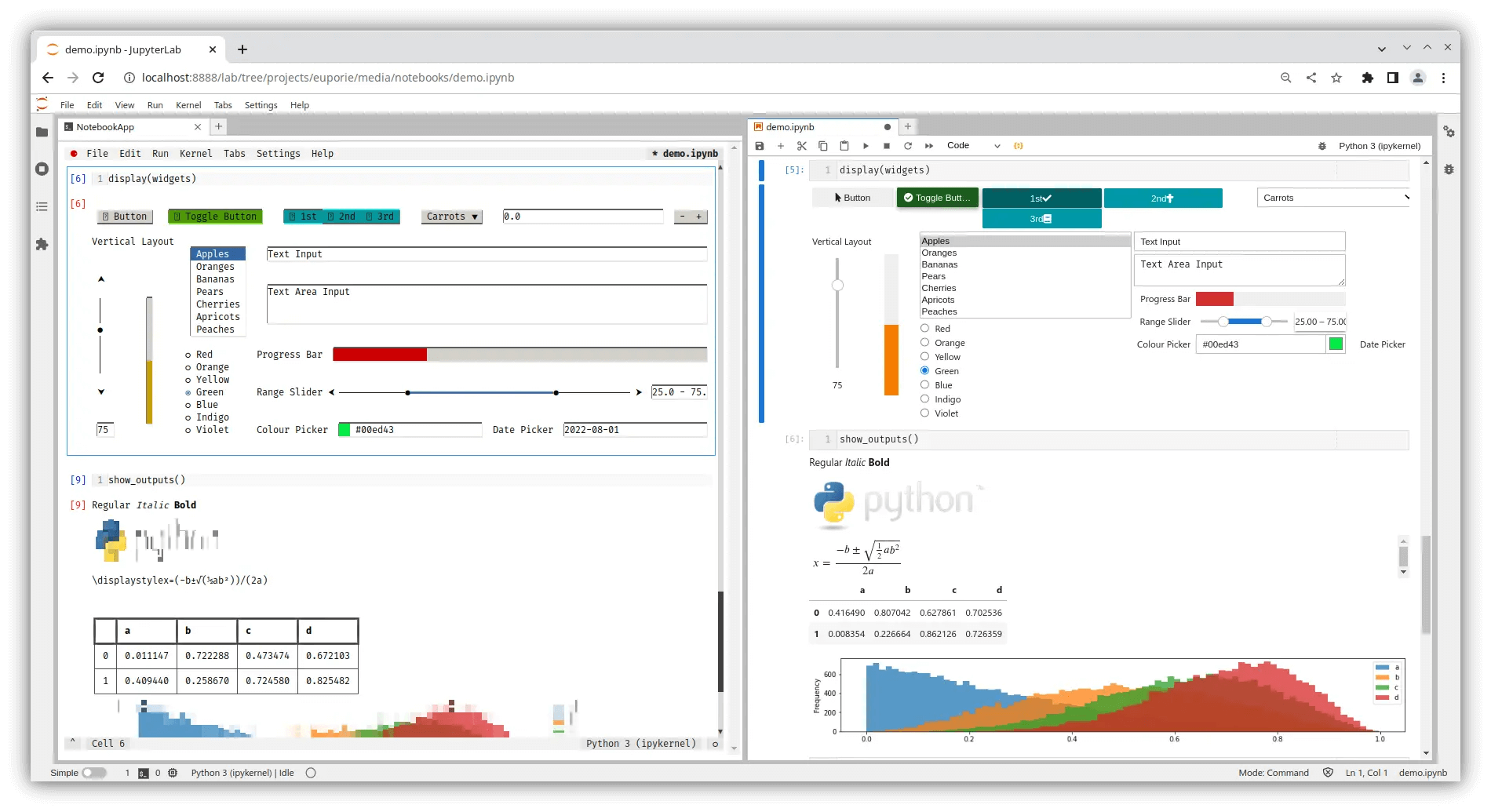
It provides a full-screen notebook editor, an interactive console and a notebook previewer, allowing Jupyter workflows to be used without a graphical desktop or web browser.
The software is particularly useful on remote servers, inside containers and over SSH. It can render rich notebook content directly in a terminal, including images, mathematical notation, tables and interactive widgets. Its modular design also lets users install only the Euporie applications they need.
This is free and open source software.
Key Features
- Create, edit, run and save Jupyter notebooks entirely within a terminal.
- Connect to and interact with Jupyter kernels.
- Interactive console with multi-line code editing.
- Notebook previewer for rendering ipynb files without opening the editor.
- Render Markdown, tables, images, LaTeX, HTML, SVG and PDF output.
- Display images using Sixel, iTerm2 and Kitty terminal graphics protocols.
- Use Jupyter widgets interactively from the terminal.
- Tab completion, line suggestions and contextual help.
- Create and manage code, Markdown and raw notebook cells.
- Run selected cells and restart or change the active kernel.
- Save a console session as a Jupyter notebook.
- Convert a running console session into a notebook while retaining its kernel connection.
- Micro, Vim and Emacs-style key bindings.
- Searchable command palette for accessing application actions.
- Command bar with completion, history and support for running shell commands.
- Configurable colour schemes and syntax-highlighting themes.
- Keyboard and mouse navigation.
- Run notebooks from the previewer and optionally save the resulting output.
- Pipe rendered notebook output to terminal programs such as pagers.
- Can be integrated as a notebook previewer in terminal file managers.
- Optional Euporie Hub application provides notebook and console sessions over SSH.
- Public-key authentication for multi-user Euporie Hub deployments.
- Modular packages for the console, notebook editor, previewer and SSH server.
- Cross-platform support – runs on Linux, macOS and Windows.
Website: github.com/joouha/euporie
Support:
Developer: Josiah Outram Halstead
License: MIT License
Euporie is written in Python. Learn Python with our recommended free books and free tutorials.
Related Software
| Notebook software | |
|---|---|
| JupyterLab | The next generation user interface for Project Jupyter |
| RStudio | Integrated development environment (IDE) for R |
| Jupyter Notebook | Web-based notebook environment for interactive computing |
| Positron | Next-generation data science IDE |
| marimo | Reactive Python notebook |
| Apache Zeppelin | Multi-purpose notebook |
| IPython | Rich architecture for interactive computing |
| euporie | Terminal interface for Jupyter notebooks and kernels |
| Polynote | Experimental polyglot notebook environment |
| Livebook | Interactive and collaborative code notebooks |
| nteract | Notebooks on your Desktop |
| Pluto | Simple reactive notebooks for Juli |
| Cantor | Frontend for mathematical and scientific software |
| Pretzel | Billed as a modern replacement for Jupyter Notebooks |
| Spark Notebook | Interactive and reactive data science using Scala and Spark |
| BeakerX | Kernels and extensions to the Jupyter interactive computing environment |
Read our verdict in the software roundup.
 LinuxLinks helps you discover the best free and open source software for Linux. Explore our extensive collection of recommended applications, including alternatives to popular proprietary software. We also publish software reviews, Linux tutorials, hardware reviews, free programming books and articles covering the wider open source community. Browse our Linux resources to discover more. Know a useful free and open source Linux application we haven't covered? Suggest a program for inclusion. Has your software been featured on LinuxLinks? Display one of our Featured on LinuxLinks badges on your website or GitHub README. |
Please read our Comment Policy before commenting.