
Last Updated on July 10, 2021
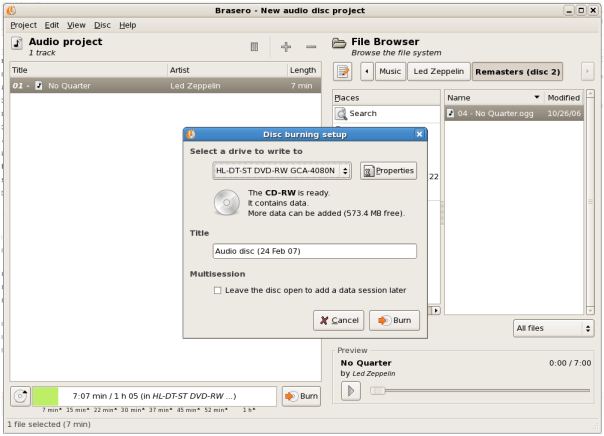
Brasero is an application to burn CD/DVD for the Gnome Desktop.
It is designed to be as simple as possible and has some unique features to enable users to create their discs easily and quickly.
It supports multiple backends: cdrtools, growisofs and libburn (optional). This maximizes hardware compatibility with a large range of different writing devices.
Brasero has replaced the Serpentine audio CD burning utility as the standard burning tool in the latest release of Ubuntu.
Features include:
Data CD/DVD:
- Supports edition of discs contents (remove/move/rename files inside directories).
- Burn data CD/DVD on the fly.
- Automatic filtering for unwanted files (hidden files, broken/recursive symlinks, files not conforming to joliet standard, …).
- Supports multisession.
- Supports Joliet extension.
- Write the image to the hard drive.
- Checks disc file integrity.
Audio CD:
- Write CD-TEXT information (automatically found thanks to gstreamer).
- Supports the edition of CD-TEXT information.
- Burn audio CD on the fly.
- Use all audio files handled by Gstreamer local installation (ogg, flac, mp3, …).
- Search for audio files inside dropped folders.
- Full edition of silences between tracks.
- Insert a pause.
- Split a track.
CD/DVD copy:
- CD/DVD copy: can copy a CD/DVD to the hard drive.
- Copy CD and DVD on the fly.
- Supports single-session data DVD.
- Supports any kind of CD.
- Copy encrypted Video DVDs (needs libdvdcss).
Other Features:
- Erase CD/DVD.
- Save/load projects.
- Burn CD/DVD images and cue files.
- Song, image and video previewer.
- Device detection thanks to HAL.
- File change notification (requires kernel > 2.6.13).
- Customisable GUI (when used with GDL).
- Supports Drag and Drop / Cut’n’Paste from nautilus (and others apps).
- Use files on a network as long as the protocol is handled by gnome-vfs.
- Search for files thanks to beagle (search is based on keywords or on file type).
- Display a playlist and its contents (note that playlists are automatically searched through beagle).
- All disc IO is done asynchronously to prevent the application from blocking.
- Brasero default backend is provided by cdrtools/cdrkit but libburn can be used as an alternative.
Website: wiki.gnome.org/Apps/Brasero
Support:
Developer: Philippe Rouquier, Luis Medinas
License: GNU GPL v2
Brasero is written in C. Learn C with our recommended free books and free tutorials.
| Explore Linux | |
|---|---|
 | Best Free and Open Source Software - A huge collection of recommended free and open source software covering every major category. |
 | In-depth Linux Software Reviews - Detailed assessments of Linux software covering features, usability and overall quality. |
 | The Big List of Active Linux Distros - An extensive collection of actively developed Linux distributions. |
 | Open Source Alternatives - Alternatives to software and services from Google, Microsoft, Apple, Adobe, IBM, Autodesk, Oracle and others. |
 | Essential Linux System Tools - Indispensable utilities for monitoring, maintaining and managing Linux systems. |
 | Linux Productivity Tools - Useful utilities for improving productivity and streamlining everyday tasks. |
 | Alternatives to Popular CLI Tools - Modern alternatives to familiar command-line utilities supplied with Linux systems. |
 | Awesome Free Linux Game Tools - Tools, utilities and companion software that improve gaming on Linux. |
 | Machine Learning on Linux - Machine learning and deep learning software, self-hosted applications and practical tools. |
 | Saving Money with Linux - Practical ways to reduce electricity consumption and lower computing costs with Linux. |
 | Linux Candy - Fun, entertaining and sometimes delightfully quirky software from the lighter side of Linux. |
Please read our Comment Policy before commenting.