

AutoKey is an open source desktop automation utility. It allows the automation of virtually any task by responding to typed abbreviations and hotkeys.
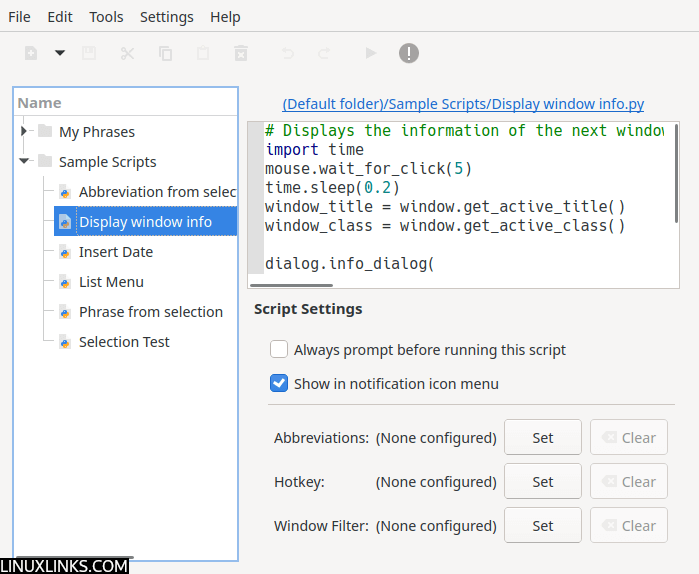
AutoKey offers a full-featured graphical user interface that makes it accessible for novices, as well as a scripting interface offering the full flexibility and power of the Python language. There are versions for GTK+ and Qt.
When a trigger is detected by Autokey, one of three things can happen; a script is activated, text is inserted at the cursor position or a pop-up menu is displayed allowing a script or phrase to be activated by selecting it.
AutoKey scripts can literally do almost anything that can be coded as a Python program. Python scripts are user created and can be shared between users. AutoKey includes a range of sample Python scripts.
AutoKey features a subset of the capabilities of the popular Windows-based AutoHotkey, but it is not intended as a full replacement.
Key Features
- Python scripting engine allows you to automate virtually any task that can be accomplished via the keyboard and/or mouse.
- Built-in code editor with autocomplete and calltips.
- Scripts are plain Python files that can be edited in any text editor.
- Similarly, phrases are stored as plain text files.
- Create collections of phrases/scripts in folders, and assign a hotkey or abbreviation to the folder to display a popup menu.
- Regular expressions can be used to filter windows by their title or class, to exclude hotkeys/abbreviations from triggering in certain applications.
- Scripts, phrases and folders can be attached to the notification icon menu, allowing you to select them without assigning a hotkey or abbreviation.
Website: github.com/autokey/autokey
Support:
Developer: Chris Dekter
License: GNU General Public License v3.0
AutoKey is written in Python. Learn Python with our recommended free books and free tutorials.
Related Software
| Visual Automation Tools | |
|---|---|
| AutoKey | Desktop scripting with hotkeys, abbreviations and Python |
| xdotool | Simulates keyboard and mouse input and controls X11 windows |
| Actiona | Builds scripted desktop workflows from configurable actions and conditions |
| OculiX | Coordinates desktop workflows using screen recognition and scripted actions |
| wtype | Generates keyboard input on Wayland compositors |
| Repeat | Records and replays desktop activity to handle repetitive everyday tasks |
| BiggerTask | Records mouse and keyboard actions for straightforward playback on Linux |
Read our verdict in the software roundup.
 Explore our comprehensive directory of recommended free and open source software. Our carefully curated collection spans every major software category. Explore our comprehensive directory of recommended free and open source software. Our carefully curated collection spans every major software category.This directory is part of our ongoing series of informative articles for Linux enthusiasts. It features hundreds of detailed reviews, along with open source alternatives to proprietary solutions from major corporations such as Google, Microsoft, Apple, Adobe, IBM, Cisco, Oracle, and Autodesk. You’ll also find interesting projects to try, hardware coverage, free programming books and tutorials, and much more. Discovered a useful open source Linux program that we haven’t covered yet? Let us know by completing this form. |
Please read our Comment Policy before commenting.