

Magit is an Emacs interface for Git.
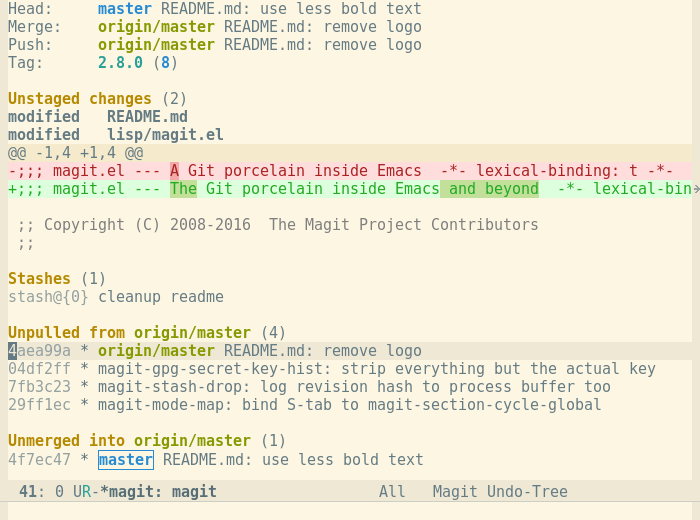
With Magit, you can inspect and modify your Git repositories with Emacs. You can review and commit the changes you have made to the tracked files, for example, and you can browse the history of past changes. There is support for cherry picking, reverting, merging, rebasing, and other common Git operations.
Unlike Emacs’s native version control support (git.el), Magit can take advantage of Git’s native features without breaking compatibility with other systems.
Key Features
- Review and commit the changes you have made to the tracked files.
- Cherry picking.
- Reverting.
- Merging:
- Manual – apply all changes to your working tree and staging area, but will not commit them.
- Automatic – commits changes immediately.
- Rebasing.
- Rewrite your commit history.
- Tagging.
- Magit extensions:
- Interface with Subversion.
- Interface with Topgit.
- General mechanism to cooperate with Git-related systems.
Website: github.com/magit/magit
Support:
Developer: Magit Owners Team
License: GNU General Public License v3.0
Related Software
| Text-Based Git Clients | |
|---|---|
| lazygit | Simple yet hugely popular terminal UI for git commands, written in Go |
| GitUI | Offers the comfort of a GUI git client but right in your terminal |
| Fugitive | Vim plugin for Git |
| Magit | Inspect and modify your Git repositories with Emacs |
| tig | ncurses-based Git repository browser |
| Neogit | Git interface plugin for Neovim inspired by Magit |
| forgit | Utility for using git interactively |
| Gitu | TUI Git client inspired by Magit |
| ggc | Go Git CLI |
| GRV | Git Repository Viewer |
| bit | Experimental modernized git CLI |
| pygitzen | Python-native terminal-based Git client |
| gitin | Commit, branch, status explorer for Git |
| Froggit | Modern, minimalist Git TUI |
Read our verdict in the software roundup.
 Explore our comprehensive directory of recommended free and open source software. Our carefully curated collection spans every major software category. Explore our comprehensive directory of recommended free and open source software. Our carefully curated collection spans every major software category.This directory is part of our ongoing series of informative articles for Linux enthusiasts. It features hundreds of detailed reviews, along with open source alternatives to proprietary solutions from major corporations such as Google, Microsoft, Apple, Adobe, IBM, Cisco, Oracle, and Autodesk. You’ll also find interesting projects to try, hardware coverage, free programming books and tutorials, and much more. Discovered a useful open source Linux program that we haven’t covered yet? Let us know by completing this form. |