

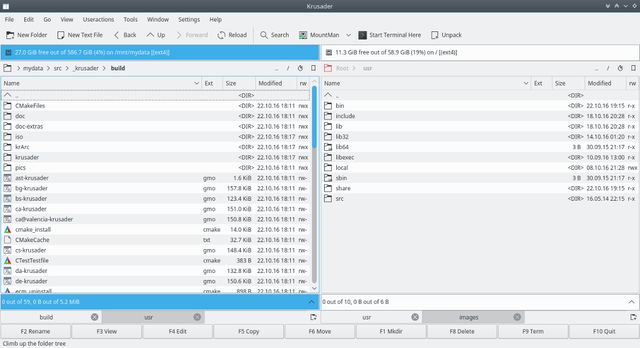
Krusader is an advanced twin panel (commander style) file manager for KDE and other desktops in the *nix world, similar to Midnight Commander or Total Commander. It provides all the file management features provided by Windows Explorer and much more.
It has extensive archive handling, mounted filesystem support, FTP, advanced search module, an internal viewer/editor, directory synchronisation, file content comparisons, powerful batch renaming etc.
It supports a wide variety of archive formats and can handle other KIO slaves such as smb or fish. It is (almost) completely customizable, very user friendly, fast and looks great on your desktop.
Features include:
- Two powerful and easy to use panels.
- Command Line and optional Terminal emulator below the twin panels.
- Strong keyboard orientation and the ability to perform all functions without the mouse.
- Context-dependent invocation of scripts and programs e.g. mouseclick/enter (execute or open with the associated application), F3 (view) and F4 (edit).
- User Menu, create your own customized menu.
- History e.g. Folder History, Popular URLs, …
- Virtual file systems (VFS) for e.g. Remote Connections, archives, search results, synchronizer.
- File transfers with (S)FTP.
- Powerful internal viewer and editor via kparts supporting almost every file format.
- Advanced Search module : searching in archives and search content on remote file systems.
- Several Panel view modes via the PopUp Panel.
- Queue manager.
- 5 different sorting methods.
- Quick search match.
- Mounted filesystem support.
Krusader tools
- Remote Connections : FTP/SAMBA with SFTP/SCP support via KIOSlaves, WebDAV, NFS, FTP.
- Locate GUI frontend.
- Synchronize Directories.
- Mount-Manager.
- Disk Usage.
- Root mode.
Krusader features
- Archive Handling: browsing, unpack, pack, testing. Supported archives : ace, arj, bzip2, deb, gzip, iso, lha, rar, rpm, tar, zip and 7-zip.
- Checksum creation-verification mechanism that supports md5, sha1, sha256, sha224, sha256, sha384, sha512, tiger, whirlpool, cfv and crc.
- Calculate occupied space of files and folders, archives and remote filesystems.
- Directory comparison and filtering.
- Compare files by content via external diff programs like Kompare, Kdiff3 or xxdiff.
- Rename files and folders via Krename.
- Completely supports drag’n’drop: drag from Konqueror straight into a .tar.gz file, from Krusader’s panel into the trash-bin, the desktop or into Konqueror.
- Preserve date for local targets at copy/move operations.
- F2 opens a Terminal Window in the default directory.
- Easy editing of file permissions and ownership and Numeric permissions.
- Selection filters used in e.g. Synchronizer and KruSearcher.
- Jump-Back.
- mimetype-aware.
- Tabbed panels and Tabbed Editor/Viewer.
- Quick search.
- File splitter.
- Mouse Gestures.
- Quick Navigation in the Location Toolbar.
- WhatsThis Help function in favour of tooltips where reasonable.
- Sync-browsing.
Website: krusader.org
Support: Documentation
Developer: Shie Erlich, Rafi Yanai
License: GNU General Public License v2.0
Krusader is written in C++. Learn C++ with our recommended free books and free tutorials.
Related Software
| File Managers | |
|---|---|
| Krusader | Advanced orthodox file manager for KDE |
| nnn | Fast and flexible file manager |
| Dolphin | Default file manager for KDE |
| Midnight Commander | User-friendly yet powerful orthodox file manager |
| Double Commander | File manager with two panels side by side |
| superfile | Modern terminal file manager |
| Ranger | Console file manager with VI key bindings |
| PCManFM-Qt | Lightweight Qt-based file manager which uses GLib |
| PCManFM | Default file manager for LXDE |
| Files | File browser designed for elementary OS |
| GNOME Files | Spatial file manager; default file manager for GNOME |
| Spacedrive | Powered by a virtual distributed filesystem |
| lf | Terminal file manager written in Go |
| GNOME Commander | Orthodox file manager for the GNOME desktop environment |
| Yazi | Fast, well optimized, and beautiful file manager. |
| CliFM | Shell-like, command line terminal file manager |
| Xfe | Very similiar to Windows Explorer |
Read our verdict in the software roundup.
| Orthodox File Managers | |
|---|---|
| Krusader | Advanced twin panel (commander style) file manager for KDE |
| Midnight Commander | User-friendly yet powerful text-mode file manager and visual shell |
| Double Commander | Inspired by Total Commander |
| Ranger | File manager with an ncurses frontend written in Python |
| GNOME Commander | Built on the GTK-toolkit and GnomeVFS |
| Xfe | Very similar to Windows Explorer but with twin panes |
| muCommander | Lightweight, cross-platform file manager |
| far2l | AR Manager fork bringing panels, plugins and archives to Linux |
| Vifm | Vim-style two-pane navigator with modal keyboard control |
| File Commander | Total Commander-like orthodox file manager |
| Sunflower | Small and highly customizable twin-panel file manager |
| trolCommander | Fork of muCommander |
| FileRunner | Simple and efficient file manager written in Tcl |
| F2 Commander | Lean text-mode commander for browsing and batch operations |
| Tux Commander | Uses the old GTK2 windowing toolkit |
| Midday Commander | Dual-pane console navigator with Midnight Commander-style flow |
| Worker | In the style of the Amiga's DirOpus |
| Waydir | Wayland-native desktop browser focused on speed and simplicity |
| WCMCommander | Mimicking the look-n-feel of Far Manager |
| gentoo | Two-pane file manager |
| emelFM2 | Orthodox file manager using GTK+ 2 |
Read our verdict in the software roundup.
 Explore our carefully curated directory of recommended free and open source software, covering every major software category. Explore our carefully curated directory of recommended free and open source software, covering every major software category.The directory forms part of our extensive collection of articles for Linux enthusiasts. It includes hundreds of detailed reviews, together with free and open source alternatives to proprietary software from companies such as Google, Microsoft, Apple, Adobe, IBM, Cisco, Oracle, and Autodesk. LinuxLinks also covers interesting projects worth exploring, Linux-compatible hardware, free programming books and tutorials, and much more. Know a useful free and open source Linux application that we haven’t covered? Tell us about it using our submission form. |
Please read our Comment Policy before commenting.