

Diodon is a lightweight clipboard manager developed with close integration into the GNOME and Unity desktop environments in mind. It maintains a history of copied items so that previously copied material can be retrieved and reused.
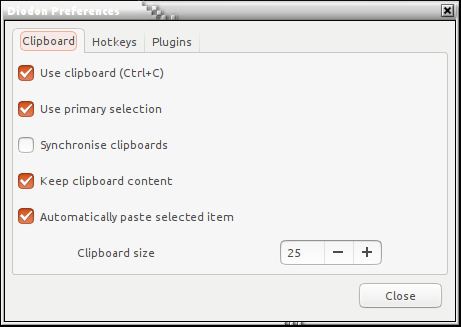
The application works with conventional clipboard content and the primary selection mechanism used by X11. These represent two different ways of copying material: explicitly copying an item with a keyboard shortcut, and selecting text with the mouse. Diodon can synchronise the two, making selected material available for conventional pasting.
Diodon uses an application indicator to provide convenient access to clipboard history. It also supports keyboard shortcuts, allowing users to recall copied content without navigating through menus.
The software uses Zeitgeist to maintain clipboard history. This allows entries to persist between desktop sessions, although storage behaviour can also be adjusted through the underlying service.
Its relatively small interface and straightforward operation make Diodon particularly suitable for users who want clipboard history without a large collection of additional utilities.
This is free and open source software.
Key Features
- Automatically records clipboard history for later retrieval.
- Supports text and image clipboard content.
- Provides application indicator integration.
- Offers keyboard shortcuts for accessing clipboard history.
- Synchronises the primary selection and conventional clipboard.
- Retains clipboard contents after the originating application closes.
- Supports automatic pasting of selected history entries.
- Provides configurable clipboard history limits.
- Supports persistent clipboard history through Zeitgeist.
- Allows additional functionality through plugins.
- Provides Unity desktop integration.
- Includes translations for international users.
Website: launchpad.net/diodon
Support:
Developer: Oliver Sauder, Dariel Dato-on
License: GNU General Public License v2.0
Diodon is written in Vala. Learn Vala with our recommended free books and free tutorials.
Related Software
| GUI Clipboard Managers | |
|---|---|
| CopyQ | Awesome clipboard manager with advanced features, written in C++ and Qt |
| GPaste | Clipboard management system |
| ClipIt | A fork of Parcellite which adds many bugfixes and features |
| Parcellite | Lightweight GTK+ Clipboard Manager |
| Diodon | Lightweight clipboard manager written in Vala |
| Klipper | Clipboard manager for the KDE interface |
| Keepboard | Cross-platform clipboard manager, written in Java |
| Clipman | Clipboard manager for Xfce |
| TFCBM | Keeps a searchable history of everything you copy |
| Waypin | Sleek clipboard viewer |
| SuperClipboard | Manage your clipboard history with a clean UI |
| Panox | Viisually appealing clipboard manager designed specifically for Wayland |
| Ortu | Local-first clipboard manager built with Tauri, Rust, and SvelteKit |
| nwg-clipman | GUI for cliphist |
| Glipper | Clipboard utility for the GNOME panel |
Read our verdict in the software roundup.
 LinuxLinks helps you discover the best free and open source software for Linux. Explore our extensive collection of recommended applications, including alternatives to popular proprietary software. We also publish software reviews, Linux tutorials, hardware reviews, free programming books and articles covering the wider open source community. Browse our Linux resources to discover more. Know a useful free and open source Linux application we haven't covered? Suggest a program for inclusion. Has your software been featured on LinuxLinks? Display one of our Featured on LinuxLinks badges on your website or GitHub README. |
Please read our Comment Policy before commenting.