

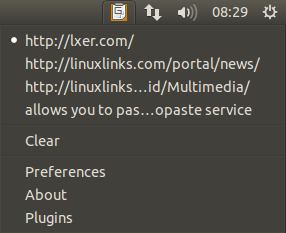
Glipper is a clipboard utility for the GNOME panel. Glipper appears in the notification area. It maintains a history of text copied to the clipboard from which you can choose. It supports a configurable number and length of clipboard entries and saves the clipboard history on exit. It also uses plugins to give the user extra functionality, including support for Actions, Snippets and No-Paste.
Glipper used to be a GNOME applet, but it now has AppIndicator support to support Ubuntu Unity and Ubuntu’s Gnome Classic.
Glipper has some of the advantages of KDE’s popular Klipper but runs natively on the Gnome desktop.
Key Features
- “copy” clipboard is filled when you use the copy function of an application. Usually the copy function is used by selecting text and pressing Ctrl+C, or with a Copy button.
- The “select” clipboard is filled when you select text in any application. As soon as you select any text, it is put in the “select” clipboard. To paste text from the “select” clipboard, simply press the middle mouse button.
- Select an element from the clipboard history and replace it with the current content of the clipboard.
- Extendable with plugins:
- Snippets – create snippets from history items.
- Network – connect multiple Glipper processes via network to synchronize their history.
- Actions – define commands to run when an item matches a regular expression.
- Nopaste – allows you to paste the entry of your clipboard to a Nopaste service.
- Grow – detects whether a new entry is just a grown version of the previous one, and if so, deletes the previous.
- Newline – example plugin that adds a newline character at the end of items in the clipboard.
- Ubuntu AppIndicator support.
- Internationalization support.
- Portable – should run on any system that supports Gnome and Python.
Website: launchpad.net/glipper
Support:
Developer: Sven Rech, Eugenio Depalo, Karderio, Laszlo Pandy
License: GNU GPL v2
Glipper is written in Python. Learn Python with our recommended free books and free tutorials.
Related Software
| GUI Clipboard Managers | |
|---|---|
| CopyQ | Awesome clipboard manager with advanced features, written in C++ and Qt |
| GPaste | Clipboard management system |
| ClipIt | A fork of Parcellite which adds many bugfixes and features |
| Parcellite | Lightweight GTK+ Clipboard Manager |
| Diodon | Lightweight clipboard manager written in Vala |
| Klipper | Clipboard manager for the KDE interface |
| Keepboard | Cross-platform clipboard manager, written in Java |
| Clipman | Clipboard manager for Xfce |
| TFCBM | Keeps a searchable history of everything you copy |
| Waypin | Sleek clipboard viewer |
| SuperClipboard | Manage your clipboard history with a clean UI |
| Panox | Viisually appealing clipboard manager designed specifically for Wayland |
| Ortu | Local-first clipboard manager built with Tauri, Rust, and SvelteKit |
| nwg-clipman | GUI for cliphist |
| Glipper | Clipboard utility for the GNOME panel |
Read our verdict in the software roundup.
 Explore our comprehensive directory of recommended free and open source software. Our carefully curated collection spans every major software category. Explore our comprehensive directory of recommended free and open source software. Our carefully curated collection spans every major software category.This directory is part of our ongoing series of informative articles for Linux enthusiasts. It features hundreds of detailed reviews, along with open source alternatives to proprietary solutions from major corporations such as Google, Microsoft, Apple, Adobe, IBM, Cisco, Oracle, and Autodesk. You’ll also find interesting projects to try, hardware coverage, free programming books and tutorials, and much more. Discovered a useful open source Linux program that we haven’t covered yet? Let us know by completing this form. |
Please read our Comment Policy before commenting.