
Amazon S3 (Simple Storage Service) is a robust and flexible object storage solution provided by AWS, designed to be highly scalable, secure, and enduring. It empowers users to store and retrieve vast amounts of data—including images, videos, and backups—accessible from anywhere online. The service utilizes a straightforward container-based organization, featuring buckets and objects, along with various low-cost storage options.
Organizations turn to Amazon S3 for its outstanding scalability and durability, making it a top choice for data lakes, backup solutions, and serving static content. It offers virtually limitless and secure storage capabilities of up to 5TB per object, ensuring users only pay for the storage they utilize, all while benefiting from automated and efficient data management solutions.
This roundup picks some useful terminal-based S3 tools for Linux. Only free and open source software is eligible for inclusion here.
Here’s our verdict captured in a legendary LinuxLinks-style ratings chart.
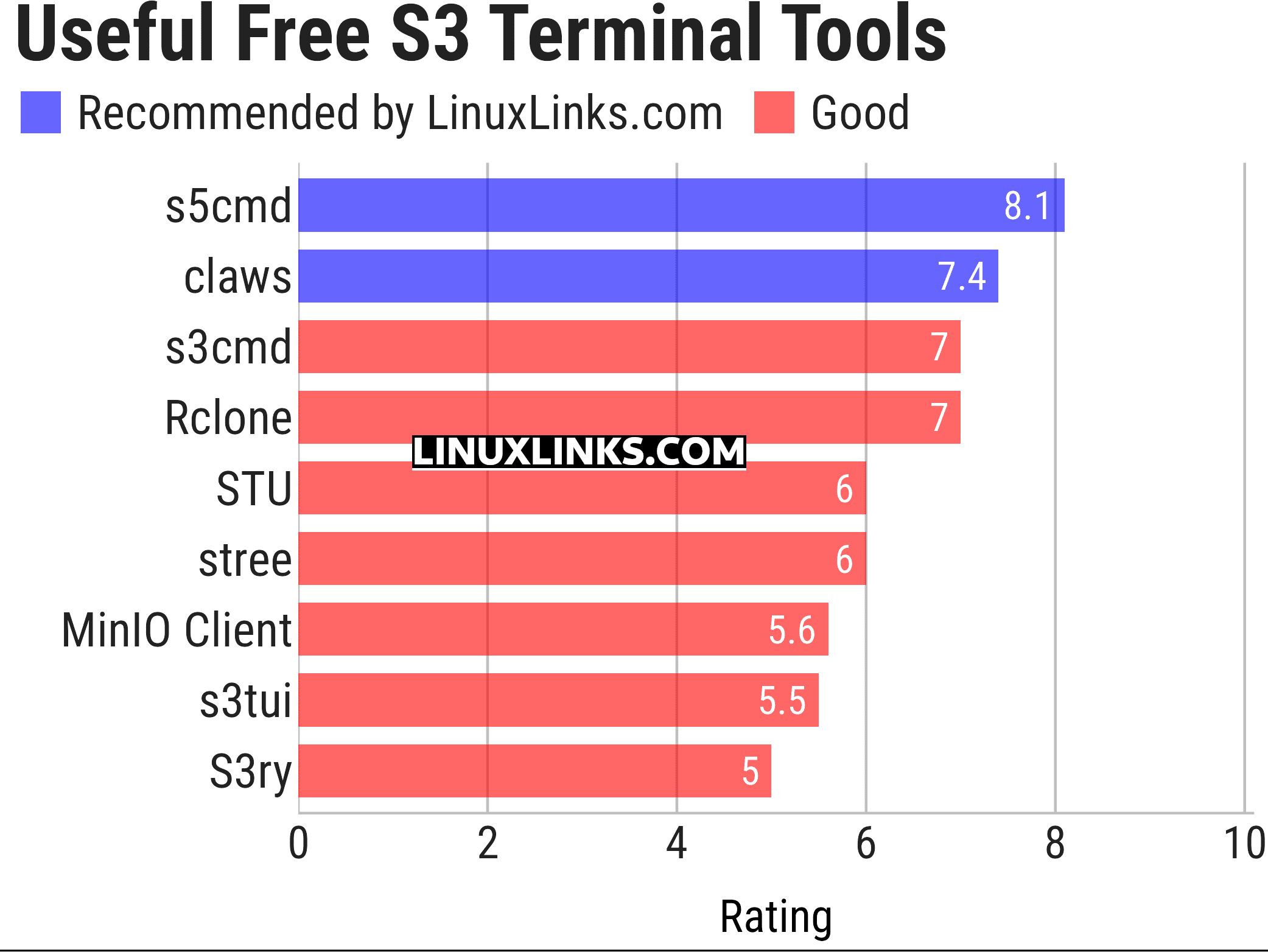
Click the links in the table below to learn more about each tool.
| S3 Terminal Tools | |
|---|---|
| s5cmd | S3 and local filesystem execution tool |
| claws | Terminal user interface for managing AWS resources |
| s3cmd | Manage objects in Amazon S3 storage |
| Rclone | Command line program to sync files and directories |
| STU | Browse buckets and objects directly from your terminal, preview files, and more |
| stree | Visualize the directory tree structure of an S3 bucket |
| MinIO Client | Work with object storage from a Unix-style shell |
| s3tui | Simple S3 CLI client for file transfers |
| S3ry | AWS S3 interactive terminal client |
This article has been updated to reflect the changes outlined in our recent announcement.
 Explore our carefully curated directory of recommended free and open source software, covering every major software category. Explore our carefully curated directory of recommended free and open source software, covering every major software category.The directory forms part of our extensive collection of articles for Linux enthusiasts. It includes hundreds of detailed reviews, together with free and open source alternatives to proprietary software from companies such as Google, Microsoft, Apple, Adobe, IBM, Cisco, Oracle, and Autodesk. LinuxLinks also covers interesting projects worth exploring, Linux-compatible hardware, free programming books and tutorials, and much more. Know a useful free and open source Linux application that we haven’t covered? Tell us about it using our submission form. |
Please read our Comment Policy before commenting.