
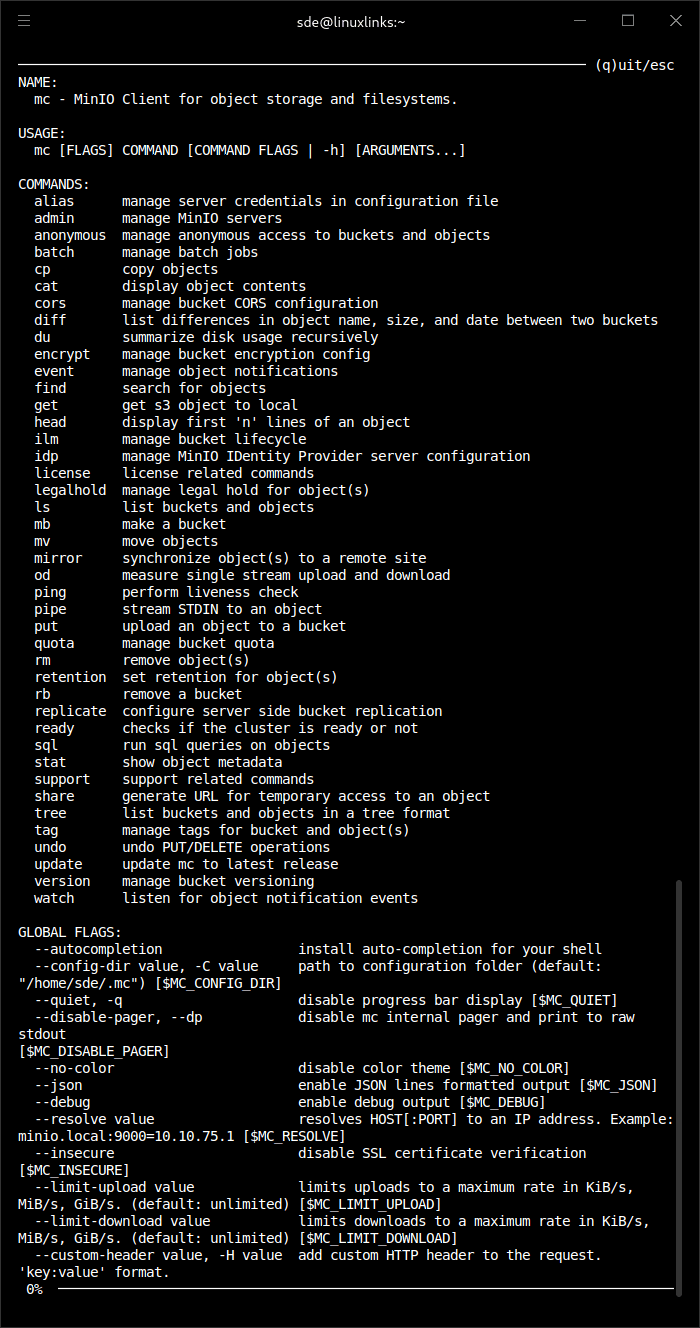
MinIO Client, commonly invoked as mc, is a command-line utility for managing object storage using commands resembling familiar Unix file-management tools. It works with MinIO deployments, Amazon S3 and other compatible storage services, providing a consistent interface for transferring, inspecting and organising stored objects.
The program handles everyday tasks such as listing buckets, copying files and synchronising storage locations. Its mirroring functionality is especially useful for maintaining copies of data between local filesystems and object stores or between compatible storage services. Connections are configured using named aliases, allowing administrators to work with several storage systems from the same command-line environment.
MinIO Client also provides advanced storage administration features, including object retention, lifecycle management, encryption, replication and access permissions. These capabilities make it useful for backup operations, scripted storage management and administering MinIO-based infrastructure.
This is free and open source software.
Key Features
- Manage Amazon S3 and S3-compatible object storage from the command line.
- Configure multiple storage endpoints using named aliases.
- List, copy, move, upload, download and remove objects.
- Synchronise storage locations using the mirror command.
- Compare buckets and identify differences in stored objects.
- Search for objects and display their metadata.
- Display object contents and stream data through standard input or output.
- Generate temporary share URLs for controlled object access.
- Manage bucket and object tags.
- Configure bucket lifecycle management and retention policies.
- Manage object legal holds and versioning.
- Configure server-side encryption and bucket replication.
- Manage anonymous bucket and object access permissions.
- Configure bucket quotas and inspect storage usage.
- Run S3 Select SQL queries against supported object data.
- Monitor bucket events and object notifications.
- Manage MinIO users, policies and server settings through administrative commands.
- Undo supported object PUT and DELETE operations.
- Cross-platform support – runs on Linux, macOS, and Windows.
Website: github.com/minio/mc
Support:
Developer: MinIO, Inc.
License: GNU Affero General Public License v3.0
MinIO Client is written in Go. Learn Go with our recommended free books and free tutorials.
Related Software
| S3 Terminal Tools | |
|---|---|
| s5cmd | S3 and local filesystem execution tool |
| claws | Terminal user interface for managing AWS resources |
| s3cmd | Manage objects in Amazon S3 storage |
| Rclone | Command line program to sync files and directories |
| STU | Browse buckets and objects directly from your terminal, preview files, and more |
| stree | Visualize the directory tree structure of an S3 bucket |
| MinIO Client | Work with object storage from a Unix-style shell |
| s3tui | Simple S3 CLI client for file transfers |
| S3ry | AWS S3 interactive terminal client |
Read our verdict in the software roundup.
 LinuxLinks helps you discover the best free and open source software for Linux. Explore our extensive collection of recommended applications, including alternatives to popular proprietary software. We also publish software reviews, Linux tutorials, hardware reviews, free programming books and articles covering the wider open source community. Browse our Linux resources to discover more. Know a useful free and open source Linux application we haven't covered? Suggest a program for inclusion. Has your software been featured on LinuxLinks? Display one of our Featured on LinuxLinks badges on your website or GitHub README. |
Please read our Comment Policy before commenting.