

Flatpak is an open source containerized package format similar to Snap. While Snap relies on a central repository for software, Flatpak can be installed from different sources. The primary source is Flathub.
One of Flatpak’s main goals is to increase the security of desktop systems by isolating applications from one another. This is achieved using sandboxing and means that, by default, applications that are run with Flatpak have extremely limited access to the host environment.
While application developers have control over the sandbox permissions they wish to configure, good practice is encouraged and can be enforced. For example, the Flathub hosting service places requirements on which permissions can be used, and software on the host may warn users if certain permissions are used.
This article focuses on useful Flatpak tools. Only free and open source software is eligible for inclusion.
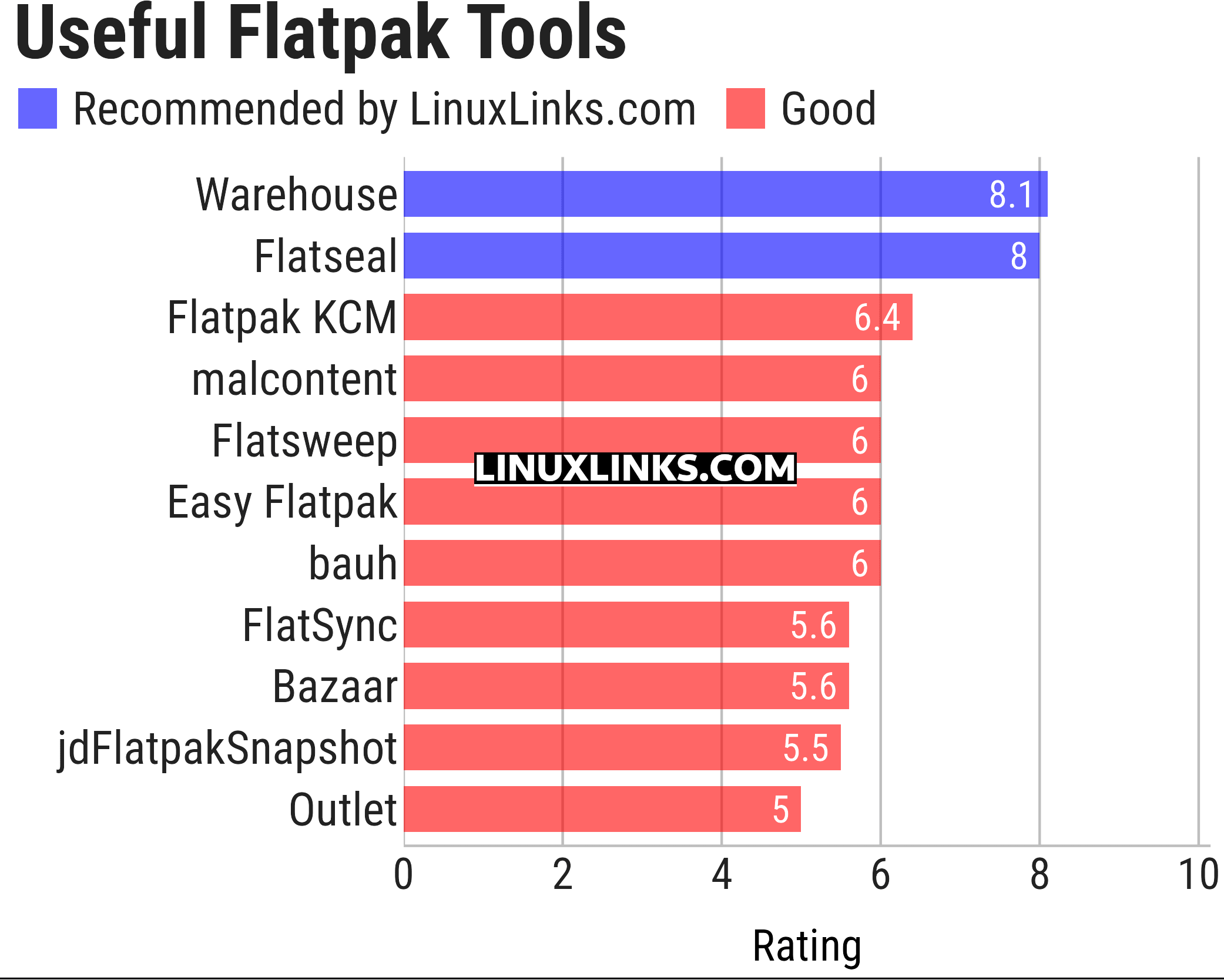
Note the ratings reflect our verdict on Flatpak functionality. For example, bauh offers functionality that’s not Flatpak specific.
Let’s explore the 11 Flatpak tools. For each title we have compiled its own portal page, a full description with an in-depth analysis of its features, a screenshot of the software in action, together with links to relevant resources.
| Flatpak Tools | |
|---|---|
| Warehouse | Versatile GNOME-based toolbox for managing Flatpaks |
| Flatseal | Graphical utility to review and modify permissions |
| Flatpak KCM | Flatpak Permissions Management |
| malcontent | Implements parental controls support |
| Flatsweep | Flatpak leftover cleaner |
| Easy Flatpak | Manage flatpaks with a simple GUI |
| bauh | Graphical interface that lets you manage your software. |
| FlatSync | Synchronize flatpak applications between devices |
| Bazaar | App store for GNOME |
| jdFlatpakSnapshot | Create snapshot of a Flatpak’s data |
| Outlet | Application management client for Flatpak |
This article has been updated to reflect the changes outlined in our recent announcement.
 Explore our carefully curated directory of recommended free and open source software, covering every major software category. Explore our carefully curated directory of recommended free and open source software, covering every major software category.The directory forms part of our extensive collection of articles for Linux enthusiasts. It includes hundreds of detailed reviews, together with free and open source alternatives to proprietary software from companies such as Google, Microsoft, Apple, Adobe, IBM, Cisco, Oracle, and Autodesk. LinuxLinks also covers interesting projects worth exploring, Linux-compatible hardware, free programming books and tutorials, and much more. Know a useful free and open source Linux application that we haven’t covered? Tell us about it using our submission form. |
Please read our Comment Policy before commenting.