

SweetPotatOs is an Arch-based Linux distribution designed to breathe new life into older and low-spec PCs. It is supplied as a live graphical system built around the SweetPotato desktop and Swirl, a lightweight Wayland compositor derived from Scroll and Sway and inspired by Niri.
Swirl takes a scrolling tiling approach rather than using a conventional overlapping desktop. Windows are arranged as columns across a continuous horizontal strip, while workspaces are organised vertically. The environment retains compatibility with familiar Sway tooling while offering a preconfigured desktop rather than expecting users to assemble an Arch system themselves.
Installation is handled by the graphical Calamares installer, which launches from the live environment. The installed system uses GRUB for booting and Ly for login.
Key Features
- Designed with older and modestly specified computers in mind.
- Scrolling tiling workflow with automatic window arrangement.
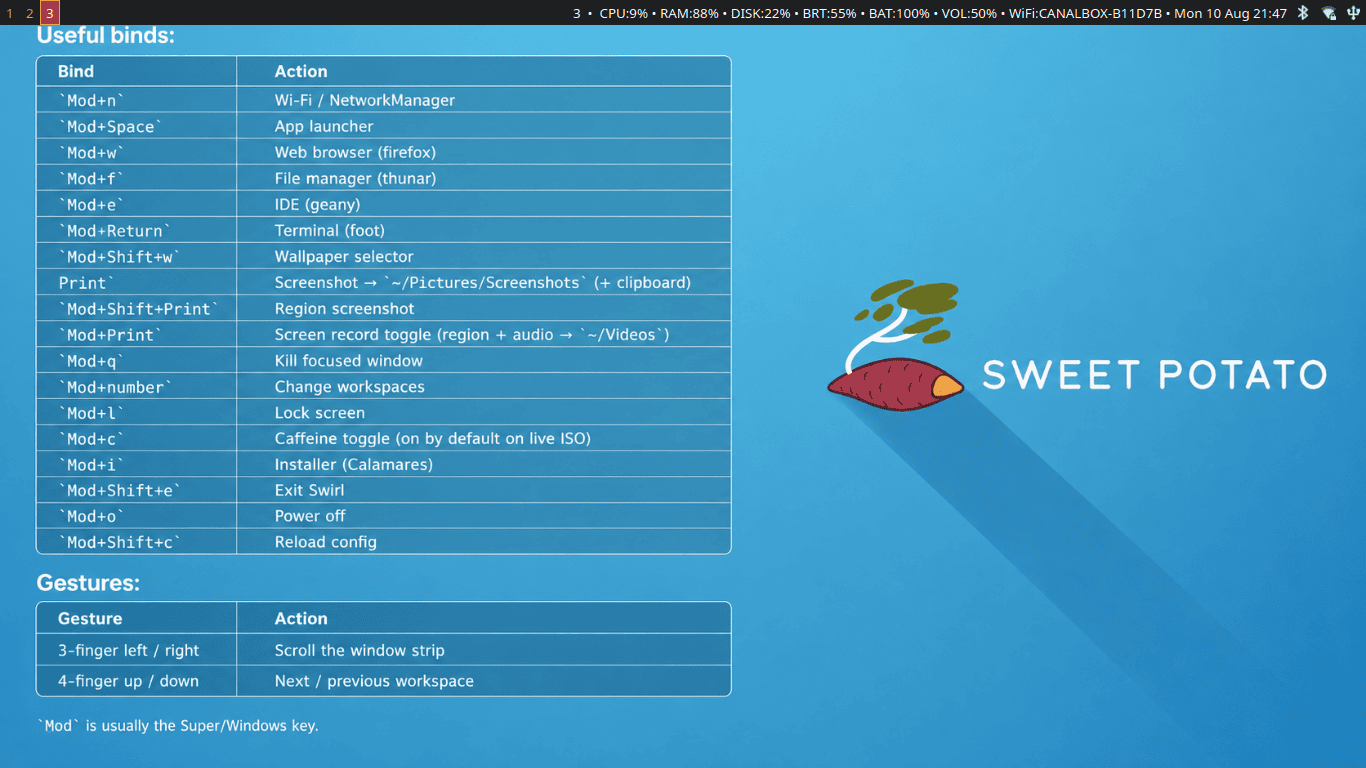
- Touchpad gestures move horizontally through windows and vertically between workspaces.
- Includes Firefox, Thunar, Geany, foot, mpv, GIMP, MuPDF, swayimg, Transmission, GNOME Disks and btop.
- Spore provides music and web radio playback.
- LocalSend provides straightforward nearby file sharing.
- Shelly provides a graphical route to package management, with pacman and yay also available.
- Extensive keyboard shortcuts provide rapid access to applications, screenshots, screen recording, wallpaper selection, workspace management and power controls.
- Uses NetworkManager for network connectivity.
- Includes a caffeine facility in the live environment to prevent unwanted sleep or locking during installation.
| Working state: | Active |
| Desktop: | Swirl |
| Init Software: | systemd |
| Package Management: | Pacman |
| Release Model: | Rolling |
| Platforms: | x86_64 |
| Home Page: | sweetpotatos.sourceforge.io |
| Developer: | Visnu |
| This article is part of our Big List of Active Linux Distributions and Open Source Operating Systems. |
What's a Linux distribution ("distro")? |
| A distro provides the user with a desktop environment, preloaded applications, and ways to update and maintain the system. Each distro makes different choices, deciding which open source projects to install and provides custom written programs. They can have different philosophies. Some distros are intended for desktop computers, some for servers without a graphical interface, and others for special uses. Because Linux is an open source operating system, combinations of software vary between Linux distros. |
Please read our Comment Policy before commenting.