

In Operation
Here’s an image of SonicRadio in action.
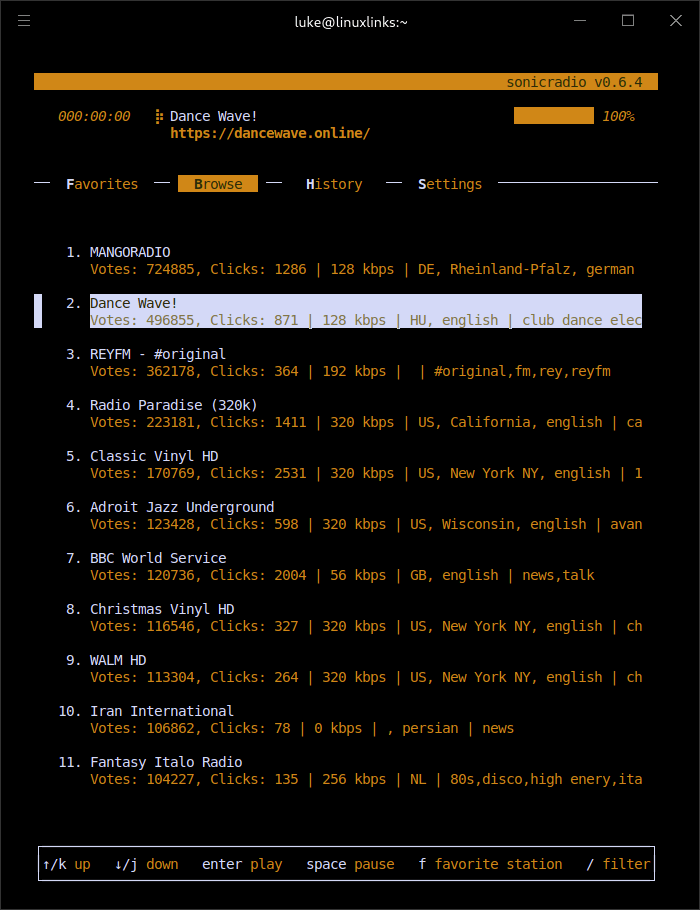
We’re in the browse section. It uses the awesome radio browser API to retrieve stations information. By default, only 30 stations are shown at a time, but this limit can be increased from the search view. The software uses mpv or FFplay to play the streams.
We can mark a station as a favourite with the f keybinding, and switch to our Favourites list with F. There’s a history section which shows stations you’ve listened to.
Some of the common keybindings are permanently displayed. For more keybindings press the ? key, which gives you additional keybindings such as station information and changing the volume.
There’s also a Settings section which lets you set the max number of entries for the history section, a choice of 8 themes and which player to use (mpv or FFplay).
Summary
There’s a lot to like about SonicRadio. It’s frugal with resources, it’s stable, and has a great text-based user interface.
At first glance, the selection of stations appears very limiting. But you just need to open the search view (accessed by pressing the s keybinding). You will then find a huge range of stations courtesy of the integration of the Radio Browser API.
SonicRadio gets our recommendation. It’s a wonderful open source internet radio program you won’t find in your distro’s software repositories.
Discuss your favourite open source software on our new Discord server.
Website: github.com/dancnb/sonicradio
Support:
Developer: Bogdan Ceausu
License: MIT License
SonicRadio is written in Go. Learn Go with our recommended free books and free tutorials.
Pages in this article:
Page 1 – Introduction and Installation
Page 2 – In Operation and Summary
Related Software
| Terminal-Based Internet Radio Apps | |
|---|---|
| PyRadio | Cross-platform curses based with support for Radio Browser |
| radio-active | Command-line tool to listen to more than 30,000 radio stations |
| SonicRadio | Stylish TUI radio player |
| RadioGoGo | Surf global radio waves |
| tera | Play radio stations, CRUD your favorite lists, and explore stations |
| radion | TUI client written in Bash |
| cTune | ncurses tool with good search functionality |
| rig.fm | Fast, focused, keyboard-friendly, and free of clutter |
| Radio Recorder | Internet radio player and recorder |
| PMRP-NG | Ground-up rewrite of PMRP |
| goradion | TUI internet radio player that uses mpv |
| Radiotrope | AI agent-enabled internet radio player |
| Radioboat | Terminal web radio client, built with simplicity in mind |
| PMRP | Poor Man's Radio Player |
| radio-cli | Simple radio CLI written in Rust |
| TuneIn CLI | Basic internet radio with TuneIn Radio and Radio Browser as providers |
| tmuzika | Music player and internet radio player |
| Curseradio | Very simple application for navigating and playing radio streams |
Read our verdict in the software roundup.
 LinuxLinks helps you discover the best free and open source software for Linux. Explore our extensive collection of recommended applications, including alternatives to popular proprietary software. LinuxLinks helps you discover the best free and open source software for Linux. Explore our extensive collection of recommended applications, including alternatives to popular proprietary software.We also publish software reviews, Linux tutorials, hardware reviews, free programming books and articles covering the wider open source community. Browse our Linux resources to discover more. Know a useful free and open source Linux application we haven't covered? Suggest a program for inclusion. Has your software been featured on LinuxLinks? Display one of our Featured on LinuxLinks badges on your website or GitHub README. |
Please read our Comment Policy before commenting.