
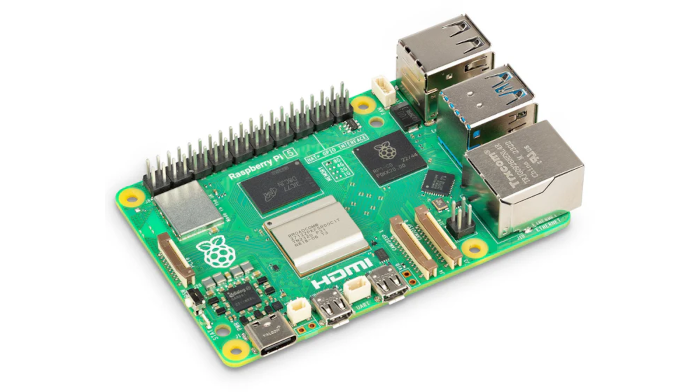
This is a multi-part blog looking at a Raspberry Pi 5 running Linux.
This article benchmarks a Raspberry Pi 5 (16GB RAM) against a DreamQuest N100 Mini PC. The Pi 5 is running Raspberry Pi OS (Debian based) whereas the N100 is running Ubuntu 25.04. The tests are run using the Phoronix Test Suite.
What’s the rationale of benchmarking the Pi 5 against an N100? Simple! This series is looking at using the Pi 5 as a desktop machine, and the N100 is a hugely popular Intel processor found in many low-cost mini PCs. The Pi 5 was provided by SunFounder.
Normally when I benchmark a machine, I look at benchmarks that focus on system performance, processor, memory/graphics, disk/WiFi. But the Pi 5 doesn’t come with a disk. Testing things like disk performance therefore seems inappropriate. An earlier article in this series provides disk benchmarks booting the Pi 5 from a microSD, and an NVMe SSD over PCIe. With the latter, I get better disk performance than many low cost mini PCs with an SSD.
I’ll just focus on processor and memory benchmarks.
Processor benchmarks
The Raspberry Pi 5 features a 2.4 GHz quad-core 64-bit ARM Cortex-A76 CPU, a VideoCore VII GPU, an in-house designed I/O controller, a power button, and a real-time clock (requires external battery).
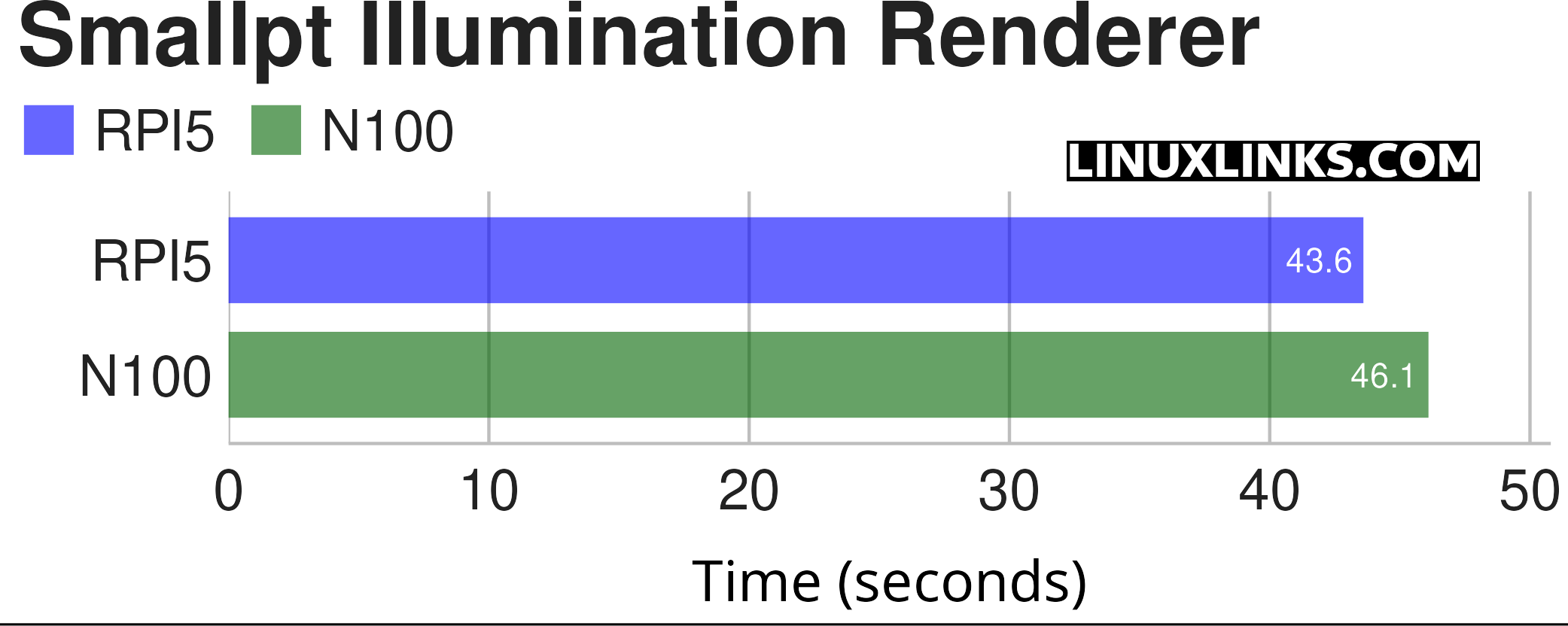
$ phoronix-test-suite benchmark smallpt
Smallpt is a C++ global illumination renderer written in less than 100 lines of code. Global illumination is done via unbiased Monte Carlo path tracing and there is multi-threading support via the OpenMP library.
The Pi 5 actually beats the N100 in this test. A great result.
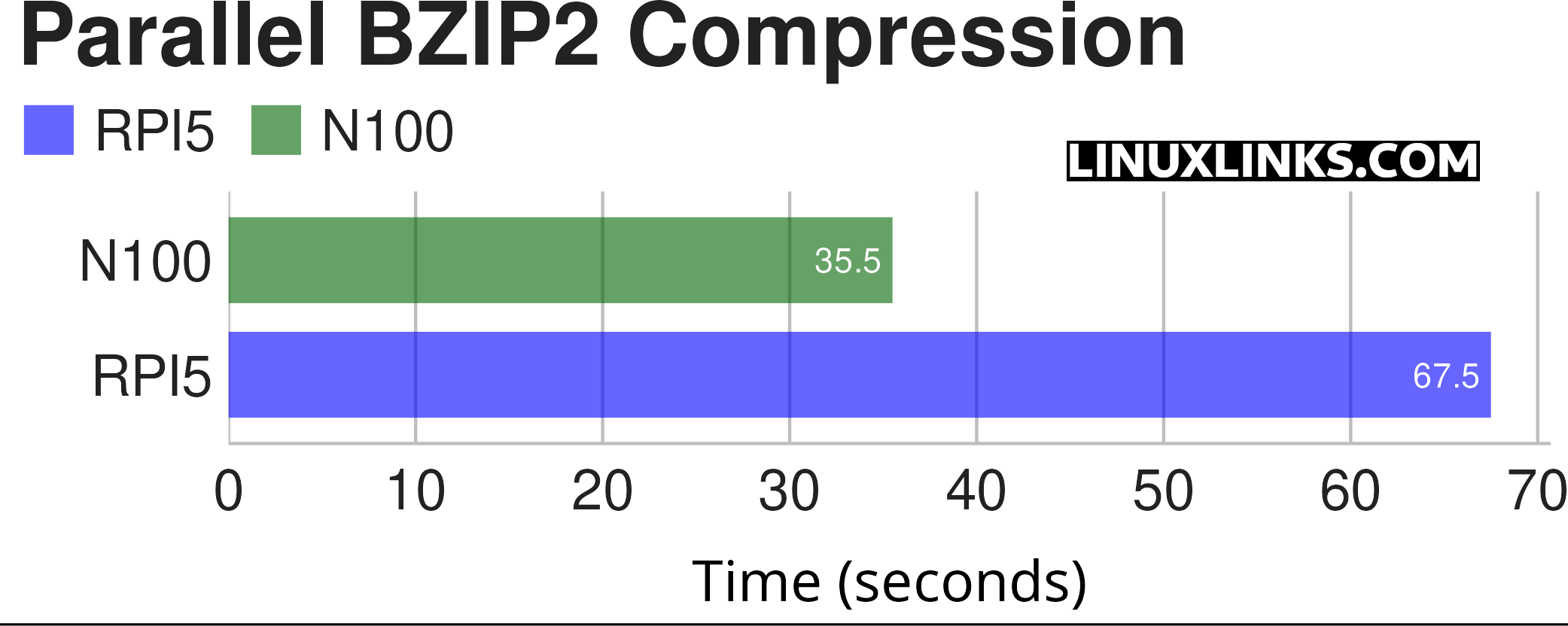
$ phoronix-test-suite benchmark compress-pbzip2
This test measures the time needed to compress a file (a .tar package of the Linux kernel source code) using BZIP2 compression.
In this benchmark the N100 wins hands down.
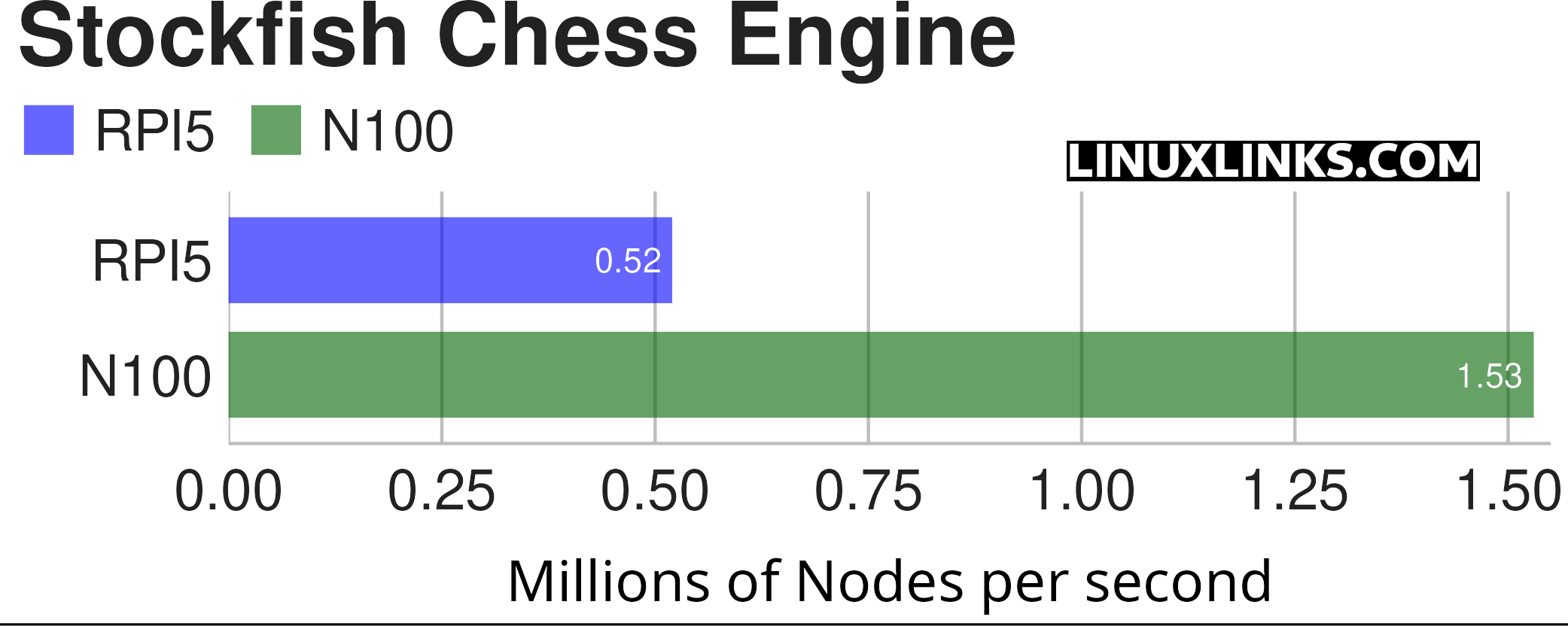
$ phoronix-test-suite benchmark stockfish
I wanted to benchmark with Crafty, but it’s not available in the Phoronix Suite for the ARM architecture. Instead I’ll use Stockfish, an advanced open-source high performance and scalable C++ chess benchmark.
The N100 whips the Pi 5 by a country mile. I still lose every game against Stockfish on the Pi though!
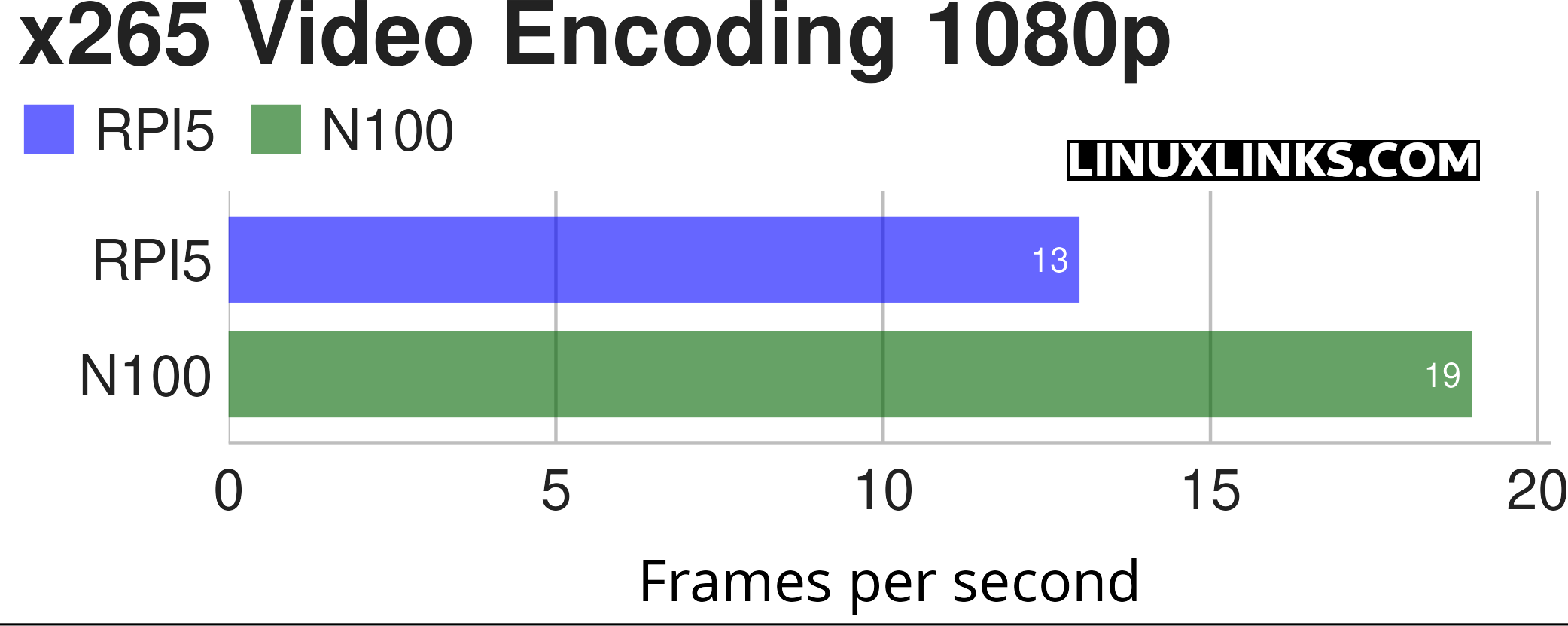
$ phoronix-test-suite benchmark x265
The Pi 5 does much better in this test but still falls behind. But both results are pretty terrible.
x265 Video Encoding 4K
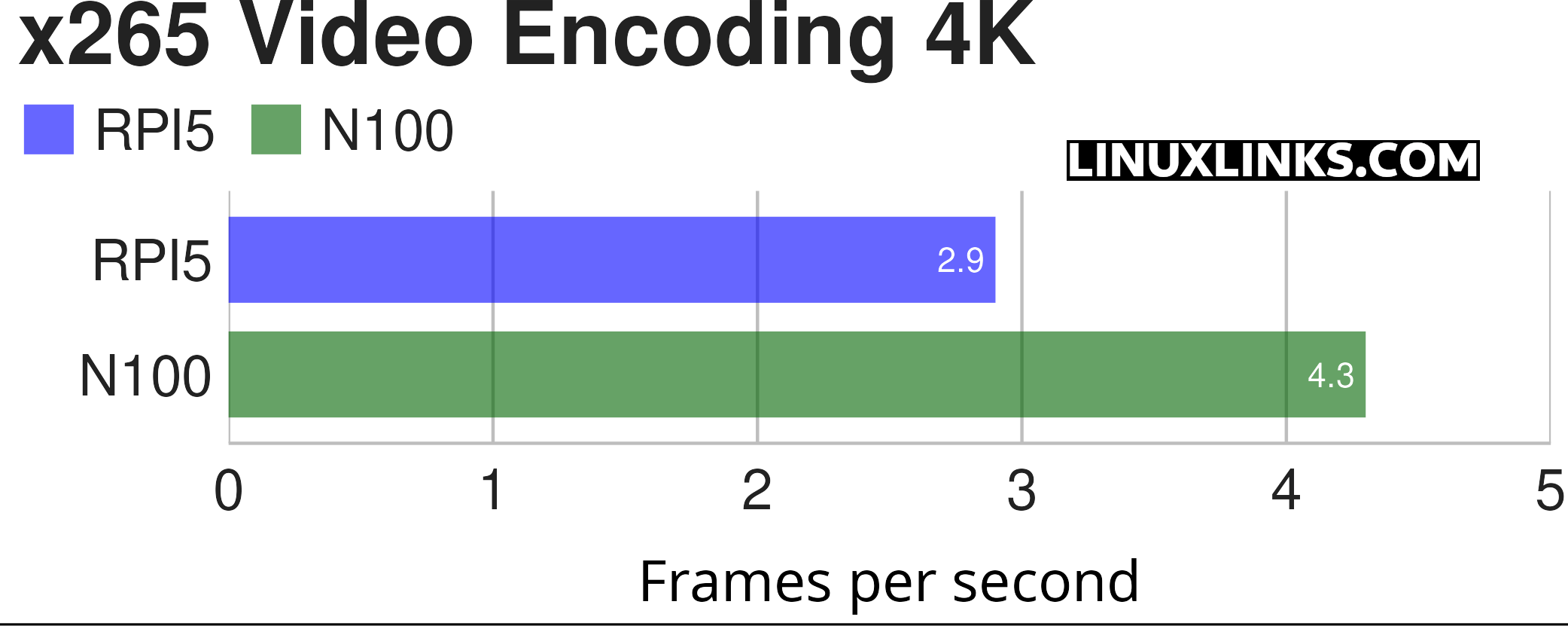
$ phoronix-test-suite benchmark x265
The margin is much less here. Again both results are nothing to write home about.
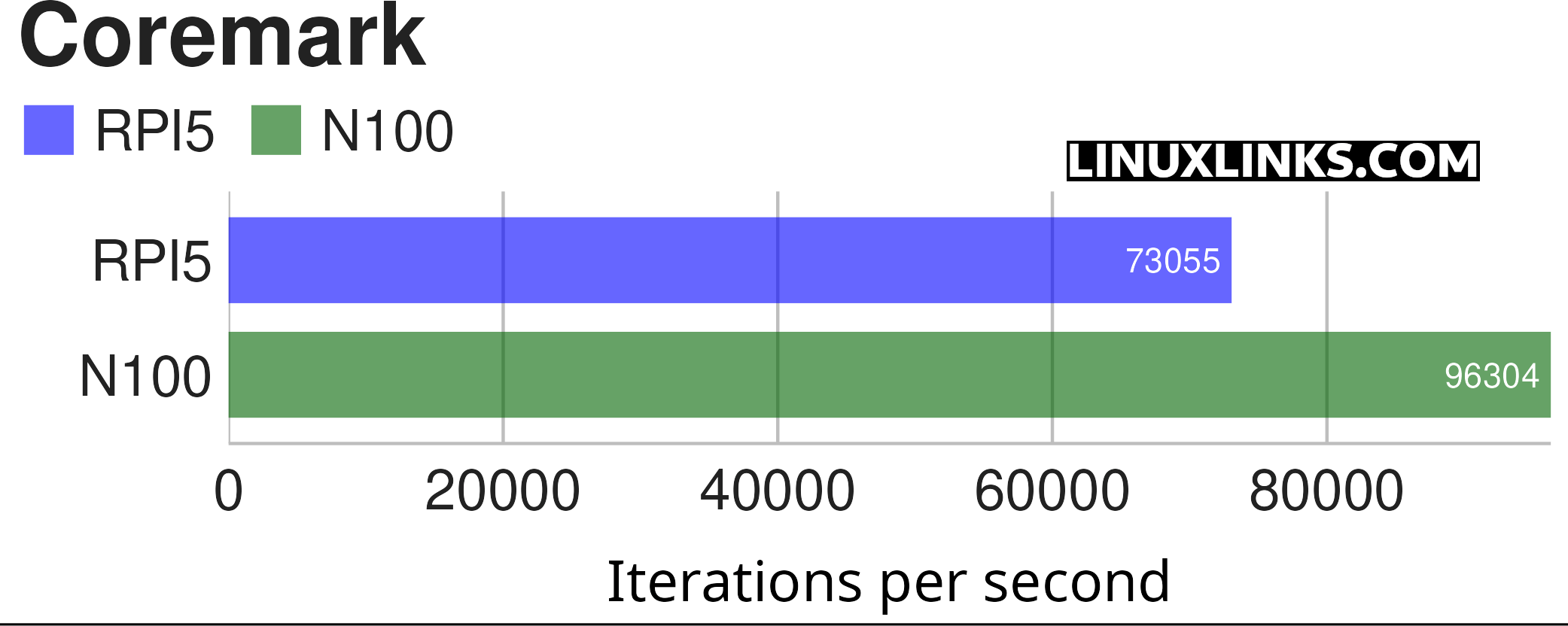
$ phoronix-test-suite benchmark coremark
Coremark is a benchmark that measures the performance of central processing units (CPU) used in embedded systems.
The Pi 5 puts in a good performance here.
Memory Benchmarks
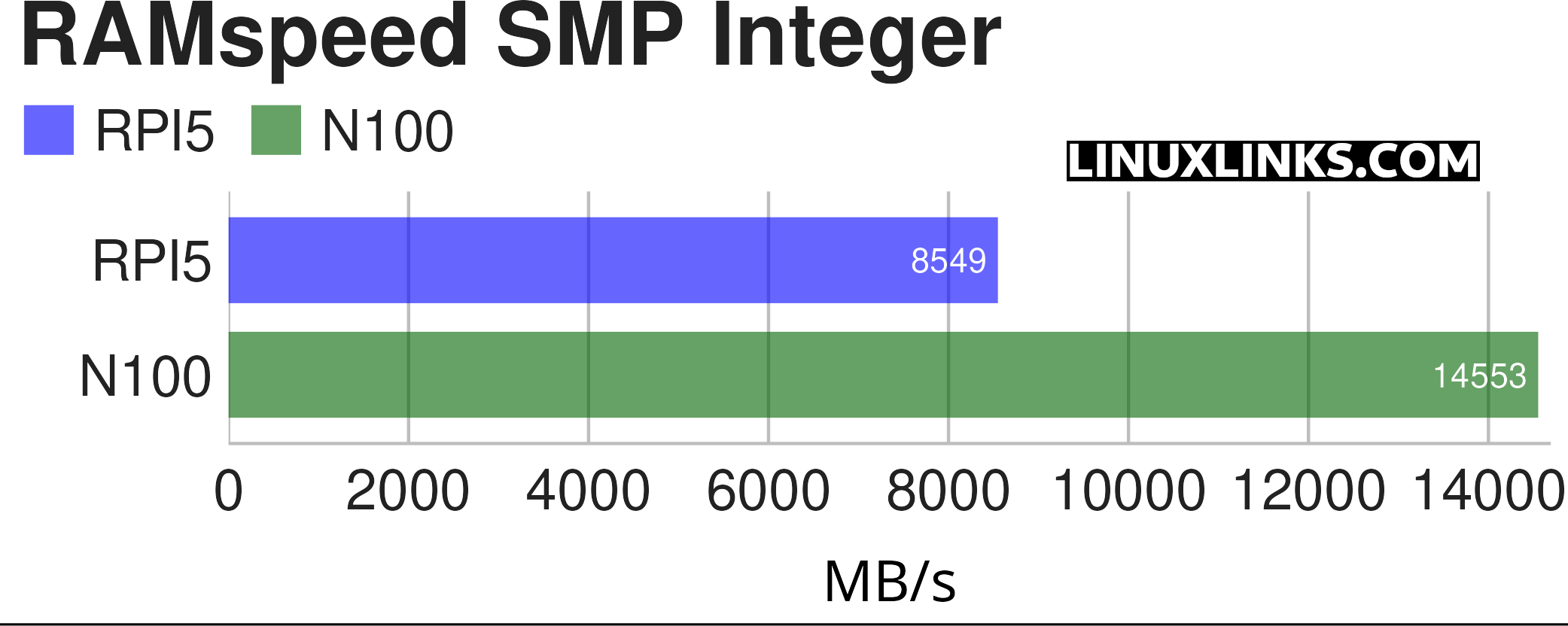
$ phoronix-test-suite benchmark ramspeed
Both machines have single channel memory and DDR4 RAM.
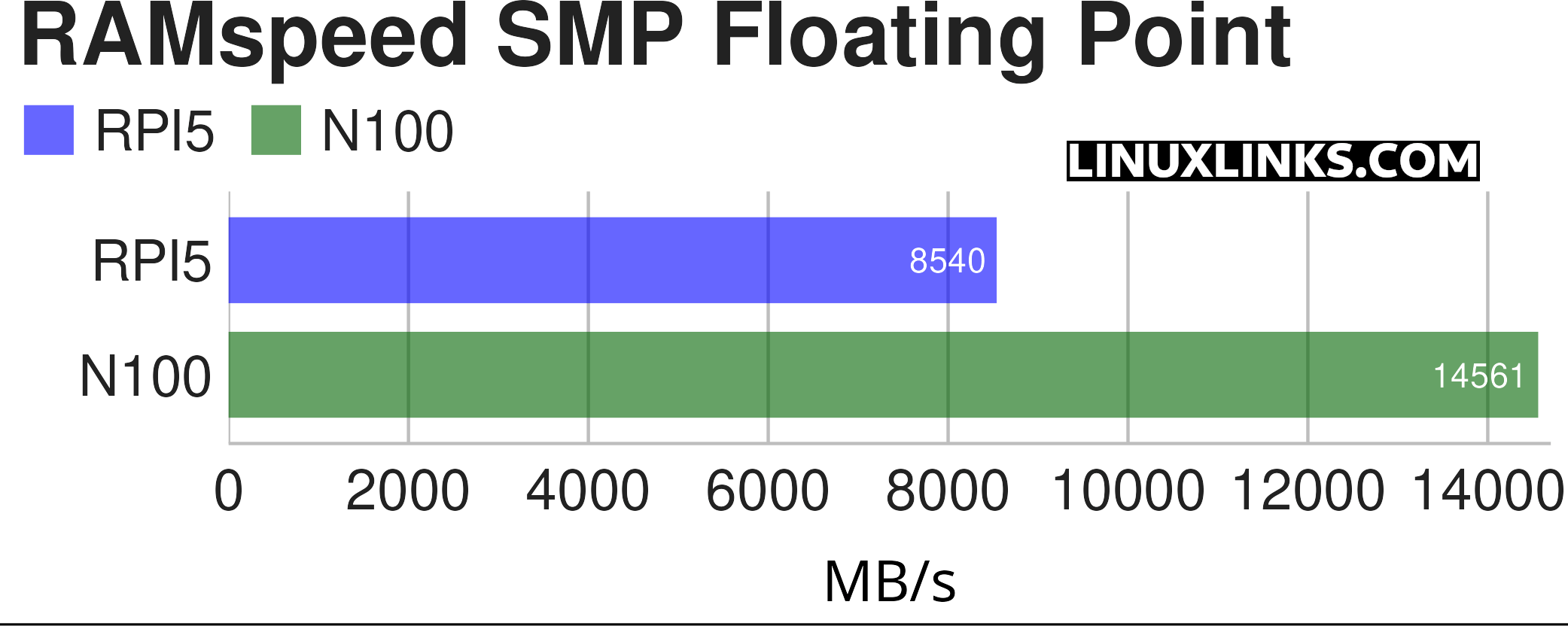
$ phoronix-test-suite benchmark ramspeed
Summary
The Pi5’s CPU has a CPU mark of 2698 compared to the N100’s 5401. As shown, in some benchmarks the Pi 5 runs the N100 fairly close.
All articles in this series:
| Raspberry Pi 5 Series | |
|---|---|
Hardware | |
| iRasptek Starter Kit | All the kit you need to get started with the Pi 5 |
| Pironman 5 Case Review | Transform the Pi 5 into a beautiful desktop mini PC |
| Passive Cooling the Pi 5 | Passively cool your Pi 5 the right way. Silent yet cool |
| Benchmarking | Benchmarking the Pi 5 against an Intel N100 mini PC |
| Overclocking | Let's increase the clock speed of the BCM2712 SoC |
| Power Consumption | Compare the power consumption of the Pi 5 with Intel Mini PCs |
| 2.5Gbps Networking | Improving the wired performance of the Pi 5 |
| WiFi | Improve WiFi performance of the Pi 5 |
| Desktop PC | Is the Pi 5 good value compared to an Intel N100 Mini PC? |
Configuration | |
| raspi-config | Useful text-based tool to configure the Pi 5 |
| PiGro | GUI tool that streamlines the process of managing the Pi 5 |
| Increase Swap Memory Size | Increase the swap size from 512MB to 2GB |
| ZRAM swapdrive | Simple script to use a ZRAM swapdrive instead of a swapfile |
Software | |
| Installing Software | Different ways to install software on the Pi 5 |
| df snap pollution | Replace df with dysk |
| Ollama GUI | Running Large Language Models on the Pi 5 |
| Music Players | GUI and TUI music players explored |
| Internet Radio | Exploring the best options for both GUI and TUI software |
| Many software articles are planned. Stay tuned! | |
Please read our Comment Policy before commenting.
What about overclocking the Pi 5? I’d be interested to see how much you can squeeze out of the Pi
Good idea. I’ll run some benchmarks overclocking the Pi 5 and publish the results tomorrow.
Quite interesting results and good overclocking.
I/Os not tested
What I/O tests do you want covered that I haven’t already published in the series?