

In Operation
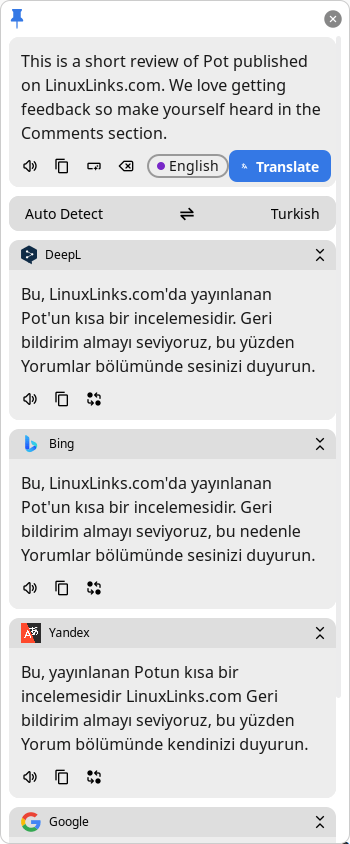 Pot offers parallel translations with multiple services. As shown in the image to the right, we’ve entered some sample text which has been translated into Turkish by DeepL, Bing, Yandex, and Google Translate. A very wide range of languages are available although not every single one is supported by each service.
Other services can be added courtesy of the software’s plugins.
You can pin the window.
There is good configurability. We can auto start Pot, choose the theme, font, fallback font. There are also a number of translation settings such as incremental and dynamic translation.
The software lets you translate by selection, by input, as well as clipboard listening.
We can also define hotkeys for selection translate, input translate, text recognition, and screenshot translation.
What else does Pot offer? Here are the highlights:
- OCR with multiple services including Tesseract OCR, Tesseract.js, Baidu, Tencent, and many others.
- Text-to-Speech with multiple services including OpenAI, ChatGLM, Baidu Translate, DeepL and many others.
- Export to vocabulary apps. There’s support for Lingva, and other services via the program’s plugin system.
- External calls – a complete HTTP interface for integration with other software. You can call pot by sending HTTP requests to 127.0.0.1:port, where port is the listening port of pot, default to 60828, and can be changed in the app settings.
- Plugin system for additional functionality.
- Cross-platform support – runs under Linux, macOS, and Windows.Support Windows, macOS and Linux. There’s support for x64, x86, as well as ARM architecture (aarch64 and armv7).
- Supports Wayland under KDE, GNOME and Hyprland.
- Proxy support.
- Multi-language support.
Summary
Pot is an excellent and versatile tool. With its wide support for services and good functionality, the program gets our strong recommendation.
Support under Wayland is not perfect but hopefully this will improve over time.
Website: pot-app.com
Support: GitHub Code Repository
Developer:
License: GNU General Public License v3.0
Pot is written in JavaScript. Learn JavaScript with our recommended free books and free tutorials.
Pages in this article:
Page 1 – Introduction and Installation
Page 2 – In Operation and Summary
Related Software
| Translators | |
|---|---|
| LibreTranslate | Machine translation API which is entirely self-hosted |
| Argos Translate | State of the art neural machine translation software. |
| Speech Note | Combines Speech to Text, Text to Speech and Machine Translation |
| Translate Shell | CLI powered by Google Translate, Bing Translator, Yandex, and Apertium |
| Crow Translate | Cross-platform, lightweight, translator |
| translateLocally | Translation on your local machine with a GUI |
| Dialect | Translation app for GNOME |
| MoonTranslator | Minimalist desktop translation app with hotkeys and multiple services |
| Klaro | Simple and fast translation app |
| Glate | Google Translator and Text To Speech Service on Linux Desktop |
| LocalTranslate | Machine translation locally using Firefox translation models |
Read our verdict in the software roundup.
 Explore our carefully curated directory of recommended free and open source software, covering every major software category. Explore our carefully curated directory of recommended free and open source software, covering every major software category.The directory forms part of our extensive collection of articles for Linux enthusiasts. It includes hundreds of detailed reviews, together with free and open source alternatives to proprietary software from companies such as Google, Microsoft, Apple, Adobe, IBM, Cisco, Oracle, and Autodesk. LinuxLinks also covers interesting projects worth exploring, Linux-compatible hardware, free programming books and tutorials, and much more. Know a useful free and open source Linux application that we haven’t covered? Tell us about it using our submission form. |
Please read our Comment Policy before commenting.
This looks really promising, but for Ubuntu 22.04.03 with Unity DE Xorg session it doesn’t feel very stable yet: translation window refuses to open sometimes (I have not yet identified the conditions when it does or doesn’t open), and TTS didn’t work for me.