

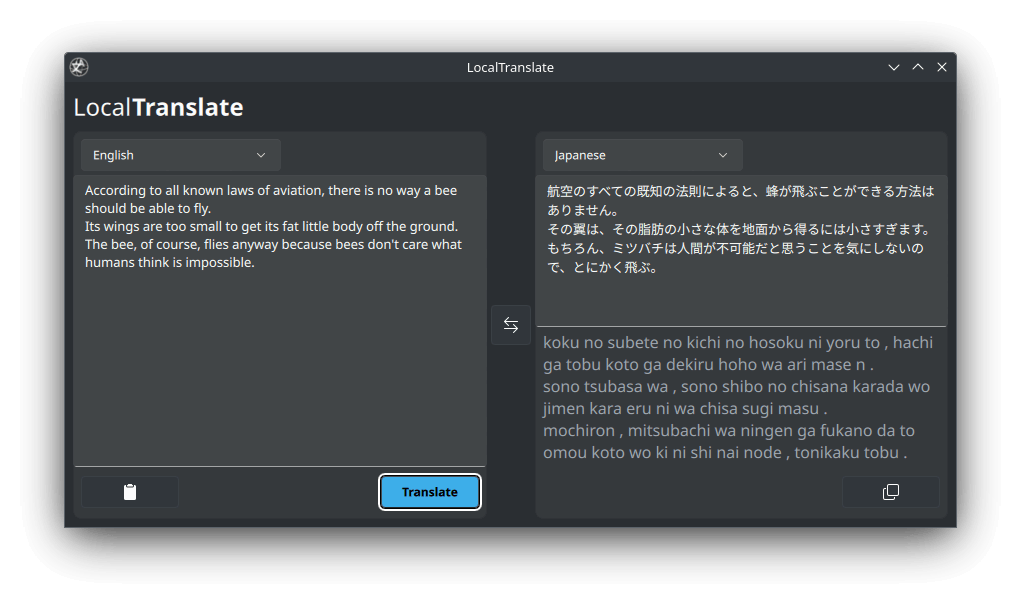
LocalTranslate is an offline machine translation application that uses the neural translation models developed for Firefox. It allows users to translate text directly on their computer without sending the content to a remote translation service. The application provides a graphical interface for selecting languages, entering text and viewing translated output. Once the required models are available locally, translation can operate without an internet connection.
The application uses Mozilla’s Firefox translation models through local inference libraries, but is not affiliated with the Mozilla Foundation. It supports a broad selection of European, Asian and Middle Eastern languages, although not every language pair is available. Some translations use an intermediate language when a direct model is unavailable. LocalTranslate also provides a command-line interface, making it suitable for scripts and terminal workflows as well as desktop use.
This is free and open source software.
Key Features
- Translate text locally using Firefox neural machine translation models.
- Perform translations without sending text to external services.
- Support more than 40 languages, including Arabic, Chinese, Japanese, Korean, Hindi, French, German and Spanish.
- Translate between supported language pairs using direct or indirect model paths.
- Choose source and target languages through graphical selection controls.
- Reverse the translation direction with a dedicated button.
- Move translated output into the source field when swapping languages.
- Translate automatically when text is pasted into the input field.
- Support automatic translation after a brief pause in typing.
- Display Latin-script transliterations for supported languages using other writing systems.
- Translate text through a command-line interface without opening the graphical application.
- Accept text through standard input for use in scripts and pipelines.
- Specify source and target languages through command-line arguments.
- List available languages using a command-line option.
- Provide command completion for Bash, Zsh and Fish.
- Remember the application window size and previously selected languages.
- Use Ctrl+Enter to translate text and Ctrl+D to clear the input.
- Provide a graphical interface using Qt Quick.
Website: github.com/terslang/LocalTranslate
Support:
Developer: terslang
License: GNU General Public License v3.0
LocalTranslate is written in C++. Learn C++ with our recommended free books and free tutorials.
Related Software
| Translators | |
|---|---|
| LibreTranslate | Machine translation API which is entirely self-hosted |
| Argos Translate | State of the art neural machine translation software. |
| Speech Note | Combines Speech to Text, Text to Speech and Machine Translation |
| Translate Shell | CLI powered by Google Translate, Bing Translator, Yandex, and Apertium |
| Crow Translate | Cross-platform, lightweight, translator |
| translateLocally | Translation on your local machine with a GUI |
| Dialect | Translation app for GNOME |
| MoonTranslator | Minimalist desktop translation app with hotkeys and multiple services |
| Klaro | Simple and fast translation app |
| Glate | Google Translator and Text To Speech Service on Linux Desktop |
| LocalTranslate | Machine translation locally using Firefox translation models |
Read our verdict in the software roundup.
 LinuxLinks helps you discover the best free and open source software for Linux. Explore our extensive collection of recommended applications, including alternatives to popular proprietary software. We also publish software reviews, Linux tutorials, hardware reviews, free programming books and articles covering the wider open source community. Browse our Linux resources to discover more. Know a useful free and open source Linux application we haven't covered? Suggest a program for inclusion. Has your software been featured on LinuxLinks? Display one of our Featured on LinuxLinks badges on your website or GitHub README. |
Please read our Comment Policy before commenting.