
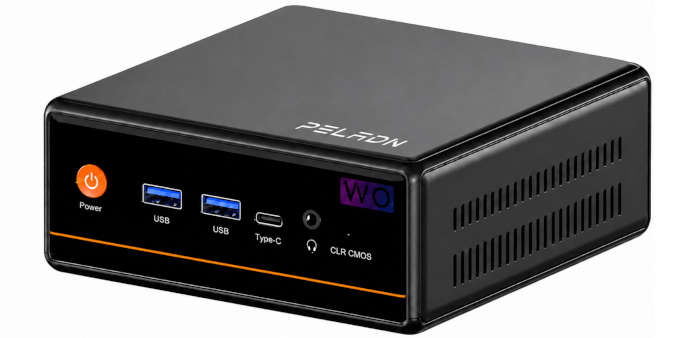
This article is part of a series looking at the PELADN WO4 5600H Mini PC.
The PELADN WO4 5600H is a compact mini PC built around AMD’s Ryzen 5 5600H, a 6-core, 12-thread processor with integrated Radeon graphics, giving it enough performance for everyday desktop use, office work, media playback, and light gaming. It’s available from Amazon US and Amazon UK. These are not affiliate links.
The PELADN WO4 is built around a familiar idea: keep the price low, the design simple, and the performance good enough for everyday desktop use. Rather than chasing premium mini PC territory, I see whether AMD’s Ryzen 5 5600H still has plenty to offer in a modest, affordable system.
My ideal PC is fanless. Passive cooling, typically through large heat sinks and heat-spreading chassis designs, removes the one component most likely to spoil an otherwise refined system: the fan. No fan means no whine, no ramping under load, no dust-clogged blades, and no background hum. For a living-room media PC, that silence is invaluable. In a bedroom, where a machine might run around the clock, it’s close to essential. I want hardware that looks discreet, performs reliably, and doesn’t remind me it exists.
With conventional desktop PCs, building a silent system is relatively straightforward. Spacious cases can accommodate large passive or near-silent CPU coolers from brands such as NoFan and Noctua, and there’s enough thermal headroom to cool surprisingly capable processors. Power supply noise can also be eliminated, either with a fully fanless PSU or a unit that remains in Zero RPM mode at low and moderate loads. If you’re willing to choose components carefully, a genuinely silent desktop is achievable without absurd compromises.
Fanless mini PCs are a different proposition. The smaller the chassis, the harder it is to shift heat without active airflow, especially once you move beyond low-power processors. There are good options. Akasa’s Turing RC Pro, for example, can house a reasonably powerful chip such as Intel’s Core Ultra 7 255H while keeping the system completely silent. I also like the Streacom FC8WD as the foundation for a fanless media PC. But these solutions are expensive, and the price premium for absolute silence is hard to ignore.
That’s why I’m more pragmatic with mini PCs. Fanless remains the ideal, but I’ll accept some fan noise if it’s well controlled. What matters is that the machine stays unobtrusive: quiet at idle, restrained under normal workloads, and free from irritating high-pitched fan behaviour. Silence is still the goal, but with mini PCs, near-silence is often the more realistic target.
The WO4 offers little control when it comes to fan noise. Unlike many mini PCs, it doesn’t offer a specific FAN mode in the BIOS. Instead, the only control over the fan is via the power profile i.e.
$ powerprofilesctl set power-saver
$ powerprofilesctl set balanced
$ powerprofilesctl set performance
or however your desktop environment labels it.
Noise level alone doesn’t tell the whole story. A fan can measure quietly in decibels yet still be distracting if the sound has an unpleasant character. A low, smooth airflow noise is far easier to ignore than a high-pitched whine, tonal bearing noise, electrical buzz, or a fan that pulses up and down every few seconds. The pattern of the noise matters just as much as the volume.
Fan control behaviour is equally important. A good cooling system should have sensible hysteresis, so the fan doesn’t constantly ramp up the moment temperatures rise by a degree or two, then immediately slow down again as they fall. That sort of rapid cycling is often more irritating than a slightly louder but steady fan. In day-to-day use, the most comfortable mini PCs aren’t necessarily the quietest at peak load. They’re the ones with smooth fan curves, no obvious whine, and predictable acoustic behaviour.
Machine at idle
At idle, the fan is inaudible. That’s excellent news for anyone who values silent operation, particularly if the machine will sit on a desk, in a bedroom, or in a living room where background noise quickly becomes irritating. There’s no obvious electrical noise, buzzing, or fan whine either, so when the system is doing very little, it fades into the background very effectively.
The caveat is that this quiet behaviour doesn’t always last long. Even fairly modest activity wakes the fan, so the machine doesn’t feel like a truly silent system in day-to-day use. Still, when the fan does start, its acoustic character is tolerable rather than harsh.
Under regular use
The cooling system doesn’t seem to offer sensible hysteresis. Rather than allowing temperatures to rise and fall within a wider, calmer range, the fan reacts too quickly to small changes in load. Under light desktop use, such as launching applications, opening browser tabs, installing updates, or doing brief bursts of CPU activity, the fan spins up and down with too much rapidity.
That behaviour can be more distracting than a steady fan speed. A constant low hum is easy to tune out, but repeated ramping draws attention to itself. The good news is that the fan doesn’t have an unpleasant character. There’s no obvious high-pitched whine, pulsing resonance, or abrasive tone. It’s the behaviour of the fan curve that’s the issue, not the quality of the fan noise itself.
Under heavy load
Under sustained heavy load, fan noise becomes significant. That’s not surprising given the size of the chassis and the amount of heat the cooling system has to move, but it does mean this machine isn’t suitable for users expecting near-silent operation during demanding workloads.
The fan is doing its job, but it’s clearly audible. For short bursts of load, that’s acceptable. For longer compile jobs, rendering, heavy multitasking, or prolonged benchmark runs, the noise becomes much harder to ignore. It’s not the worst acoustic profile I’ve heard from a mini PC, but anyone sensitive to fan noise should treat this as a meaningful drawback.
Complete list of articles in this series:
| PELADN WO4 5600H Mini PC | |
|---|---|
| Introduction | Introduction to the series and interrogation of the machine |
| Benchmarks | Benchmarking the PELADN WO4 5600H Mini PC |
| Power | Testing and comparing the power consumption |
| Noise | How quiet is this mini PC? |
| BIOS | In the world of computing, BIOS, which stands for Basic Input/Output System, plays a crucial role |
| Wi-Fi | Measuring WiFi Performance |
Please read our Comment Policy before commenting.