

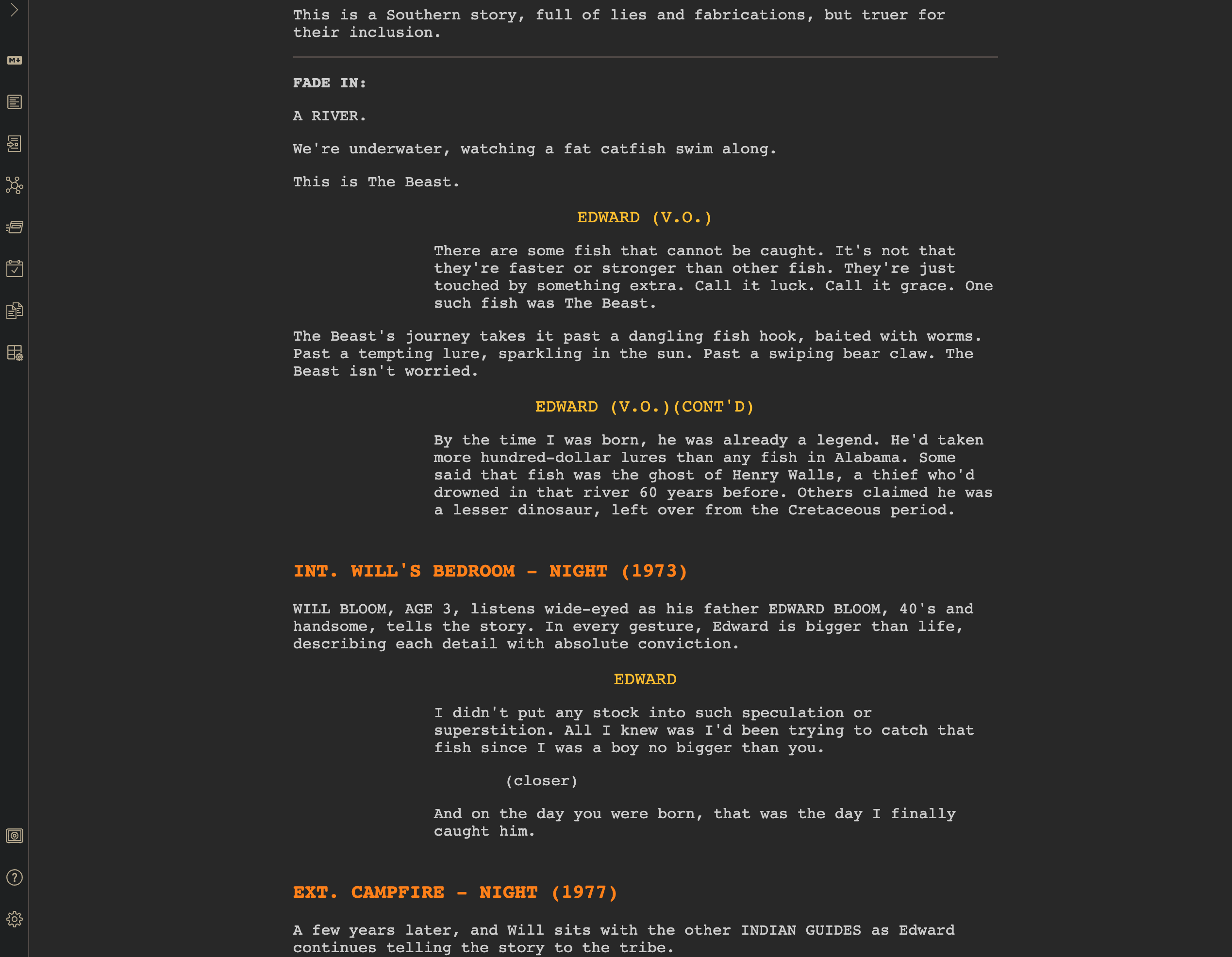
obsidian-fountain is a plugin that adds Fountain screenplay syntax formatting to Obsidian. It allows writers to develop film scripts within the same environment they use for managing research, character information, outlines and other supporting material.
Fountain is a lightweight markup language for writing screenplays in plain text. The plugin recognises its syntax and applies screenplay-aware styling directly in Obsidian’s editor.
Rather than introducing a separate document format, obsidian-fountain works with Markdown notes. This allows writers to combine screenplay conventions with Obsidian’s linking and note-management facilities.
The plugin is developed independently of Obsidian. Although obsidian-fountain is open source, it requires the proprietary Obsidian application.
This is free and open source software.
Key Features
- Fountain screenplay syntax highlighting within Obsidian’s editor.
- Recognises scene headings, character names, dialogue, action and other screenplay elements.
- Automatically apply Fountain formatting to Markdown files with the .fountain.md extension.
- Enable screenplay formatting by adding a fountain tag to a note’s frontmatter properties.
- Activate Fountain styling using the fountain CSS class.
- Combine Fountain screenplay conventions with standard Markdown syntax.
- Use Obsidian’s internal links to connect scripts with research and supporting notes.
- Keep character records, outlines and scene references alongside the manuscript.
- Use ordinary Markdown editing facilities without converting the screenplay into a proprietary document format.
- Customise the appearance of screenplay elements using exposed CSS variables.
- Adjust formatting colours and visual styling for individual Fountain syntax elements.
- Combine the editor with other compatible Obsidian plugins.
- Maintain screenplay material in text-based documents that can be edited outside Obsidian.
Website: github.com/chuangcaleb/obsidian-fountain-editor
Support:
Developer: Chuang Caleb
License: MIT License
obsidian-fountain is written in TypeScript. Learn TypeScript with our recommended free books and free tutorials.
Related Software
| Script Writing Tools | |
|---|---|
| Trelby | Simple, powerful, full-featured program for writing movie screenplays |
| Manuskript | Use the snowflake method to grow your ideas |
| Pago | Screenwriting plugin for the Vim text editor |
| Screenwriter-mode | A plug-in for Emacs |
| Screenplain | Plain text to readable screenplay |
| KIT Scenarist | Fully-featured studio for creating movie screenplays |
| LyX | The Hollywood document class equips LyX for script writing |
| Afterwriting | Post-processing tools for Fountain screenplay |
| Story Architect | Reinventing the screenwriting software |
| lottie | Fountain screenplay editor |
| obsidian-fountain | Fountain support for Obsidian |
| Barefoot | Convert Fountain screenplay files to plain text |
Read our verdict in the software roundup.
 LinuxLinks helps you discover the best free and open source software for Linux. Explore our extensive collection of recommended applications, including alternatives to popular proprietary software. We also publish software reviews, Linux tutorials, hardware reviews, free programming books and articles covering the wider open source community. Browse our Linux resources to discover more. Know a useful free and open source Linux application we haven't covered? Suggest a program for inclusion. Has your software been featured on LinuxLinks? Display one of our Featured on LinuxLinks badges on your website or GitHub README. |