

mycli is a command line terminal client for MySQL, MariaDB, and Percona with auto-completion and syntax highlighting.
mycli is written using prompt_toolkit, a library for building powerful interactive command line applications in Python.
mycli is free and open source software.
Key Features
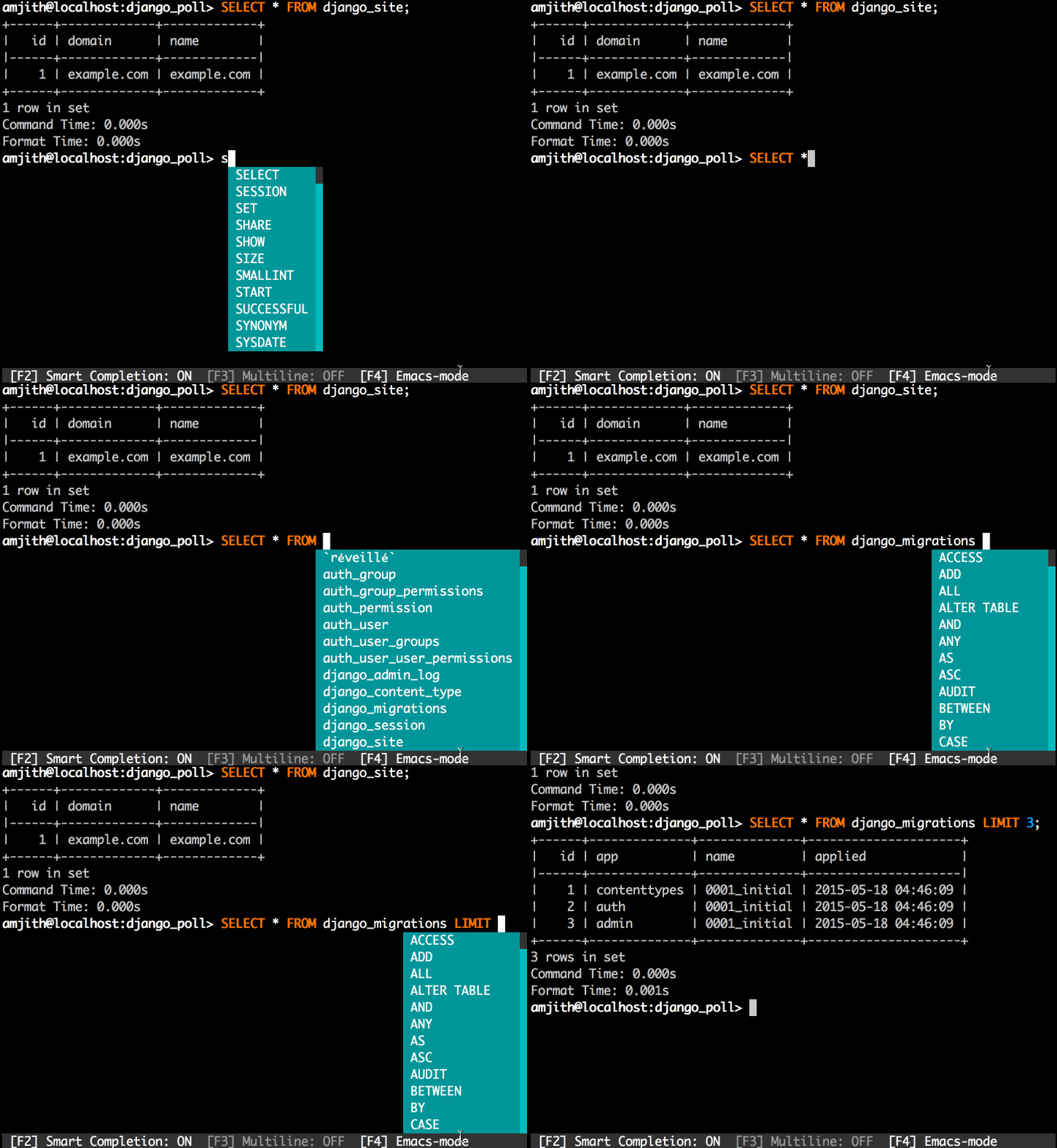
- Auto-completion as you type for SQL keywords as well as tables, views and columns in the database. Auto-completion is on by default. The REPL will pop up a suggestion menu as soon as you start typing. The suggestions are context sensitive based on the position of the cursor. eg: Only tables are suggested after the FROM keyword, only column names are suggested after the WHERE clause.
- Syntax highlighting using Pygments. Syntax highlighting has plenty of themes that can be changed via the config file.
- Smart-completion (enabled by default) will suggest context-sensitive completion.
- SELECT * FROM <tab> will only show table names.
- SELECT * FROM users WHERE <tab> will only show column names.
- Support for multiline queries.
- Favorite queries with optional positional parameters. Favorite Queries are a way to save frequently used queries with a short name. Save a query using \fs alias query and execute it with \f alias whenever you need.
- Timing of sql statments and table rendering.
- Config file is automatically created at ~/.myclirc at first launch.
- Log every query and its results to a file (disabled by default).
- Pretty prints tabular data (with colors).
- Support for SSL connections.
- There are two types of keybindings available. Emacs mode and Vi mode
- Cross-platform support – runs under Linux and macOS. The software may run under Windows but this is not tested.
Website: www.mycli.net
Support: Documentation, GitHub Code Repository
Developer: Thomas Roten, Irina Truong, Matheus Rosa, Darik Gamble, Dick Marinus, Amjith Ramanujam, and many contributors
License: 3-clause BSD license
mycli is written in Python. Learn Python with our recommended free books and free tutorials.
Related Software
| MySQL Tools | |
|---|---|
| DBeaver | Universal database tool |
| phpMyAdmin | MySQL web administration tool |
| NocoDB | Build databases as spreadsheets |
| MySQL Workbench | Complete visual database design tool |
| mycli | Command line interface for MySQL, MariaDB, and Percona |
| gh-ost | GitHub's Online Schema Migrations for MySQL |
| Beekeeper Studio | Cross-platform SQL editor and database manager |
| usql | Command-line database client |
| sqlit | lazygit of SQL databases |
| Harlequin | Easy, fast, and beautiful database client for the terminal |
| DbGate | Database manager for MySQL, PostgreSQL, MongoDB |
| Percona Toolkit | Essential command-line utilities for MySQL |
| SQuirreL SQL Client | Graphical SQL client written in Java |
| Adminer | Full-featured tool for managing content in MySQL database |
| dblab | Interactive client for PostgreSQL, MySQL, SQLite3, and more |
| Antares | SQL client based on Electron.js and Vue.js |
| XtraBackup | Backup utility for MySQL |
| innotop | Real-time, advanced investigation tool |
| SQLCheck | Detects common SQL anti-patterns |
| Skeema | Manage MySQL and MariaDB schema changes |
| Sequeler | Native Linux SQL client built in Vala and Gtk |
| orchestrator | High availability and replication management tool |
| OmniDB | Collaborative environment For database management |
Read our verdict in the software roundup.
 Explore our comprehensive directory of recommended free and open source software. Our carefully curated collection spans every major software category. Explore our comprehensive directory of recommended free and open source software. Our carefully curated collection spans every major software category.This directory is part of our ongoing series of informative articles for Linux enthusiasts. It features hundreds of detailed reviews, along with open source alternatives to proprietary solutions from major corporations such as Google, Microsoft, Apple, Adobe, IBM, Cisco, Oracle, and Autodesk. You’ll also find interesting projects to try, hardware coverage, free programming books and tutorials, and much more. Discovered a useful open source Linux program that we haven’t covered yet? Let us know by completing this form. |
Please read our Comment Policy before commenting.