

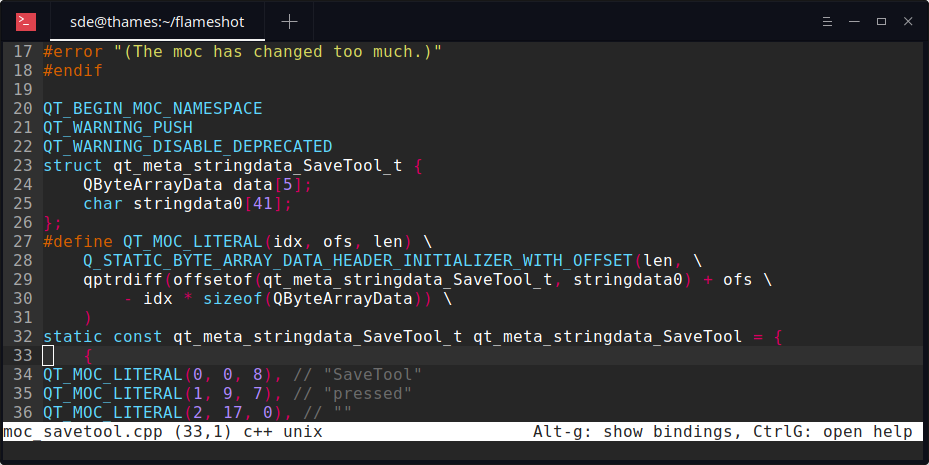
micro is a terminal-based open source text editor that aims to be easy to use and intuitive, while also taking advantage of the full capabilities of modern terminals.
micro aims to be somewhat of a successor to the nano editor.
It comes as one single, batteries-included, static binary with no dependencies. The editor is written in the Go programming language.
Features include:
- Multiple cursors including support for Sublime-style multiple cursors.
- Common keybindings which can be rebound to users’ preferences.
- Support for binding raw escape sequence.
- Splits and tabs.
- Nano-like menu for showing the keybindings.
- Full mouse support. Click and drag to select text, double click to select by word, and triple click to select by line.
- Plugin system (plugins are written in Lua):
- Micro has a built-in plugin manager to automatically install, remove, and update all your plugins.
- Persistent undo.
- Automatic linting and error notifications.
- Syntax highlighting (for over 90 languages).
- Color scheme support:
- By default, micro comes with 16, 256, and true color themes.
- True color support (enabled by setting the MICRO_TRUECOLOR env variable to 1).
- Snippets.
- Copy and paste with the system clipboard.
- Small and simple.
- Easily configurable.
- Macros.
- Common editor things such as undo/redo, line numbers, Unicode support, softwrap, and more.
- Run an interactive shell from within the text editor. Supported on MacOS, Linux, OpenBSD, FreeBSD, and Dragonfly.
- Cross platform support.
Website: micro-editor.github.io
Support: Tutorial, GitHub code repository, Gitter
Developer: Zachary Yedidia and many contributors
License: MIT license
micro is written in Go. Learn Go with our recommended free books and free tutorials.
| Explore Linux | |
|---|---|
 | Best Free and Open Source Software - A huge collection of recommended free and open source software covering every major category. |
 | In-depth Linux Software Reviews - Detailed assessments of Linux software covering features, usability and overall quality. |
 | The Big List of Active Linux Distros - An extensive collection of actively developed Linux distributions. |
 | Open Source Alternatives - Alternatives to software and services from Google, Microsoft, Apple, Adobe, IBM, Autodesk, Oracle and others. |
 | Essential Linux System Tools - Indispensable utilities for monitoring, maintaining and managing Linux systems. |
 | Linux Productivity Tools - Useful utilities for improving productivity and streamlining everyday tasks. |
 | Alternatives to Popular CLI Tools - Modern alternatives to familiar command-line utilities supplied with Linux systems. |
 | Awesome Free Linux Game Tools - Tools, utilities and companion software that improve gaming on Linux. |
 | Machine Learning on Linux - Machine learning and deep learning software, self-hosted applications and practical tools. |
 | Saving Money with Linux - Practical ways to reduce electricity consumption and lower computing costs with Linux. |
 | Linux Candy - Fun, entertaining and sometimes delightfully quirky software from the lighter side of Linux. |
Please read our Comment Policy before commenting.