

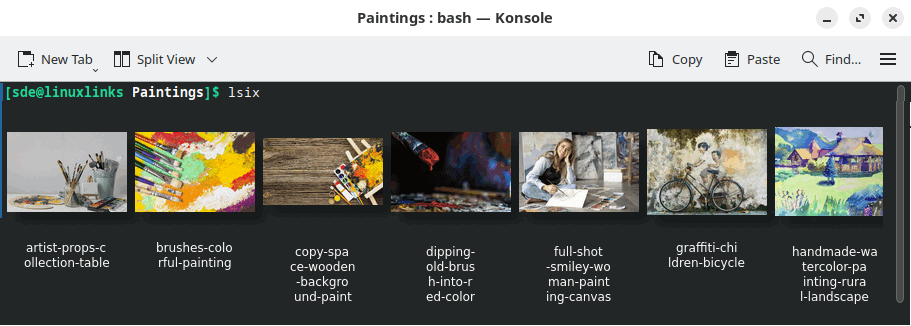
lsix is like the ls command but for images.
The tool shows thumbnails in a terminal using sixel graphics. The terminal emulator needs to support sixel.
Just typing lsix will show images in the current working directory. You can also specify filenames and, of course, use shell wild cards (e.g., lsix *jpg *png).
Because lsix uses ImageMagick pretty much any image format will be supported
This is free and open source software.
Features include:
- Expand GIFs.
- PNGs and SVG files have correct alpha channel for the terminal background. That is because lsix uses terminal escape sequences to try to figure out your foreground and background colors.
- Detects if your terminal can display SIXEL graphics inline using control sequences.
- Works well over ssh. Perfect for manipulating those images on the web server when you can’t quite remember what each one was.
- Non-bitmap graphics often work fine (.svg, .eps, .pdf, .xcf).
- Automatically detects if your terminal, like xterm, can increase the number of color registers to improve the image quality and does so.
- Automatically detects terminal’s foreground and background colors.
- In terminals that support dtterm WindowOps, the number of tiles per row will adjust appropriately to the window width.
- If there are many images in a directory (>21), lsix will display them one row at a time so you don’t need to wait for the entire montage to be created.
- If your filenames are too long, lsix will wrap the text before passing it into ImageMagick’s montage. (Without lsix, montage just jumbles long filenames on top of one another.)
- Easily change things like the width of each tile in the montage, the font family, and point size by editing simple variables at the top of the file. (Tip: try convert -list font to see what fonts you have on your machine.)
- Unicode filenames work fine, as long as your font has the glyphs.
Website: github.com/hackerb9/lsix
Support:
Developer: hackerb9
License: GNU General Public License v3.0
lsix is written in Bash. Learn Bash with our recommended free books and free tutorials.
| Explore Linux | |
|---|---|
 | Best Free and Open Source Software - A huge collection of recommended free and open source software covering every major category. |
 | In-depth Linux Software Reviews - Detailed assessments of Linux software covering features, usability and overall quality. |
 | The Big List of Active Linux Distros - An extensive collection of actively developed Linux distributions. |
 | Open Source Alternatives - Alternatives to software and services from Google, Microsoft, Apple, Adobe, IBM, Autodesk, Oracle and others. |
 | Essential Linux System Tools - Indispensable utilities for monitoring, maintaining and managing Linux systems. |
 | Linux Productivity Tools - Useful utilities for improving productivity and streamlining everyday tasks. |
 | Alternatives to Popular CLI Tools - Modern alternatives to familiar command-line utilities supplied with Linux systems. |
 | Awesome Free Linux Game Tools - Tools, utilities and companion software that improve gaming on Linux. |
 | Machine Learning on Linux - Machine learning and deep learning software, self-hosted applications and practical tools. |
 | Saving Money with Linux - Practical ways to reduce electricity consumption and lower computing costs with Linux. |
 | Linux Candy - Fun, entertaining and sometimes delightfully quirky software from the lighter side of Linux. |
Please read our Comment Policy before commenting.