
Last Updated on January 22, 2022
less is a terminal pager. A pager is a program that displays text files. Other pagers commonly in use are more and pg. Pagers are often used in command-line environments. less is similar to more, but has the extended capability of allowing both forward and backward navigation through the file. Unlike most Unix text editors/viewers, less does not need to read the entire file before starting, resulting in faster load times with large files.
less is not an editor. You can’t change the contents of the file you’re viewing. less is not a windowing system. It doesn’t have fancy scroll bars or other GUI (graphical user interface) elements. It was designed to work on simple text-only terminals.
less has been used by thousands of people around the world since its release in 1985.
You can use less +F to start less in its “forward forever” mode. In this mode, less will behave like tail -f, ignoring the ends of files and providing a steady stream of text. It offers a way to monitor the tail of a file which is growing while it’s being viewed.
Less is free and open source software.
Features include:
- Backwards movement.
- Searching and highlighting – less lets you search for text in the file you’re viewing. You can search forwards and backwards. Furthermore, less highlights the text that matches your search, to make it easy to see where the match is.
- Multiple files – less allows you to switch between any number of different files, remembering your position in each file. You can also do a single search which spans all the files you are working with.
- Bold and underline
- Some text files, notably Unix-style “man pages”, use overstriking (backspaces) to simulate underlined and bold text. Less interprets this overstriking and displays the text in real underlined or bold mode.
- Advanced features – Less has a large number of fancy features for advanced users. Once you learn the basics, you’ll find you can customize less to do almost anything you want it to do. You can change key bindings, set different tab stops, set up filters to view compressed data or other file types, customize the prompt, display line numbers, use “tag” files, and more.
- Portability – available on many different machines, different system architectures, and different terminals.
Website: greenwoodsoftware.com/less
Support: GitHub Code Repository
Developer: Mark Nudelman
License: Dual-licensed under GNU GPLv3 and a custom BSD-style license
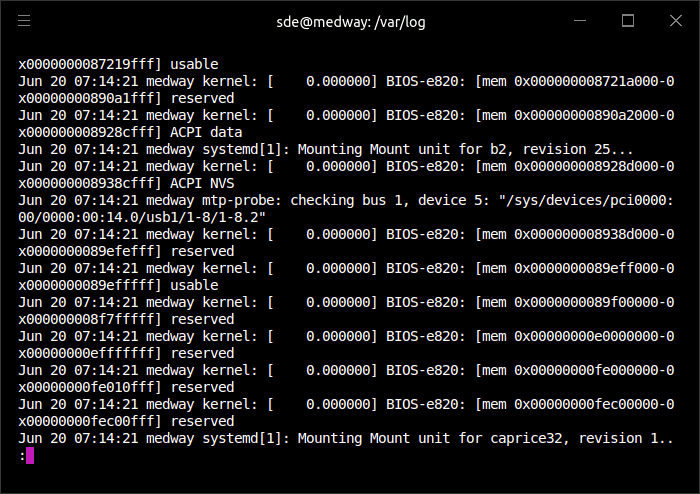
less is written in C. Learn C with our recommended free books and free tutorials.
Drop-in replacements for Core Utilities
| Explore Linux | |
|---|---|
 | Best Free and Open Source Software - A huge collection of recommended free and open source software covering every major category. |
 | In-depth Linux Software Reviews - Detailed assessments of Linux software covering features, usability and overall quality. |
 | The Big List of Active Linux Distros - An extensive collection of actively developed Linux distributions. |
 | Open Source Alternatives - Alternatives to software and services from Google, Microsoft, Apple, Adobe, IBM, Autodesk, Oracle and others. |
 | Essential Linux System Tools - Indispensable utilities for monitoring, maintaining and managing Linux systems. |
 | Linux Productivity Tools - Useful utilities for improving productivity and streamlining everyday tasks. |
 | Alternatives to Popular CLI Tools - Modern alternatives to familiar command-line utilities supplied with Linux systems. |
 | Awesome Free Linux Game Tools - Tools, utilities and companion software that improve gaming on Linux. |
 | Machine Learning on Linux - Machine learning and deep learning software, self-hosted applications and practical tools. |
 | Saving Money with Linux - Practical ways to reduce electricity consumption and lower computing costs with Linux. |
 | Linux Candy - Fun, entertaining and sometimes delightfully quirky software from the lighter side of Linux. |
Please read our Comment Policy before commenting.