

KTimer is a KDE utility for launching programs and executing commands after a configurable delay. Instead of scheduling jobs for a particular date or time of day, it uses countdown timers that begin when the user starts them.
The application is useful for desktop activities that need to happen after a short or extended interval. For example, it can delay the launch of an application, execute a maintenance script or arrange for several commands to run in sequence.
KTimer is designed for interactive desktop use rather than replacing cron or systemd timers for unattended system administration. Its graphical interface makes it straightforward to monitor countdowns and control several scheduled operations from one window.
This is free and open source software.
Key Features
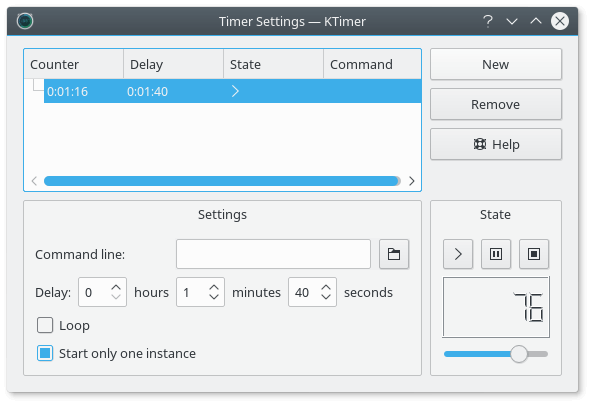
- Create separate tasks by entering the command or executable that should run when a countdown finishes.
- Maintain multiple timers, each with its own command and independently configurable delay.
- Start and stop individual countdowns without affecting the other scheduled tasks.
- Adjust timer durations using hours, minutes and seconds, or change the delay using the graphical slider.
- Enable looping to execute a command repeatedly after successive countdown intervals.
- Configure consecutive tasks so a countdown begins after the preceding task in the list has finished.
- Control whether multiple instances of the same scheduled command may run simultaneously.
- Save task configurations, including commands, delays and selected timer options, for reuse.
Website: apps.kde.org/en-gb/ktimer
Support:
Developer: Stefan Schimanski
License: GNU General Public License v2.0
KTimer is written in C++. Learn C++ with our recommended free books and free tutorials.
Related Software
| GUI Command Schedulers | |
|---|---|
| KCron | Configure and schedule tasks |
| KTimer | Little tool to execute programs after some time |
| KAlarm | Schedule alarms and reminders for events, tasks, and important dates |
| Zeit | Qt frontend to crontab and at |
Read our verdict in the software roundup.
 LinuxLinks helps you discover the best free and open source software for Linux. Explore our extensive collection of recommended applications, including alternatives to popular proprietary software. LinuxLinks helps you discover the best free and open source software for Linux. Explore our extensive collection of recommended applications, including alternatives to popular proprietary software.We also publish software reviews, Linux tutorials, hardware reviews, free programming books and articles covering the wider open source community. Browse our Linux resources to discover more. Know a useful free and open source Linux application we haven't covered? Suggest a program for inclusion. Has your software been featured on LinuxLinks? Display one of our Featured on LinuxLinks badges on your website or GitHub README. |
Please read our Comment Policy before commenting.