

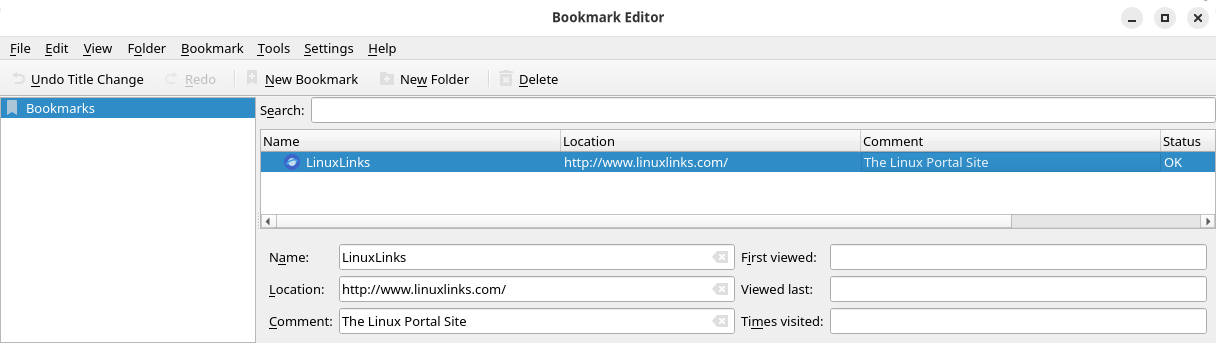
KEditBookmarks is a bookmark organizer and editor. In many applications (e.g.Konqueror, Konsole, Konversation) the Bookmarks → Edit Bookmarks option opens the Bookmark Editor.
Alternatively you can launch the editor as standalone application to edit the browser bookmarks.
The editor shows a tree view of your bookmarks and bookmark subfolders. As is usual for tree views in KDE, subfolders are shown with a small > arrow at the left of the folder name; left clicking on it will expand the view to show the contents of that subfolder and the > arrow will change to v; left clicking on the v arrow will collapse the subfolder view.
This is free and open source software.
Website: invent.kde.org/utilities/keditbookmarks
Support:
Developer: KDE Developers
License: GNU General Public License v2.0
KEditBookmarks is written in C++. Learn C++ with our recommended free books and free tutorials.
Related Software
| GUI Bookmark Managers | |
|---|---|
| KEditBookmarks | Organize, edit and tidy KDE bookmarks |
| Cosmicding | COSMIC client for managing linkding bookmarks |
| RabbitMark | Qt desktop app for keeping bookmarks organized |
| Frigoligo | Native client for reading and managing Wallabag content |
| Sitemarker | Simple tool for saving and organizing favourite sites |
| Marca | GTK app for collecting and managing web bookmarks |
Read our verdict in the software roundup.
 Explore our comprehensive directory of recommended free and open source software. Our carefully curated collection spans every major software category. Explore our comprehensive directory of recommended free and open source software. Our carefully curated collection spans every major software category.This directory is part of our ongoing series of informative articles for Linux enthusiasts. It features hundreds of detailed reviews, along with open source alternatives to proprietary solutions from major corporations such as Google, Microsoft, Apple, Adobe, IBM, Cisco, Oracle, and Autodesk. You’ll also find interesting projects to try, hardware coverage, free programming books and tutorials, and much more. Discovered a useful open source Linux program that we haven’t covered yet? Let us know by completing this form. |
Please read our Comment Policy before commenting.