
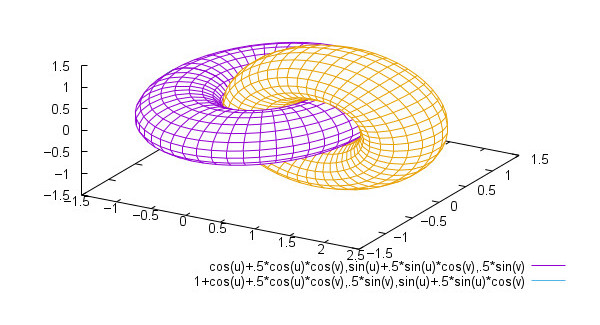
GLE (Graphics Layout Engine) is a high quality graphics package for scientists, combining a user friendly interface with a full range of facilities for producing publication quality graphs, diagrams, posters and slides.
GLE provides LaTeX quality fonts together with a flexible graphics module which allows the user to specify any feature of a graph (down to the line width of the subticks, for example).
Complex pictures can be drawn with user defined subroutines and simple looping structures.
GLE, itself, is essentially a command line application. It comes with a user interface QGLE. The interface provides a preview window that receives messages from GLE and displays the resulting EPS file. It can also open GLE and EPS directory. It has the ability to add and edit simple objects, and also change various projects of objects such as line width, and colour.
The strength of GLE lies in its adaptability and reproducibility . Rather than a set of pixel values, a GLE diagram is stored as a series of vector drawing instructions. A line is stored as a line, a circle as a circle. The GLE package itself takes these instructions and converts them into a recognisable graphic.
Key Features
- Suitable for producing graphics for reports and scientific papers.
- Lines, circles, boxes, arrows, and text.
- Mathematical functions such as, sin(), cos(), log(), exp(), etc.
- For-next loops, subroutines, variables, if-then-else.
- A graph module for drawing graphs of data and functions.
- Advanced graphics commands like paths, clipping, and rotation.
- Inclusion of bitmap and PostScript files.
- Inclusion of other GLE files thus allowing libraries.
- Uses LaTeX for text output and supports mathematical formulae in graphs and figures.
- Outputs to graphics file formats such as Encapsulated PostScript (EPS) or Portable Document Format (PDF).
Website: www.gle-graphics.org
Support: Documentation
Developer: Many contributors
License: BSD license
GLE is written in C++. Learn C++ with our recommended free books and free tutorials.
Related Software
| Plotting Tools | |
|---|---|
| matplotlib | Python based plotting system in a style similar to Matlab |
| ggplot2 | Powerful R package for declaratively creating graphics |
| gnuplot | Command-line driven interactive plotting program |
| ROOT | Solves the data analysis challenges of high-energy physics |
| Octave | Built-in plotting and visualization tools |
| DataMelt | Produces professional graphics with libraries for data manipulation |
| Veusz | Scientific plotting and graphing program |
| LabPlot | Data plotting and function analysis tool for KDE |
| PyQtGraph | Scientific Graphics and GUI Library for Python |
| Makie | interactive data visualizations and plotting for Julia |
| GLE | Graphics Layout Engine |
| PyVista | 3D plotting and mesh analysis |
| PLplot | Scientific plotting library |
| AlphaPlot | Fork of SciDAVis |
| SciDAVis | Scientific Data Analysis and Visualization |
| RLPlot | Generate publication quality graphs |
| Genius | Educational tool in mathematics and for research |
| ZeGrapher | 2D math and data plotter |
| Uniplot | Lightweight terminal plotting library for Python |
| Kst | Real-time large dataset viewing and plotting tool |
| Ctioga2 | Command-line plotting utility |
| Plots | Simple graph plotting app for GNOME |
| brplot | Ssmall application and library that plots data |
| SSPlot | Simple plotting utility and numerical simulator |
| KmPlot | Supports Cartesian, parametric, polar, implicit and differential plots |
| Charta | Generate colorful terminal graphs |
| Incplot | Command like tool for drawing great looking plots in the terminal |
Read our verdict in the software roundup.
 Explore our carefully curated directory of recommended free and open source software, covering every major software category. Explore our carefully curated directory of recommended free and open source software, covering every major software category.The directory forms part of our extensive collection of articles for Linux enthusiasts. It includes hundreds of detailed reviews, together with free and open source alternatives to proprietary software from companies such as Google, Microsoft, Apple, Adobe, IBM, Cisco, Oracle, and Autodesk. LinuxLinks also covers interesting projects worth exploring, Linux-compatible hardware, free programming books and tutorials, and much more. Know a useful free and open source Linux application that we haven’t covered? Tell us about it using our submission form. |
Please read our Comment Policy before commenting.