
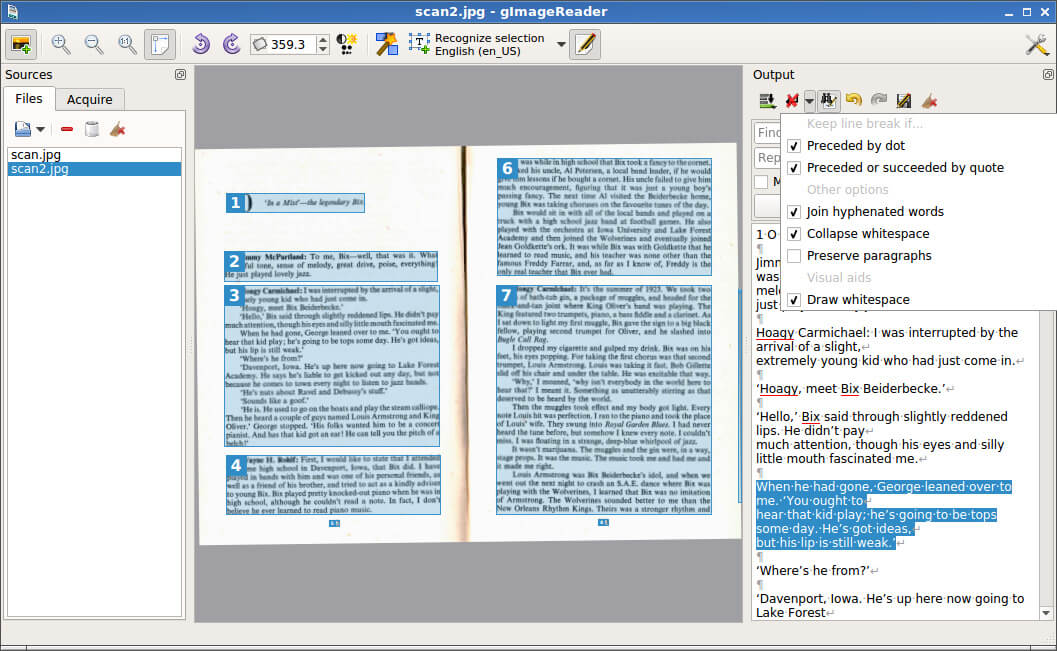
gImageReader is a graphical frontend for the Tesseract optical character recognition engine. It provides an interface for extracting text from scanned documents, photographs, screenshots and PDF files without having to use Tesseract directly from the command line. The application is available with GTK and Qt interfaces, allowing users to choose a version suited to their desktop environment.
Images and documents can be imported from local files, scanning devices or the clipboard. gImageReader displays the source material alongside the recognised text, making it possible to compare the output with the original image and correct recognition errors. It can process several pages or documents in one operation, which is useful when converting longer documents or collections of scanned pages.
Recognition areas can be identified automatically or selected manually. The application supports plain text recognition and the hOCR format, which preserves information about the location and structure of recognised text. Users can edit the extracted text, perform spellchecking and export the results. Its hOCR facilities can also generate searchable PDF documents containing a text layer aligned with the original scanned pages.
This is free and open source software.
Key Features
- Provide graphical interfaces for the Tesseract OCR engine.
- Offer GTK and Qt variants of the application.
- Import scanned images and PDF documents from local storage.
- Acquire images from compatible scanning devices.
- Import image content from the clipboard.
- Capture screenshots for optical character recognition.
- Process multiple images or document pages in a single operation.
- Identify text recognition areas automatically.
- Allow users to define and adjust recognition regions manually.
- Recognise text using supported Tesseract languages.
- Display recognised text alongside the source image.
- Provide an editable text pane for correcting recognition errors.
- Support spellchecking of recognised text.
- Export recognition results as plain text.
- Generate hOCR documents containing text and layout information.
- Generate searchable PDF documents from hOCR output.
- Allow users to inspect and correct document recognition results.
- Support multiple interface translations.
- Cross-platform support – runs on Linux and Windows.
Website: github.com/manisandro/gImageReader
Support:
Developer: Sandro Mani and contributors
License: GNU General Public License v3.0
gImageReader is written in C++. Learn C++ with our recommended free books and free tutorials.
Related Software
| OCR Tools | |
|---|---|
| OCRmyPDF | Adds an OCR text layer to scanned PDFs using the unpaper utility |
| Paperwork | Simplify the management of your paperwork |
| OCRFeeder | Desktop OCR suite featuring a complete GTK graphical user interface |
| NAPS2 | Easy-to-use document scanning with OCR and PDF output |
| gImageReader | Simple Gtk/Qt front-end to Tesseract |
| gscan2pdf | GUI to produce PDFs or DjVus from scanned documents |
| lios | linux-intelligent-ocr-solution for converting print into text |
| Rescribe | Desktop OCR tool for cleaning and processing scanned books |
| hocr-tools | Manipulate and evaluate hOCR format |
| Skanpage | Simple scanning application optimized for multi-page document scanning |
| GOCR | Reads images in many formats |
| QuickSnip | OCR and Google Lens search |
| ocropy | Open source document analysis and OCR system |
| Scantpaper | Scan documents and export them to PDF or DjVu |
Read our verdict in the software roundup.
| OCR Screen Capture Tools | |
|---|---|
| NormCap | OCR-powered screen-capture tool to capture information instead of images |
| gImageReader | Simple Gtk/Qt front-end to Tesseract |
| TextShot | Python tool for grabbing text via screenshot |
| dpScreenOCR | Powered by Tesseract, it supports more than 100 languages |
| Frog | Intuitive text extraction tool (OCR) for GNOME |
| TextSnatcher | Perform OCR operations in seconds |
| Mark Shot | High-performance screenshot and annotation tool |
| OCR4Linux | Text extraction tool |
| SnipText | Screen capture OCR tool |
Read our verdict in the software roundup.
 LinuxLinks helps you discover the best free and open source software for Linux. Explore our extensive collection of recommended applications, including alternatives to popular proprietary software. We also publish software reviews, Linux tutorials, hardware reviews, free programming books and articles covering the wider open source community. Browse our Linux resources to discover more. Know a useful free and open source Linux application we haven't covered? Suggest a program for inclusion. Has your software been featured on LinuxLinks? Display one of our Featured on LinuxLinks badges on your website or GitHub README. |
Please read our Comment Policy before commenting.