
GOCR is an optical character recognition program that converts images containing printed text into editable text files. It uses character recognition techniques that do not require neural network models or extensive training data. The program was developed primarily for recognising printed documents and can operate independently from a command line or through graphical frontends.
GOCR works with several raster image formats, including members of the Netpbm family. Additional formats can be processed through external image conversion utilities. It is particularly suited to relatively clear, single-column documents containing printed characters of a suitable size. Recognition quality depends on factors such as image resolution, font characteristics, page layout and the amount of noise present in the image.
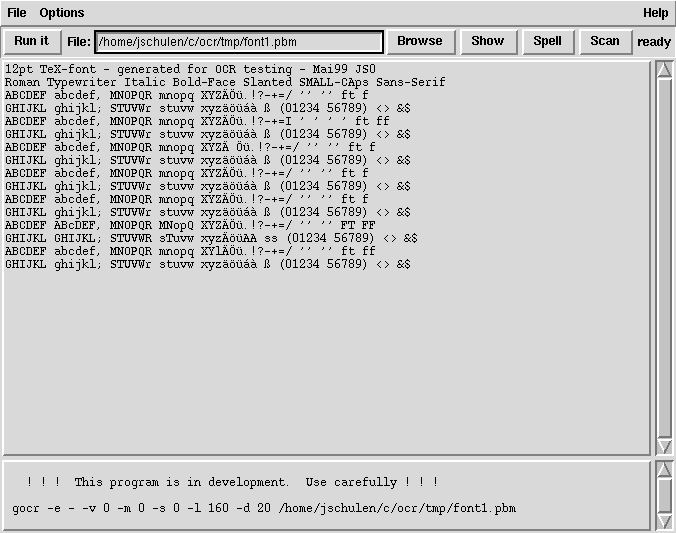
The program provides options for controlling recognition behaviour and interpreting image content. It can work with different threshold settings and character recognition parameters, allowing users to adjust processing for particular documents. A small graphical interface is also available for users who prefer not to operate the recognition engine directly. Its relatively compact design makes GOCR useful for studying traditional OCR techniques and processing documents where its recognition methods remain effective.
This is free and open source software.
Key Features
- Recognise printed characters in raster images.
- Convert recognised text into editable text output.
- Provide a command-line interface for OCR processing.
- Operate through compatible graphical frontends.
- Include a simple graphical frontend using Tcl/Tk.
- Read PNM, PBM, PGM and PPM image files.
- Support PCX and TGA image formats.
- Process additional formats through Netpbm conversion tools.
- Support images converted from PNG, JPEG, TIFF, GIF and BMP.
- Read supported compressed image files through external decompression utilities.
- Recognise suitable single-column printed documents.
- Handle sans-serif characters within an appropriate image size range.
- Support configurable image threshold values.
- Provide options for adjusting character recognition behaviour.
- Perform recognition without requiring pretrained neural network models.
- Support recognition of selected barcode patterns.
- Integrate with scripts and automated image processing workflows.
Website: jocr.sourceforge.net
Support:
Developer: Jörg Schulenburg
License: GNU General Public License v2.0
GOCR is written in C. Learn C with our recommended free books and free tutorials.
Related Software
| OCR Systems | |
|---|---|
| PaddleOCR | OCR and document-parsing toolkit |
| Tesseract | High quality neural net (LSTM) based OCR engine focused on line recognition |
| EasyOCR | OCR that reads natural scene text and dense text in documents |
| RapidOCR | Fast offline deployment across multiple platforms and languages |
| ocrs | Modern OCR engine |
| Surya | Multilingual document OCR toolkit with text recognition |
| ocropy | Open source document analysis and OCR system |
| OpenOCR | Toolkit for general OCR research and applications |
| Ocrad | OCR engine based on a feature extraction method |
| kraken | Turn-key automatic text recognition system |
| Cuneiform | OCR Engine to convert OCR documents into editable form |
| GOCR | Reads images in many formats |
Read our verdict in the software roundup.
| OCR Tools | |
|---|---|
| OCRmyPDF | Adds an OCR text layer to scanned PDFs using the unpaper utility |
| Paperwork | Simplify the management of your paperwork |
| OCRFeeder | Desktop OCR suite featuring a complete GTK graphical user interface |
| NAPS2 | Easy-to-use document scanning with OCR and PDF output |
| gImageReader | Simple Gtk/Qt front-end to Tesseract |
| gscan2pdf | GUI to produce PDFs or DjVus from scanned documents |
| lios | linux-intelligent-ocr-solution for converting print into text |
| Rescribe | Desktop OCR tool for cleaning and processing scanned books |
| hocr-tools | Manipulate and evaluate hOCR format |
| Skanpage | Simple scanning application optimized for multi-page document scanning |
| GOCR | Reads images in many formats |
| QuickSnip | OCR and Google Lens search |
| ocropy | Open source document analysis and OCR system |
| Scantpaper | Scan documents and export them to PDF or DjVu |
Read our verdict in the software roundup.
 LinuxLinks helps you discover the best free and open source software for Linux. Explore our extensive collection of recommended applications, including alternatives to popular proprietary software. We also publish software reviews, Linux tutorials, hardware reviews, free programming books and articles covering the wider open source community. Browse our Linux resources to discover more. Know a useful free and open source Linux application we haven't covered? Suggest a program for inclusion. Has your software been featured on LinuxLinks? Display one of our Featured on LinuxLinks badges on your website or GitHub README. |
Please read our Comment Policy before commenting.